



Top Trends in Maintenance & Support in Software Development
Think of software maintenance & support as everything that happens after your application goes live. It’s the continuous work of fixing, updating, and fine-tuning the software to make sure it runs smoothly, stays secure, and actually does what your users need it to do.
Ignoring it is a bit like buying a brand-new sports car and then never changing the oil or checking the tires. It might look great at first, but it’s only a matter of time before you’re stranded on the side of the road.
Why Proactive Software Maintenance Is a Competitive Advantage

Getting your software out the door is a huge milestone, but it’s really just the starting line. Too many businesses see maintenance and support in software development as a necessary evil – a line item for when things inevitably break. This reactive approach doesn’t just miss the point; it misses a massive opportunity.
The most successful companies treat maintenance as a forward-thinking strategy. It’s what separates a digital tool that keeps delivering value from one that slowly chips away at your reputation and revenue.
The cost of doing nothing is staggering. Unplanned downtime, for example, can cost a business an average of $260,000 per hour, according to industry studies. That number alone should make any executive pause. On the flip side, data from Infraspeak shows that 91% of businesses using predictive maintenance see major drops in downtime and repair times.
A smart maintenance plan isn’t just about preventing disaster; it’s about keeping your digital engine tuned for performance and ready to win the race.
The Business Case for Proactive Upkeep
Making the switch from a reactive, “break-fix” mentality to a proactive one pays off in real, measurable ways. Instead of constantly putting out fires, patching security flaws, or dealing with user-infuriating crashes, your team can focus on making meaningful improvements that help grow the business. This kind of foresight is a key part of any solid digital strategy, as we explored in our guide on digital transformation best practices.
A proactive approach ensures your software is always:
-
Secure and Compliant: Consistent updates and patches are your first line of defense, closing security gaps before they can be exploited. For anyone serious about security, understanding what patch management is and why it matters is a non-negotiable part of the process.
-
Performing Optimally: Code can get clunky over time, causing performance to lag. Ongoing optimization keeps your application snappy and responsive, which is absolutely essential for keeping users happy and engaged.
-
Aligned with Business Goals: Markets shift, customer demands change, and new tech opens up new possibilities. Proactive maintenance gives your software the flexibility to adapt and grow right alongside your business.
When you treat software maintenance as a cycle of continuous improvement, you’re not just protecting your initial investment – you’re making it more valuable over time. Your software becomes a launching pad for innovation, not a growing pile of technical debt.
Ultimately, investing in quality maintenance and support is a direct investment in your customers and your brand. It signals reliability and shows you’re committed to delivering a great experience, building the kind of loyalty that truly impacts the bottom line.
Understanding the Four Pillars of Software Maintenance

To get a real handle on your software’s budget and long-term health, you need to know that not all maintenance and support in software development is created equal. Think of it like owning a car: you might need to fix a flat tire one day, while the next you’re thinking about a custom paint job. Software requires the same range of care to stay reliable and valuable.
Breaking down the work into four distinct categories helps you shift from a generic “maintenance budget” to a focused, strategic plan. It gives you clarity on where your money is actually going and helps you balance today’s emergencies with tomorrow’s goals. A good partner in custom software development can help you craft a strategy that covers all four of these areas.
Corrective Maintenance: The Digital Firefighter
This is maintenance in its most classic sense: something broke, and we need to fix it. When users run into bugs, a system crashes, or a feature stops working, corrective maintenance is the emergency response to diagnose and solve the problem.
It’s the software equivalent of calling a plumber for a burst pipe. You didn’t plan for it, but now it’s all hands on deck to contain the issue and get things back to normal. This is the reactive, “break-fix” work that most people picture when they hear the word “maintenance.”
Adaptive Maintenance: Keeping Pace with Change
Your software doesn’t exist in a vacuum. The digital world is always shifting: operating systems get major updates, third-party services change their APIs, and security regulations evolve. Adaptive maintenance is all about making sure your application keeps working smoothly with its changing surroundings.
Think about how you have to update your phone’s apps after a new iOS or Android version comes out. The app itself wasn’t “broken,” but without that update, it might become sluggish, glitchy, or completely unusable. It’s about adapting to external forces to ensure your software doesn’t get left behind. For example, an AI software development company must constantly adjust its products to function with new data frameworks and cloud infrastructure.
Perfective Maintenance: Evolving for a Better Experience
Perfective maintenance is where you get to go from good to great. This is proactive work focused on making the software better for the people who use it every day. It involves refining features, boosting performance, and improving the user interface based on real feedback and new business goals.
Imagine a car manufacturer adding heated seats to a popular model because customers in colder regions asked for them. The car worked just fine before, but this enhancement makes it more comfortable and valuable. This is how you turn a functional product into one people love – a journey we’ve guided many of our client cases through.
This type of maintenance is how you stay competitive and keep users happy. It directly adds business value by improving the product, often through adding new capabilities like those our AI development services provide.
Preventive Maintenance: Avoiding Problems Before They Start
The most forward-thinking maintenance is the kind that stops problems before they ever happen. Preventive maintenance involves behind-the-scenes work like optimizing code, refactoring technical debt, and updating security protocols to head off future failures.
It’s like a mechanic rotating your car’s tires to prevent uneven wear and a dangerous blowout on the highway. While this proactive approach is smart, it has to be applied intelligently. Some industry studies from sources like Sockeye show that up to 30% of scheduled tasks can be too frequent, wasting time and money.
The goal is to move toward smarter, data-driven approaches. Predictive maintenance, for instance, can cut unplanned downtime by up to 50%. This forward-looking mindset is central to how we apply AI for your business, ensuring your software remains healthy and stable for the long haul.
Choosing Your Software Support Model and Defining SLAs
Picking the right software support model feels a lot like choosing an insurance plan for your car. A daily commuter has very different needs from a long-haul trucker, and the same logic applies to your software. The level of maintenance and support in software development you invest in will have a direct say in your budget, how happy your users are, and the overall health of your application down the road.
The key is to match the support model to how critical the software is to your business. An internal tool that’s used once in a while just doesn’t carry the same weight as a customer-facing platform that’s processing payments 24/7.
Let’s walk through the three main approaches so you can figure out what makes the most sense for you.
The Break/Fix Model
First up is the Break/Fix model, and it works exactly like it sounds. When something breaks, you call a team to fix it. You then pay for the time and materials they used. It’s a completely reactive approach.
Think of it as having a great mechanic’s number saved in your phone, but never taking your car in for a scheduled oil change. This model can look attractive from a cost perspective since you only pay when there’s a problem. The catch? Costs are completely unpredictable and can skyrocket during a major outage. Plus, there’s zero effort put into preventing those problems from happening in the first place.
The Managed Services Model
A Managed Services model is where you shift from being reactive to proactive. Instead of just waiting for things to go wrong, you bring on a support partner through a retainer or subscription. This team takes ownership of your application’s health, handling everything from routine monitoring and updates to performance tuning.
This is less of a transaction and more of a true partnership. Your provider is motivated to keep your system running smoothly to minimize their own firefighting. This gives you predictable monthly costs and the strategic advantage of having experts who know your system inside and out, actively working to keep it stable.
Dedicated 24/7 Support
For your most mission-critical systems, the ones where even a few minutes of downtime can mean lost revenue and trust, dedicated 24/7 support is the only way to go. This model gives you a team that is on-call around the clock, ready to jump on high-priority incidents the second they happen. It’s a must-have for global companies, major e-commerce sites, and any system tied directly to your bottom line.
This is the highest tier of assurance you can get. It’s a promise that no matter what time it is, an expert is ready to start working on a fix immediately.
To help you visualize the trade-offs, here’s a breakdown of how these three models stack up against key business factors.
Comparison of Software Support Models
| Model | Best For | Cost Structure | Response Time | Strategic Value |
|---|---|---|---|---|
| Break/Fix | Non-critical apps, low budgets | Per-incident, hourly | Unpredictable | Low (Reactive, no long-term planning) |
| Managed Services | Business-critical apps, predictable budgets | Monthly/annual retainer | Guaranteed (SLA) | High (Proactive, continuous improvement) |
| Dedicated 24/7 | Mission-critical systems, global user bases | Premium monthly retainer | Immediate (SLA) | Very High (Maximum uptime and risk mitigation) |
Choosing the right model is a strategic decision that balances cost, risk, and the importance of the application to your operations.
Demystifying Service Level Agreements (SLAs)
Regardless of the model you land on, your Service Level Agreement (SLA) is the single most important document in the relationship. An SLA isn’t just a formality; it’s a firm, written contract that clearly defines the level of service you will receive from your provider. It turns vague promises into concrete, measurable commitments.
As we explored in our guide on software maintenance and support services, at a minimum, a solid SLA has to spell out:
-
Response Time: How quickly will the support team acknowledge your report of an issue? This isn’t about the fix; it’s about how fast they get back to you and start looking into it.
-
Resolution Time: What’s the maximum time allowed to actually solve the problem? This is almost always tiered by severity – a total system crash gets fixed faster than a minor cosmetic bug.
-
Uptime Guarantee: This is a promise, usually a percentage like 99.9%, that the software will be up and running. It’s a powerful metric that holds your provider accountable for keeping the system stable.
An SLA isn’t just legal jargon; it’s the operational rulebook for your support partnership. It ensures everyone is on the same page about what “good service” looks like and provides recourse if those standards aren’t met.
What a Modern Maintenance and Support Workflow Looks Like
Good maintenance and support in software development doesn’t happen by accident. Far from being a chaotic fire drill, it’s a disciplined, well-oiled machine. When an issue pops up, a mature team follows a clear path from detection to resolution, turning potential crises into routine, predictable fixes.
It all starts the moment a problem is flagged, either by an automated monitoring tool or a user submitting a report. That initial signal immediately becomes a ticket in a tracking system like Jira or Zendesk. This isn’t just about logging the problem; it creates a complete record, ensuring nothing falls through the cracks.
Next, the ticket hits triage. Think of it like a hospital’s emergency room. A support lead or project manager quickly assesses the severity. Is the entire application down (a code red), or is it a minor typo on a single page? This step is crucial because it sets the priority and routes the issue to the correct engineering team.
The support model you choose will heavily influence how quickly and proactively this process works.
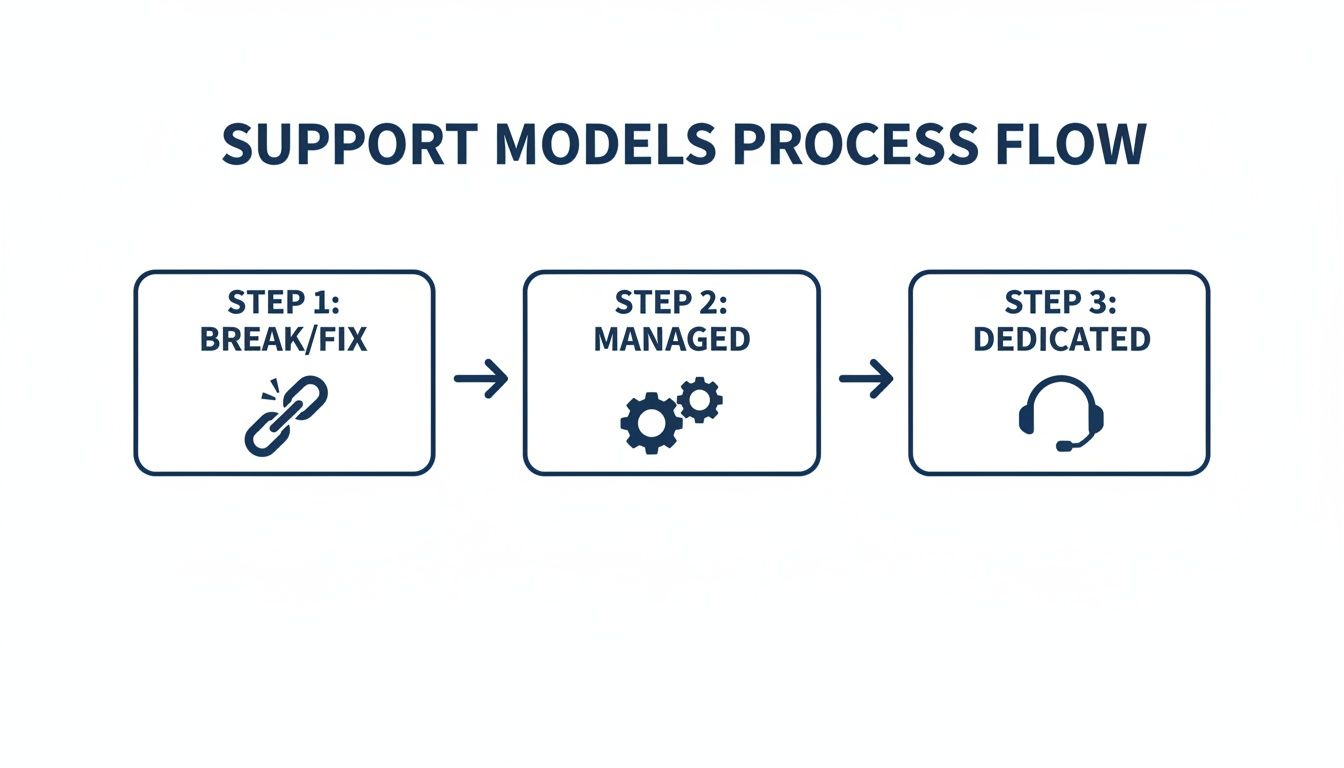
As you can see, the workflow evolves from the purely reactive Break/Fix model toward a much more strategic and proactive Dedicated model. The right fit really dictates the entire support experience.
The Toolchain Behind Every Efficient Fix
Once an issue is triaged and assigned, a specific set of tools takes over. This integrated toolchain is what separates professional support operations from amateur hour. For complex applications like custom ecommerce solutions, where downtime means lost revenue, this kind of setup is non-negotiable.
An experienced technical partner already has this entire ecosystem in place, which can save you years of expensive trial and error. Here’s what that looks like in practice:
-
Version Control (Git): All code changes are meticulously tracked using a system like Git. To work on a fix, a developer creates a separate “branch,” which is a safe, isolated copy of the code. This prevents their in-progress work from destabilizing the live application.
-
Automated Testing (Selenium, Cypress): Before any fix gets the green light, it has to pass a series of automated tests. Frameworks like Selenium or Cypress act like robots, mimicking user behavior to ensure the fix works and hasn’t accidentally created new bugs elsewhere (a “regression”).
-
Performance Monitoring (Datadog, New Relic): Did the fix slow the application down? You can’t just guess. Tools like Datadog or New Relic give engineers real-time visibility into server load, response times, and memory usage, showing the immediate performance impact of their changes.
This systematic approach, from isolated development in Git to rigorous automated testing, removes guesswork and minimizes risk. It’s a disciplined workflow that ensures every fix improves the software without introducing new problems.
From Code to Live Deployment
After a developer finishes writing the code and it passes all the automated checks, it’s not done yet. The code is then submitted for a peer review, where another developer on the team inspects it for quality, clarity, and adherence to established coding standards. It’s a simple but powerful quality gate.
Once the review is complete and the code is approved, the real magic happens: Continuous Integration and Continuous Deployment (CI/CD). This is a fully automated pipeline that takes the approved code, merges it into the main codebase, runs one final round of tests, and then deploys it to the live servers. Automation here is key; it shrinks deployment time from hours to mere minutes and virtually eliminates the risk of human error.
When you work with an expert AI software development company, you get these sophisticated workflows from day one. It’s the difference between a support process that feels constantly reactive and stressful and one that is predictable, efficient, and keeps your software and your users happy.
How AI Is Changing the Game in Software Maintenance
For a long time, software maintenance has been a reactive discipline. A bug appears, and we squash it. A server crashes, and we scramble to get it back online. The focus has always been on fixing what’s already broken. But that’s starting to change, thanks to artificial intelligence.
AI is helping us move from a purely reactive stance to one that’s genuinely predictive. Instead of just being a cost center, maintenance and support in software development are becoming a way to create real business value. Rather than waiting for a user to report an issue, AI can analyze data to spot trouble brewing, allowing teams to get ahead of problems before they ever affect the user experience.
AI-Powered Anomaly and Log Analysis
Modern applications are incredibly chatty. They produce endless streams of log files that document every single action happening behind the scenes. For a human engineer, trying to monitor this flood of information in real time is like trying to hear a specific whisper in a crowded stadium; it’s just not possible.
This is where AI shines. Machine learning algorithms can be trained on your application’s data to learn what “normal” looks like. Once that baseline is established, the AI can monitor log files around the clock, instantly flagging any strange behavior or deviation.
Think of it this way: an AI model might spot a subtle increase in memory consumption that a person would easily overlook. This could be an early warning sign of a memory leak that, if left unchecked, would crash a server in a few days. AI turns log files from a forensic tool into an early warning system.
This gives engineers the runway they need to investigate and fix the root cause, all before a single user notices a problem. It’s a completely different way of thinking about system stability.
Predictive Maintenance with Machine Learning
Going a step further, machine learning (ML) models can actually predict when a part of your software is likely to fail. By analyzing historical performance metrics, error rates, and resource usage, these models can forecast future problems with surprising accuracy. As we explored in our guide on AI for software development, this is reshaping how engineering teams operate.
For example, an ML model could track a database’s query response times over months and calculate that, based on current trends, performance will drop below an acceptable threshold in about three weeks. That’s a concrete, actionable insight. It gives the team a clear deadline to optimize queries or scale up their infrastructure, preventing a slowdown that could frustrate customers.
Intelligent Chatbots for Instant Support
Let’s be honest: not every support ticket is a five-alarm fire. A huge chunk of them are simple, repetitive questions about password resets or how to use a certain feature. This is the perfect job for an AI-driven chatbot, which can dramatically lighten the load on your Tier 1 support team.
These aren’t the clunky, rule-based bots of the past. Modern chatbots use natural language processing (NLP) to understand what users are actually asking for and provide helpful, conversational support.
-
Provide Instant Resolutions: They can answer frequently asked questions 24/7 without needing a human.
-
Automate Data Gathering: For a complex issue, they can collect all the preliminary details before handing it off to a human engineer.
-
Guide Users: They can walk people through common troubleshooting steps.
By fielding the high volume of simple requests, chatbots free up your expert engineers to focus on the tricky, high-stakes problems where their skills are truly needed. This approach helps turn maintenance into a system that not only fixes issues but also learns from them, securing your software’s health for the long haul.
FAQ: Your Top Software Maintenance Questions
We’ve covered a lot of ground, but you probably still have a few questions about how all this works in the real world. Let’s tackle some of the most common questions we hear from leaders about maintenance and support in software development.
How much should I budget for software maintenance?
The classic rule of thumb is to set aside 15-25% of your initial development cost for annual maintenance. This is a starting point, and the real number depends on your application’s complexity, its age, and the support model you choose. A mission-critical system needing 24/7 support will be at the higher end, while a simple internal tool will be lower.
What is the difference between maintenance and support?
Think of them as two different jobs for the same car:
-
Maintenance is the proactive work done by engineers under the hood: fixing bugs, optimizing code, and adding new features to improve the software’s long-term health.
-
Support is the reactive service that helps users with immediate problems: answering questions, troubleshooting issues, and ensuring they can use the software effectively.
You need both. Maintenance keeps the software healthy, and support keeps the users happy.
Can I handle software maintenance in-house?
You can, but it’s a significant commitment. It means hiring for specific skills, investing in tools, and creating processes from scratch. Often, internal teams get pulled into new projects, and maintenance falls behind. Partnering with a dedicated AI software development company gives you immediate access to an expert team, which is often more cost-effective and reliable.
When is the right time to think about maintenance?
From day one. The biggest mistake is treating maintenance as an afterthought. Planning for maintenance during the initial development phase makes everything easier and cheaper down the road. As we explored in our guide on the software development lifecycle, the best strategies treat maintenance as a continuous part of the software’s journey, not a task to tackle after launch.
Ready to build a robust maintenance and support strategy that secures your software’s future? At Bridge Global, we combine decades of experience with advanced AI to deliver proactive, efficient, and cost-effective solutions. Explore our custom software development services today.

About Preethi Saro Philip
Preethi Saro Philip is a Post Graduate Research Degree holder in Economics with more than 10 years of experience in writing, editing, research and teaching. She has an intense passion for content crafting and calls herself a ‘wordsmith’. She enjoys writing on wide-ranging topics including business, technology, health & lifestyle, education, environment etc.
View all posts by Preethi Saro Philip →