



How to Hire a Shopify Plus Development Agency
Most agency advice starts with portfolios and partner badges. That order is backwards. A Shopify Plus development agency is the right partner when your checkout rules, B2B accounts, markets, or ERP sync have outgrown a standard store, and you should settle the platform and store shape before you score any supplier.
When Shopify Plus Fits Better Than Another Platform
Hire a Shopify Plus development agency when you need Plus-only checkout extensibility, B2B catalogs and terms, several markets, or high-volume sync with ERP and PIM systems. Choose another route when volume is modest, when Adobe Commerce already holds your product and order records, or when you cannot staff the extra work that a separate front end creates.
Plus sits at the enterprise end of Shopify, so the work tends to centre on reliability under load. It also centres on international trade, complex catalogs, governed releases, and back-office accuracy. A theme project with a payment gateway attached is a different purchase. If that is your real scope, paying for Plus and for enterprise delivery usually buys capacity you will not use.
Which commerce platform fits the operating model
| Buying situation | Shopify Plus | Adobe Commerce | WooCommerce | Headless front end |
|---|---|---|---|---|
| High-volume B2C with hosted checkout | Native checkout with Plus-only extensions for Information, Shipping, and Payment | Possible, with more self-managed operations work | Possible, with hosting and plugin load tested under peak traffic | Adds a second front end and release train to run |
| B2B terms and ERP as source of truth | Company locations, catalogs, and payment terms, with ERP sync as the data owner | Fits where Adobe Commerce is already the system of record | Fewer native B2B rules, so more plugins to govern | Does not correct inaccurate back-office data |
| One region, modest catalog, small team | Often more platform than the team needs | Usually more platform than the team needs | Often the practical fit | Rarely justified by volume alone |
| Many countries, one operating model | Country or region markets with no stated numerical cap | Possible, with added localization build work | Possible, with more operations work per market | Each market front end multiplies QA and support |
| Separate catalogs, legal entities, or regional owners | Up to nine expansion stores, each live store with its own theme license | Separate instances possible | Separate sites possible | Per-market logic must stay in sync across front ends |
| Experience beyond the native storefront | Stay native until a measured gap is proven | Front-end scope set by build capacity | Theme changes may suffice | Hydrogen or another headless build, with higher running cost |
Read the table by operating model, and you'll see where money moves. Hosted checkout favours Plus when conversion depends on controlled extensions. ERP-led B2B favours whichever platform your finance team already trusts for price and stock. A small regional team usually gets better value from WooCommerce and a disciplined plugin policy. For a broader view of the trade-offs, see Shopify platform comparisons from RankEngine alongside your own requirements list.
Headless needs the coldest look. An IDC survey cited by Shopify's enterprise guide to headless B2B commerce found that 91% of enterprise retailers using a full-stack platform planned to move toward a composable front end, while 74% of organizations already using a composable front end planned to become fully headless. Intent is high, and that is exactly why agencies sell it early. Each extra front end still needs its own development, QA, accessibility checks, observability, and incident response.
Practical rule: Approve headless only after you can name the measured gap in the native storefront and the engineers who will own the second release train.
Freeze two decisions before you brief agencies. Decide whether Plus, Adobe Commerce, WooCommerce, or a headless layer fits your operating model. Then decide whether you need one store with Markets or separate expansion stores. Teams planning growth across regions should also read the guide to ecommerce scalability consulting before they lock the architecture. Once those decisions are written down, proposals become comparable.
What a Shopify Plus Development Agency Should Build
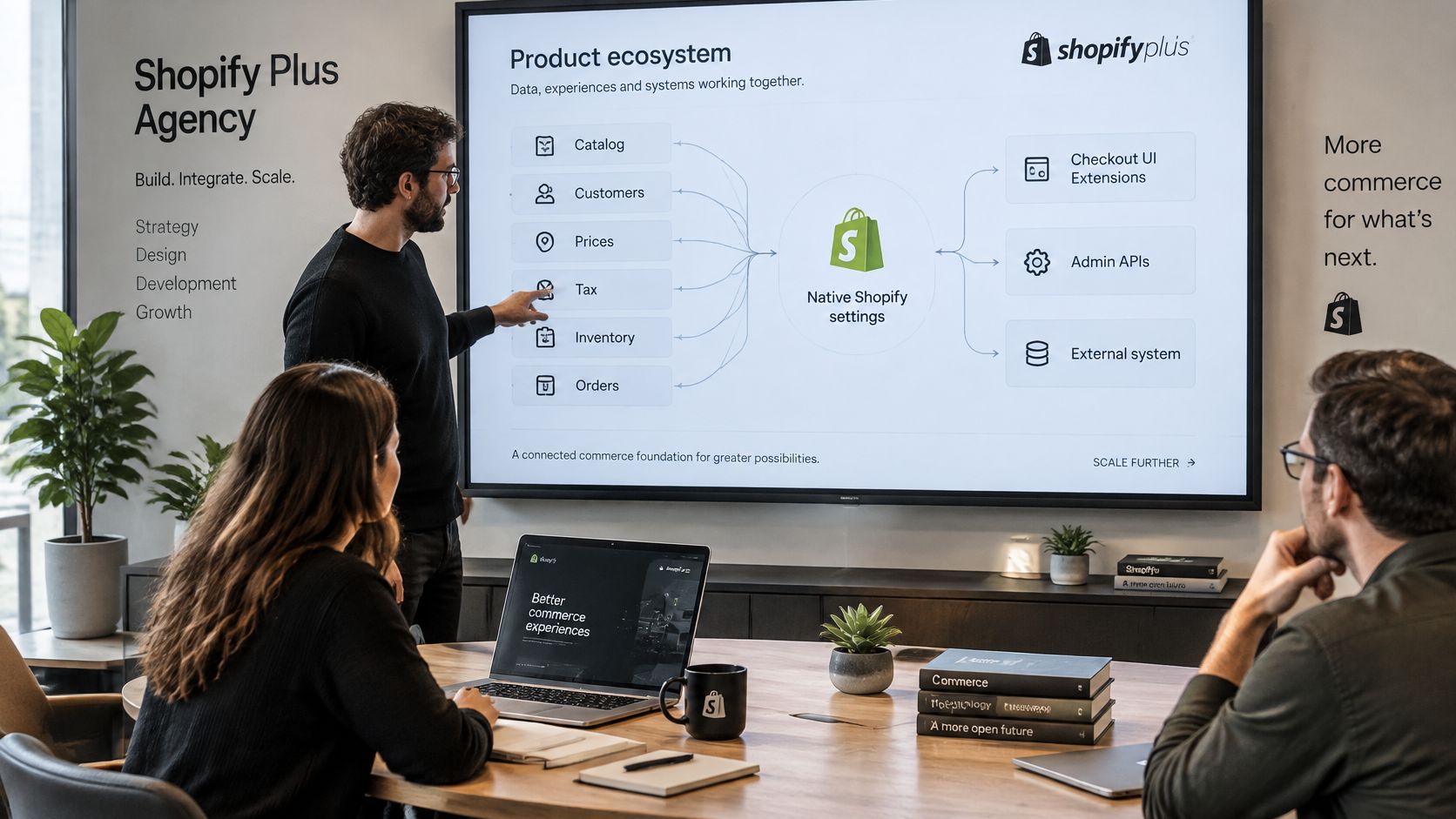
A credible scope starts with discovery mapping, and it records one decision per business rule. Your agency should map catalog structure, customer types, pricing, tax, inventory, and orders to native Shopify settings first. Only then should it assign a rule to a Checkout UI Extension, an Admin API, or an external service. That order keeps custom code small and makes later upgrades cheaper.
Migration comes next, covering products, customers, the order history you need for service and reporting, and redirects that protect search traffic. It should also list apps to retire, because carrying old workarounds into Plus is a quiet way to rebuild the problem you paid to leave. We cover the migration and PIM procedures in our existing guides on those topics, so your proposal should reference a method rather than repeat generic steps.
Storefront, integrations and B2B scope
Theme work normally stays on Online Store 2.0 unless your platform decision already selected Hydrogen. Good UI/UX design services matter here, although design cannot repair wrong prices or stale stock. Integration scope usually covers ERP, PIM, OMS, or WMS, payments, tax, and fulfilment. Sound builds use webhooks, queues, idempotent writes, and a reconciliation view for records that disagree between systems.
Our ERP and CRM integration work follows that pattern, and specialist advice on how firms connect business platforms makes the same point about owning the data contract. For readers weighing a separate front end, as we explored in our guide to choosing a headless commerce implementation partner, the build steps matter less than who runs the stack afterwards.
B2B scope should name company locations and payment terms in plain language. It should also name approval flows and the catalogs assigned to each account. Store structure is the constraint buyers most often miss. The Shopify Plus plan documentation states that Plus supports up to nine expansion stores, that each live expansion store requires its own theme licence, and that country or region markets can be created without a stated numerical limit. It also supports unlimited B2B catalogs with direct assignment to company locations.
Use Markets when several countries can share one theme and one operating model. Use expansion stores when regions need separate owners or materially different storefronts. Market-specific checkout block customisation belongs to Plus, so localised checkout behaviour should be scoped apart from translated content.
How to Evaluate a Shopify Plus Development Agency
Score agencies on evidence you can test in a written proposal. Logos and confident sales calls tell you very little about cutover weekend. The checklist below is built for ecommerce directors and CTOs who need comparable answers from every bidder.
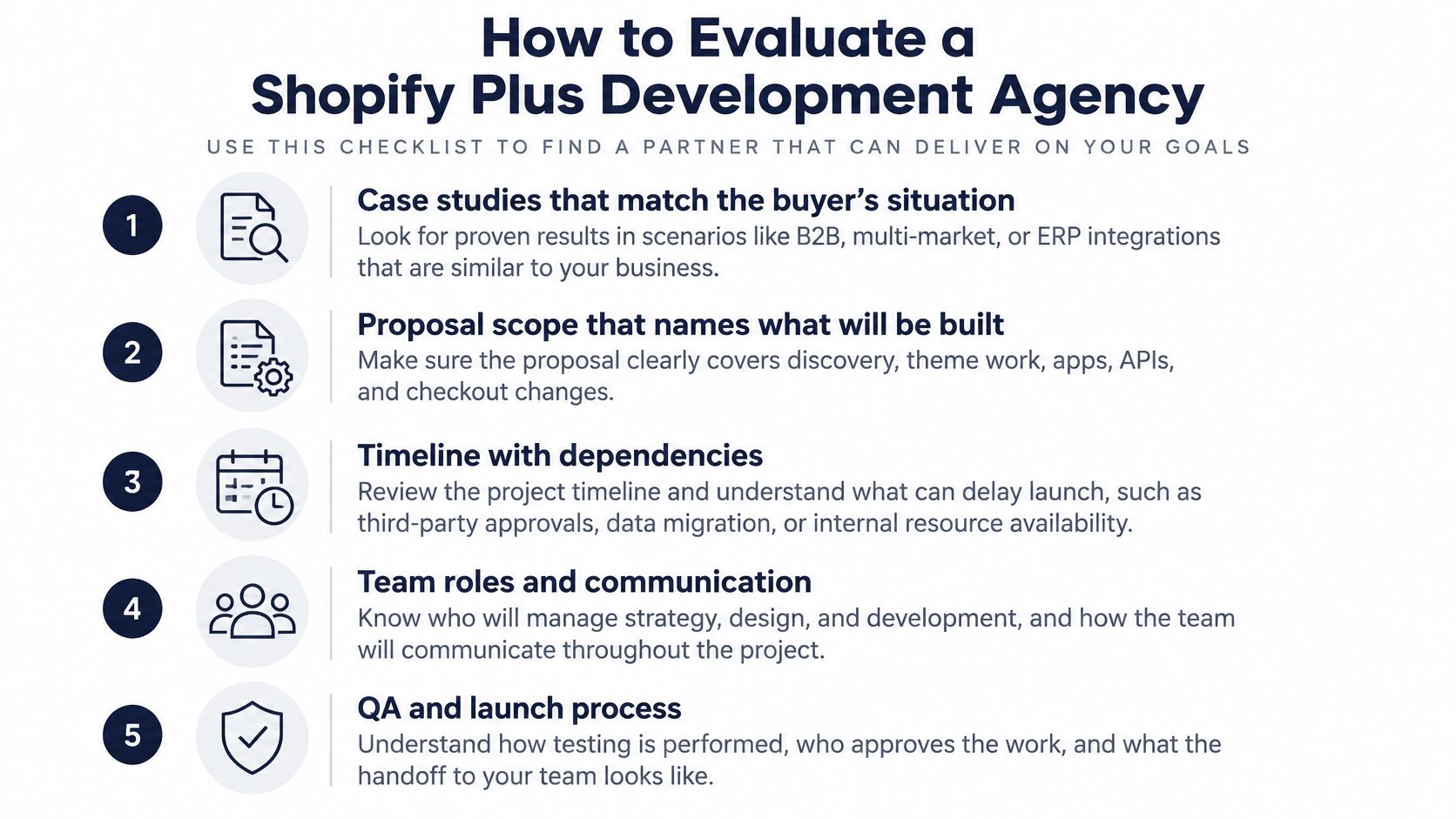
A checklist you can paste into a scorecard
-
Matching case studies: Ask for work that resembles your situation, such as B2B terms, multi-market rollout, or ERP replacement, and read each case only as its own page describes it.
-
Named Shopify depth: Require the proposal to address Checkout UI Extensions, Markets, expansion stores, and B2B catalogs directly.
-
API choice with reasons: Make the agency state where it will use REST and where it will use GraphQL Admin APIs, and why.
-
Rate-limit design: Check the plan for queueing, pagination, retries, and monitoring on every high-volume sync.
-
Integration failure handling: Look for idempotency, dead-letter handling, and a reconciliation screen your operations team can read without developer help.
-
Support model: Get named engineers, hours of cover, launch on-call arrangements, and a list of runbooks that stay with your team.
-
Pricing model: Compare fixed scope, time and materials, and dedicated squad options with exclusions written out in full.
-
Recent references: Speak to two clients from the past two years and ask about cutover defects and response times.
The rate-limit item deserves a direct question. Shopify's REST Admin API rate limit documentation gives a standard bucket of 40 requests per app per store with a leak rate of 2 requests per second, while Plus raises those values to a 400-request bucket and 20 requests per second. A tenfold allowance still empties during a burst import. Your agency should treat HTTP 429 responses as a normal control path, with backoff and queueing designed in from the start.
Add five RFP questions that expose weak delivery habits. Ask how the team will baseline abandonment, errors, and Core Web Vitals before theme work begins. Ask which rules stay native, how one order gets tested across tax, inventory, payment, fulfilment, and ERP, and who owns app sprawl after launch. Ask how permissions, rollback, and release notes will be documented. Written answers to those questions separate engineering firms from theme shops.
Engagement shape affects how you judge all of this, so compare our software development service models before you decide between full-cycle delivery and team augmentation. Buyers who want another practitioner view can read Shopify Plus development insights from ECORN and test its claims against the same scorecard. Then look at relevant ecommerce client cases and judge the match to your own programme.
Score the proposal that names failure modes in detail. Vague confidence about integrations usually becomes your incident ticket after launch.
Project Phases and What Changes the Timeline
Timelines slip for ordinary reasons, and most of them sit outside the theme. Dirty product data, duplicate B2B companies, and undecided tax rules move dates more reliably than front-end effort does. I'd refuse any fixed week count offered before discovery has inspected the source data.
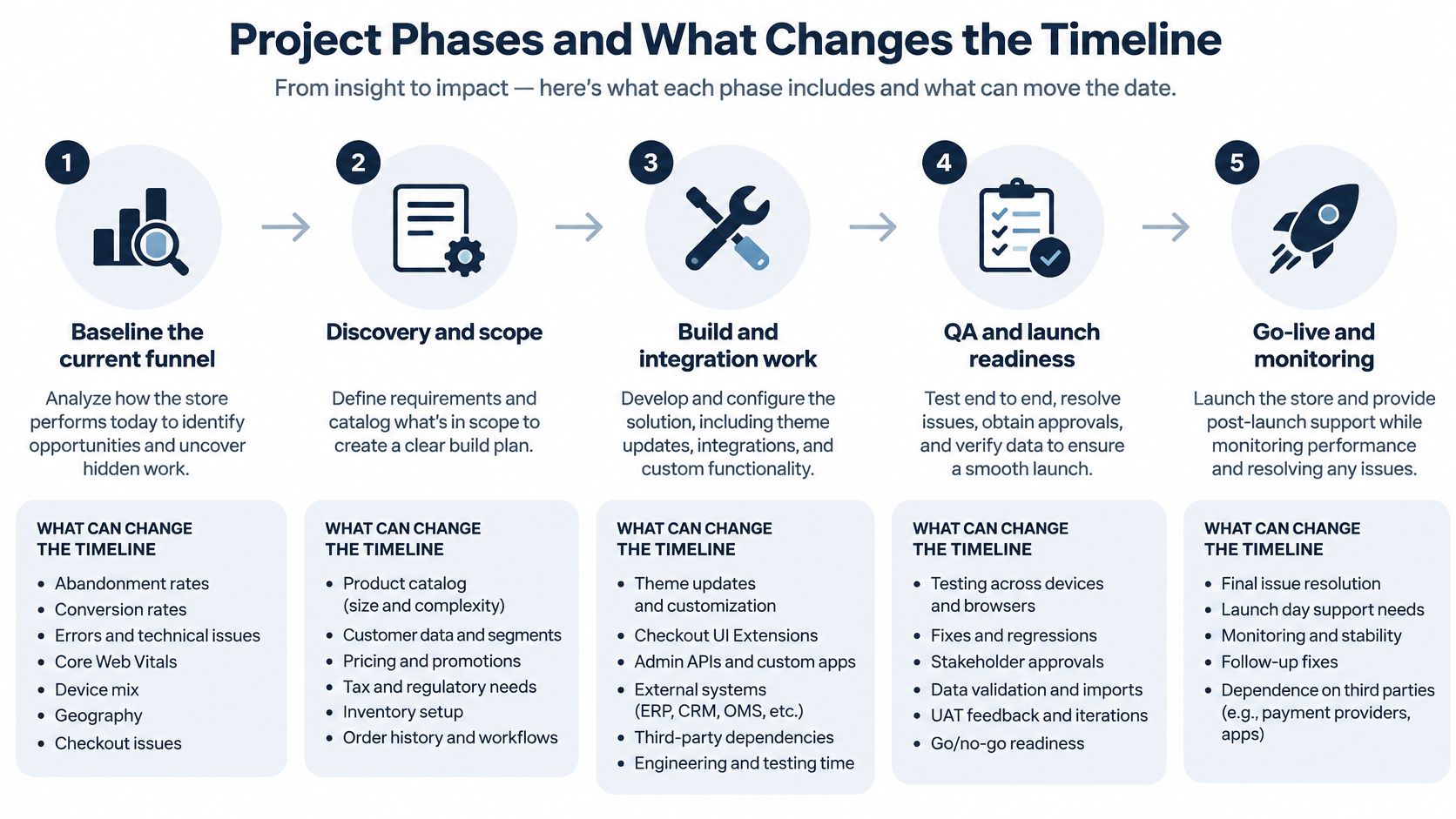
Phases in programme order
-
Baseline the funnel: Record abandonment, conversion, error rates, Core Web Vitals, device mix, geography, and checkout drop-off so regressions are visible later.
-
Write the target shape: Fix the store structure and data contracts, and mark each rule as native configuration, an extension, or an external service.
-
Clean source data: Repair products, prices, and company records in ERP and PIM before build work depends on them.
-
Build the smallest surface: Implement the narrowest checkout or app change that satisfies the rule, with timeouts, retries, idempotency, and logs included.
-
Integrate and test one transaction: Run a single order through ERP, PIM, tax, payment, and fulfilment, including failure, retry, and partial-order cases.
-
Stage the rollout: Move content and redirects, then release checkout changes in stages with no regression in completion, payment success, latency, accessibility, or order accuracy.
-
Hand over operations: Transfer runbooks, permission lists, monitoring dashboards, and a tested rollback path to the team that will own the store.
Checkout work carries hard platform limits that shape the plan. Shopify's Checkout UI Extensions documentation confirms that extensions for the information, shipping, and payment steps are available only to Shopify Plus stores, that Shopify enforces a compiled bundle limit of 64 KB, and that extensions can be rate-limited when they make too many changes during a buyer session. A design that ignores the bundle limit gets discovered late, usually during performance testing.
One pattern causes both defects and delay. Placing synchronous ERP, tax, fraud, or inventory calls directly in the checkout path makes every third-party slowdown a checkout failure. Safer designs cache reference data where the business allows it and reconcile after order creation. They also carry correlation IDs across checkout, payment, fulfilment, and ERP records so support staff can trace one order end to end.
Expect the calendar to stretch when markets multiply payment and shipping setup. It also stretches when B2B approvals differ by account, when historical orders must migrate, and when a headless front end adds a second release train. A single store with one ERP connector is the short case. Several expansion stores or a new PIM is the long case, and no honest agency will price them as equals.
Cost Drivers and Engagement Models
No public source supports a single agency project price, so I won't quote one. Any figure an agency gives you before discovery is an indicative estimate resting on assumptions, and those assumptions belong in writing. What you can verify today is the platform fee, and you should keep it in a separate column from services.
Shopify's Plus pricing page lists a starting price of $2,300 per month for standard setups and integrations on a three-year term, or $2,500 per month on a one-year term. It also advertises capacity of more than 10,000 checkouts per minute with unlimited bandwidth, transactions, and SKUs. Treat those numbers as Shopify's published platform terms. They don't guarantee that your custom app, search service, or ERP connector will sustain the same throughput.
What moves a Shopify Plus programme budget
| Cost driver | What moves the estimate | Outside the Plus subscription |
|---|---|---|
| Platform subscription | Standard setups at 2300 USD per month on a three-year term or 2500 USD per month on a one-year term | Custom apps, middleware, migration and support |
| Checkout and B2B rules | Markets, payment terms, catalogs and extension test scope | Checkout extension engineering |
| Integrations | ERP, PIM, OMS, tax, payments, fulfilment and API volume | Queues, monitoring and reconciliation |
| Migration | Catalog size, order history, redirects and source-data cleanup | Discovery and cutover support |
| Front end | Online Store theme versus Hydrogen or another headless build | Ongoing front-end ownership |
| Engagement model | Fixed scope, time and materials, or dedicated squad | Scope exclusions and change-request rate |
| Run costs | Release cadence, cover hours and who holds runbooks | Retainer or augmented team after launch |
Engagement model decides where risk sits. Under full-cycle delivery, the agency owns scope, sequencing, and acceptance, so the proposal must price discovery and acceptance testing as explicit line items. Under team augmentation, your product owner keeps control, and the important lines become run-rate, senior review, and knowledge transfer. Our overview of custom ecommerce development services explains how that choice changes scoping in practice.
Several costs sit outside both the platform fee and a typical build quote. Paid apps and theme licences for expansion stores are common examples. Middleware hosting, observability tooling, and translation also tend to sit outside. Ask every bidder to split the proposal into platform fees, build, migration, and first-year support. Then compare the assumptions column line by line, because that is where cheap quotes hide their missing work.
Budget test: If a proposal cannot explain what would make the price rise by a third, the estimate is decoration.
Red Flags, Contract Terms and Post-Launch Support
Some proposal flaws should end the conversation. The agency recommends headless before measuring any gap in the native storefront. The estimate cannot name the ERP, PIM, or payment systems involved. The checkout plan ignores extension size limits or puts live ERP calls on the payment step. Each of those signals a team selling a preferred stack rather than solving your operating problem.
Commercial red flags are just as clear. Prices arrive with no assumptions and no exclusions. Build and support costs are blended into one number you cannot unpick later. References decline to discuss cutover defects, or the team claims a Shopify partner status it cannot show. A fixed week count promised before data discovery belongs in the same group.
Terms to put in the contract
-
Acceptance tests: Define order accuracy checks across price, tax, stock allocation, and fulfilment status before go-live sign-off.
-
Environments and rollback: Name staging and production access, release approval steps, and the rollback trigger for launch week.
-
Ownership: State who owns custom code, theme work, documentation, and store admin access after handover.
-
Change control: Fix the change-request rate and the process for approving scope additions during the build.
-
Service levels: Set response and restore targets for launch week and the first 90 days, with named escalation contacts.
Post-launch support is steady engineering work. Failed webhooks need replay, rate limits need watching, and Core Web Vitals need monthly reporting by page type and device. Merchandising requests and app updates fill the rest of the backlog. Staff that works under the model you chose at contract stage, and review the queue monthly against revenue impact.
Bridge Global develops custom ecommerce platforms with ERP connectivity for B2B and B2C environments, and offers flexible engagement models that include full-cycle delivery, corporate business solutions, and AI transformation frameworks. If your programme needs that kind of engineering partner, review our custom ecommerce solutions and judge the fit against the checklist above.
Frequently Asked Questions
How much does a Shopify Plus development agency cost?
No fixed agency price is published, and cost depends on markets, integrations, migration volume, and support model. Request a proposal that splits platform fees, build, migration, and first-year support with stated assumptions.
How long does a Shopify Plus migration take?
The calendar depends on ERP and PIM data quality, the number of markets, B2B approval rules, and historical order volume. You shouldn’t accept a week count before discovery has inspected the source systems.
Which checkout customisations require Shopify Plus?
Checkout UI Extensions for the Information, Shipping, and Payment steps require Plus, as does checkout block customisation per market. Extensions must also fit within the 64 KB compiled bundle limit.
Should a Shopify Plus build use headless by default?
No. Headless adds a second front end with its own release, QA, and support workload, so it should follow a measured gap in the native storefront and confirmed engineering capacity to run it.
If you’re scoping a Shopify Plus programme and need engineers who can own integrations, checkout rules, and post-launch support, talk to the team behind our ecommerce work. Visit Bridge Global to discuss your platform decision and get a proposal structured around your operating model.

About Preethi Saro Philip
Preethi Saro Philip is a Post Graduate Research Degree holder in Economics with more than 10 years of experience in writing, editing, research and teaching. She has an intense passion for content crafting and calls herself a ‘wordsmith’. She enjoys writing on wide-ranging topics including business, technology, health & lifestyle, education, environment etc.
View all posts by Preethi Saro Philip →