



AI and Software Development: A Guide to Smarter Apps
The worlds of AI and software development have officially merged. What once felt like a sci-fi concept is now a practical reality – AI has become an intelligent partner that’s present at every stage of the development lifecycle, from the first spark of an idea to long-term maintenance.
The New Blueprint for Building Software with AI
Think about how software used to be built. It was a lot like an architect drafting a static blueprint for a house. Every detail was planned upfront, and the construction crew followed the plans to the letter. If you wanted to move a wall or add a window mid-construction, it meant halting everything, redrawing the plans, and dealing with massive delays and costs. The process worked, but it was painfully slow and rigid.
Bringing AI into the mix is like swapping that paper blueprint for a dynamic, intelligent 3D model of a modern car. This isn’t just a visual aid; it’s an active system. It helps engineers design intricate parts, runs thousands of performance simulations in minutes, and even suggests improvements based on real-world physics. That’s the kind of active, intelligent partnership AI now offers software teams.
From Competitive Edge to Foundational Tool
Not too long ago, using AI gave you a serious leg up on the competition. Today, it’s simply the price of admission. For CTOs and product leaders, integrating AI is no longer a strategic choice for getting ahead; it’s a fundamental need for staying relevant.
The data tells a clear story. A staggering 84% of developers are already using or plan to adopt AI tools by 2026. With adoption this widespread, AI is no longer a differentiator but a baseline. As an experienced AI solutions partner, we see this daily; it’s become critical for attracting top talent and scaling engineering capacity.
This isn’t just a minor evolution. It’s a complete shift in how modern applications are conceived and built.
The Tangible Benefits for Your Business
Once you cut through the hype, you find that “AI-driven development” delivers real, measurable business value. This isn’t about replacing your developers; it’s about supercharging them by offloading the tedious, repetitive work so they can focus on what they do best: solving problems creatively.
Adopting AI is a fundamental shift from writing code to designing outcomes. It empowers teams to solve more complex problems faster by offloading repetitive tasks to intelligent assistants.
This new way of working unlocks some major advantages:
-
Accelerated Time-to-Market: With AI handling chunks of coding, automated testing, and deployment pipelines, you can shrink development cycles from months to weeks.
-
Enhanced Code Integrity: AI acts as a tireless reviewer, scanning codebases to flag potential bugs, security holes, and performance drains before they ever make it to production.
-
Increased Developer Productivity: By automating the grunt work, developers are free to pour their energy into architecture, innovation, and features that deliver real business impact.
For any company building software today, figuring out how to apply AI for your business is the first and most important step. This new blueprint isn’t just about coding differently; it’s about building smarter, faster, and more resilient products from day one.
How AI Is Rewriting Each Stage of the SDLC
Talking about AI in software development can feel a bit abstract. The best way to grasp its real-world impact is to walk through the familiar Software Development Lifecycle (SDLC) and see exactly where AI is changing the game.
This isn’t about one giant, disruptive tool that replaces everything. Instead, think of it as a series of smart, targeted upgrades that make each stage of development faster, more efficient, and more intelligent. It’s the difference between following a hand-drawn map and having a GPS co-pilot guiding you at every turn.
This infographic gives you a great visual of that shift, showing how the old manual process stacks up against the new AI-powered approach.
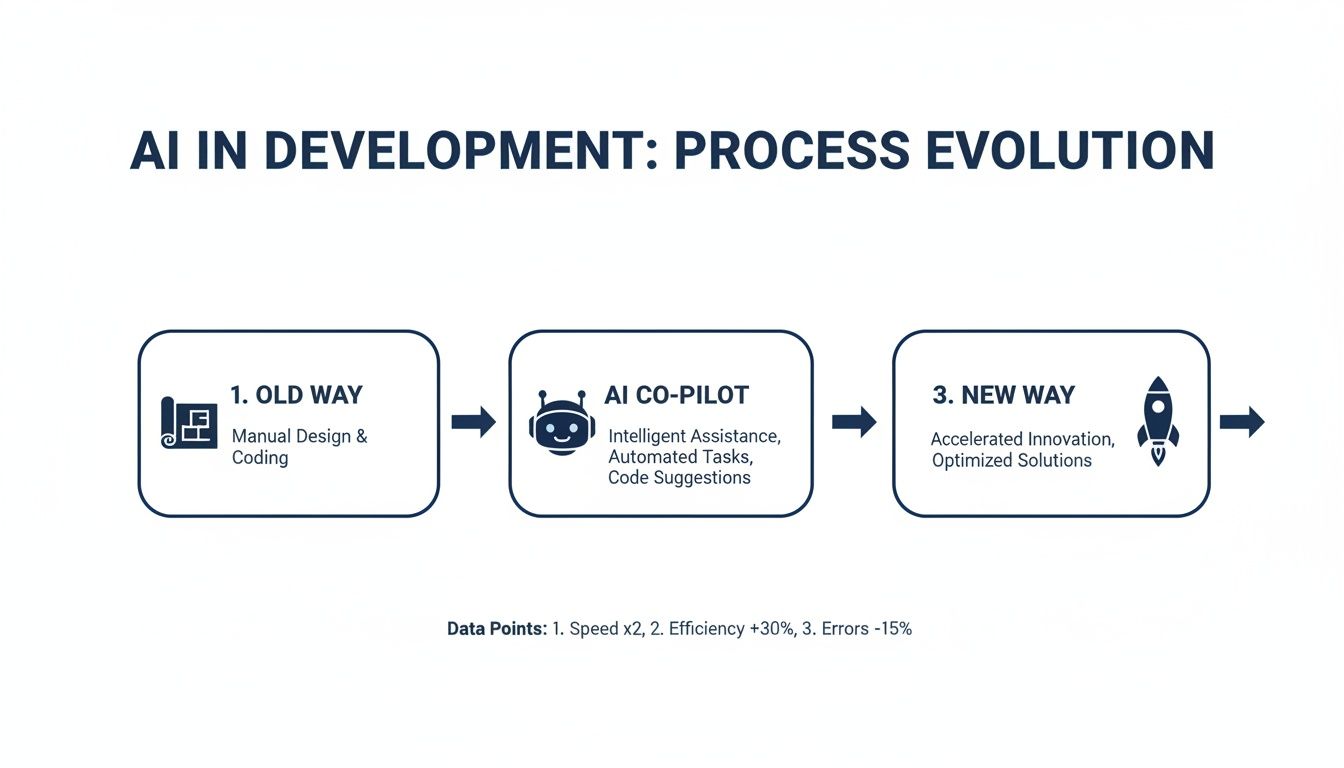
You can see how AI acts as a force multiplier, injecting speed and insight into the entire project. Let’s break down exactly what that looks like, stage by stage.
To make this clearer, the table below maps out how AI capabilities are being applied across the SDLC and the concrete business benefits they deliver.
AI Integration Across the Software Development Lifecycle (SDLC)
| SDLC Stage | AI Capability | Business Benefit |
|---|---|---|
| Requirements & Design | NLP-driven analysis of user feedback; AI-generated UI/UX mockups. | Faster, data-driven product decisions; rapid design exploration and optimization. |
| Coding & Generation | Code completion and generation; language translation; boilerplate code automation. | Increased developer productivity; focus on high-value architectural tasks. |
| Testing & QA | Automated test case generation; predictive defect analysis; smart bug prioritization. | Higher test coverage, earlier bug detection, and more stable releases. |
| Deployment & Monitoring | CI/CD pipeline optimization; automated canary analysis and rollbacks. | Safer, more reliable deployments with minimized downtime. |
| Maintenance & Operations | Proactive anomaly detection; predictive maintenance alerts. | Reduced system failures; shift from reactive fixes to proactive improvements. |
As you can see, AI's role is not just to automate but to augment and inform, creating a more resilient and efficient development process from start to finish.
Requirements and Design
We've all been there: trying to make sense of endless interview notes, survey responses, and support tickets to figure out what to build next. It's a slow, often biased process. Today, Natural Language Processing (NLP) models can churn through thousands of customer comments in minutes, objectively identifying common pain points and highlighting the most-requested features. This takes the guesswork out of product roadmapping and anchors it in real user data.
Then comes the design phase. Instead of a designer creating wireframes from scratch, AI tools can spin up multiple UI/UX concepts from a simple text description. This lets the team instantly visualize different approaches, A/B test layouts, and fine-tune the user experience long before anyone writes a single line of code.
Coding and Generation
The coding stage is where you see some of the most dramatic changes in AI and software development. AI-powered code assistants, or "co-pilots," have quickly become essential tools for developers.
These assistants do far more than just autocomplete a variable name. They suggest entire functions, translate code from one language to another, and handle all the repetitive boilerplate, freeing developers to focus their brainpower on tricky logic and architecture.
The developer's role is shifting from that of a typist to more of an editor or a director. You guide the AI, review its output, and integrate it into the larger project. The key is to apply automation smartly, as we've discussed in our guide on selecting an AI use case. It’s about augmenting human expertise, not replacing it.
Testing and Quality Assurance
Manual testing has always been a major bottleneck, slowing down release cycles. AI is breaking that bottleneck wide open by automating both the creation and execution of tests. AI models can analyze a codebase and automatically generate a whole suite of tests, achieving a level of coverage that would be nearly impossible to do by hand.
This capability is now central to modern software testing services, where AI tools perform several key jobs:
-
Predictive Analysis: Pinpointing which parts of the code are most likely to have bugs based on past data.
-
Autonomous Test Generation: Automatically creating unit, integration, and even end-to-end test scripts.
-
Smart Bug Triage: Organizing and prioritizing new bugs based on their potential customer impact.
By weaving AI into the QA process, teams find problems much earlier, reduce the risk of regressions, and ultimately ship much more reliable software.
Deployment and Maintenance
AI's job isn't done when the code is shipped. In the deployment stage, AI can analyze historical release data to suggest the best, lowest-risk times to push updates, minimizing any disruption to users. If a post-deployment monitor flags an issue, it can even trigger an automatic rollback.
Once the software is live, AI-powered monitoring tools act as vigilant watchdogs over application performance and system health. They learn what "normal" looks like and can spot subtle patterns that indicate a failure is on the horizon, alerting developers before users are ever affected. This move from reactive firefighting to predictive maintenance is crucial for building resilient systems, and you can see real-world examples in our client cases.
Ultimately, the evolution of the custom software development process is clear: AI is proving to be a powerful partner at every single step.
Choosing Your AI Development Toolkit and Architecture
Once you decide to bring AI into your software development lifecycle, the next big question is a practical one: which tools and architectural patterns will you actually use? This isn't just about picking the trendiest new thing; it's about making deliberate choices that lay a solid foundation for building intelligent, adaptable software.
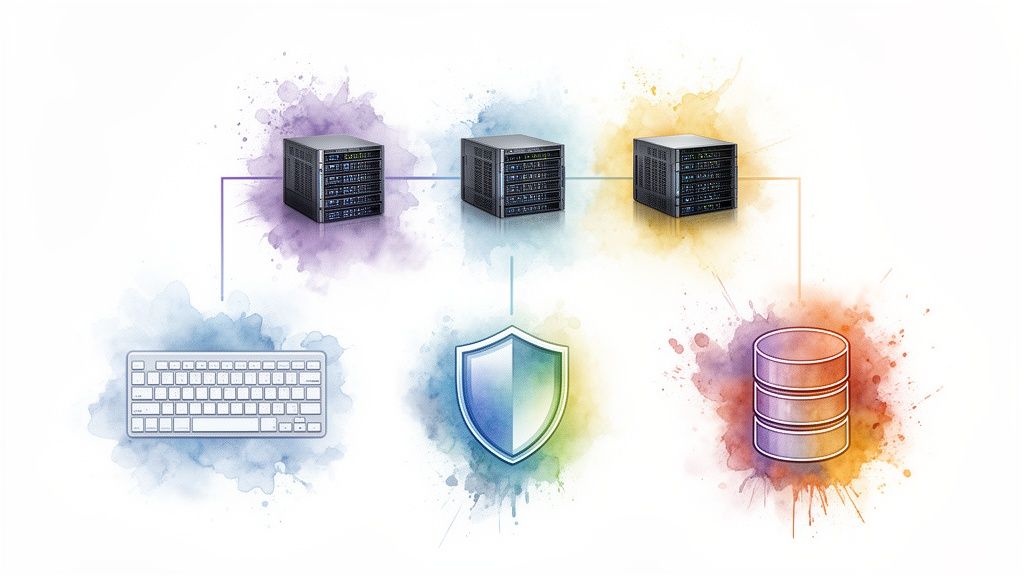
The market for AI-powered development tools has exploded, and it’s easy to get lost. To make sense of it all, it helps to group them by what they do for your team day-to-day. Some act like a pair programmer, while others are more like a tireless security guard for your code.
-
Intelligent Code Generation: Tools like GitHub Copilot and Amazon CodeWhisperer are game-changers here. You can write a comment in plain English describing a function, and they’ll generate the code for you. It’s fantastic for getting past writer’s block and handling boilerplate code quickly.
-
Predictive Code Completion: Think of Tabnine as autocomplete on steroids. It learns from your team’s unique codebase and conventions to suggest the most likely next lines of code, which not only speeds up individual developers but also helps maintain consistency across the project.
-
AI-Powered Security and Quality: This is where you bring in the experts. Platforms like Snyk and SonarQube use AI to proactively scan for tricky security flaws and subtle code quality issues. They find complex bugs that simple linters might miss, long before they can cause problems in production.
This is just a small sample, and figuring out the right mix can feel overwhelming. Having an experienced AI solutions partner can make all the difference, helping you cut through the noise and select a toolchain that truly fits your project goals.
Designing an AI-Ready Architecture
But the tools are only half the equation. Your software's underlying architecture is what will ultimately determine if your AI ambitions succeed or fail. A rigid, monolithic application will fight you every step of the way when you try to introduce a new AI model. A modern, modular design, on the other hand, embraces change.
An AI-ready architecture is designed for evolution. It treats AI models as independent, swappable components, allowing the system to become smarter over time without requiring a complete overhaul.
Two architectural patterns are particularly well-suited for building AI-powered applications:
-
Microservices Architecture: This is all about breaking a big, complex application into a collection of small, independent services. For AI, this is a perfect fit. You can create one microservice for your recommendation engine and another for a fraud detection model. Each service can be developed, deployed, and scaled on its own, giving you the freedom to update an AI model without touching the rest of the application.
-
Data-Driven Architecture: In this setup, data is the lifeblood of your system. Every user action and system event flows through a central data pipeline. This creates a rich, continuous stream of information that you can feed into various AI models to get real-time insights, personalize user experiences, or trigger automated actions. It puts intelligence at the very core of your software.
The right architecture is crucial for any successful project, but it’s non-negotiable when AI is involved. The design choices you make upfront will either accelerate or hinder your ability to innovate later.
The Right Blend of Tools and Design
In the end, real success comes from combining the right tools with the right architecture. Imagine your team using a powerful AI code generation tool to rapidly build a new sentiment analysis feature. Because you’re using a microservices architecture, they can deploy it as a standalone service, test it in isolation, and roll it out with minimal risk to your core product.
This blend of smart tooling and forward-thinking system design is what modern AI and software development are all about. By making these choices deliberately, you’re not just solving today's problems; you’re setting your projects up to seamlessly integrate the next wave of AI innovation.
Real-World Wins with AI in Software
Theory is great, but results are what really matter. Talking about how AI fits into the development lifecycle is one thing, but seeing it solve a real-world business problem is where its power truly clicks. When you look at the stories behind the technology, you start to see a clear pattern of success across different industries.
This isn't just about helping developers work faster; it's about creating software that directly drives critical business goals. These applications of AI and software development aren't just ideas on a whiteboard; they're out in the wild, delivering value right now.
Let's look at a few concrete examples of how companies are getting it right.
Fintech Tackles Fraud with Predictive Analytics
Financial tech companies are in a constant battle to stay one step ahead of sophisticated fraud. One firm, for instance, was getting hammered by a high volume of fraudulent transactions. This wasn't just costing them money; it was eroding the trust they had built with their customers. Their old, rules-based system simply couldn't adapt fast enough to the new tricks criminals were using.
They decided to build a predictive analytics model and bake it right into their transaction processing software.
-
The Challenge: A surge in fraudulent transactions, with an outdated system that couldn't keep up with new fraud patterns.
-
The AI-Driven Solution: They developed a custom machine learning model to scan transaction data in real time. This model was trained to spot subtle red flags and suspicious patterns that a human or a simple rule would easily miss.
-
The Result: After getting the new system online, the company saw a 40% reduction in fraudulent activity within just six months. That translated to millions in savings and a major boost in consumer confidence.
Ecommerce Boosts Retention with Personalization
In the crowded e-commerce space, getting customers to come back is everything. An online retail platform noticed its generic product recommendations were falling flat. Shoppers were abandoning their carts, and very few were becoming repeat buyers. They needed to make every person’s experience feel personal and relevant.
The answer was a new recommendation engine powered by collaborative filtering and deep learning. This system doesn't just look at what a user has browsed or bought before; it also analyzes the behavior of similar shoppers to suggest products they are almost certain to love. This completely changed how users interacted with the site.
With this AI-powered personalization, the platform saw a 25% increase in customer retention. By delivering a more relevant and engaging shopping experience, they turned one-time buyers into loyal customers. You can explore how these ideas might apply to your own goals on our AI for your business page.
Healthcare Improves Diagnostic Accuracy
When it comes to healthcare, accuracy can be a matter of life and death. A health-tech company was building a mobile app for diagnostic imaging, and they faced a huge challenge: how to help clinicians interpret complex scans both quickly and accurately. The aim was to build a reliable decision-support tool that could minimize human error and speed up the diagnostic process.
They built an AI-powered feature that uses computer vision to analyze medical images. After training the model on thousands of anonymized scans, it learned to recognize indicators of specific conditions that might otherwise be missed. The impact of this kind of AI is being felt across many sectors, with dedicated Machine Learning Software Transforming Biological Data Analysis and creating entirely new possibilities for medical discovery.
These stories all point to the same trend. The global software market is already massive, with projections showing it will grow from $823.92 billion in 2026 to an incredible $2,248.33 billion by 2034.
Within that boom, the demand for specialized solutions is surging. The custom software development segment, in particular, is set to expand even faster as organizations invest heavily in building their own AI-enhanced tools. For more proof, you can browse our client cases to see how we've helped others deliver these kinds of powerful solutions.
Your Roadmap to an AI-Powered Development Strategy
Jumping into AI-driven development can feel overwhelming. The good news? You don't have to boil the ocean. A smart strategy isn't about a massive, all-at-once overhaul. It’s about taking smart, measured steps that build momentum, show real value, and keep risks in check.
Let's be clear about the stakes. The global AI software market, valued at USD 386.08 billion in 2026, is on a trajectory to hit USD 995.45 billion by 2030. That’s a staggering compound annual growth rate (CAGR) of 26.7%. The generative AI space is growing even faster at a 29% CAGR. For any serious organization, these aren't just market trends; they're a signal that integrating AI is becoming fundamental to staying in the game.
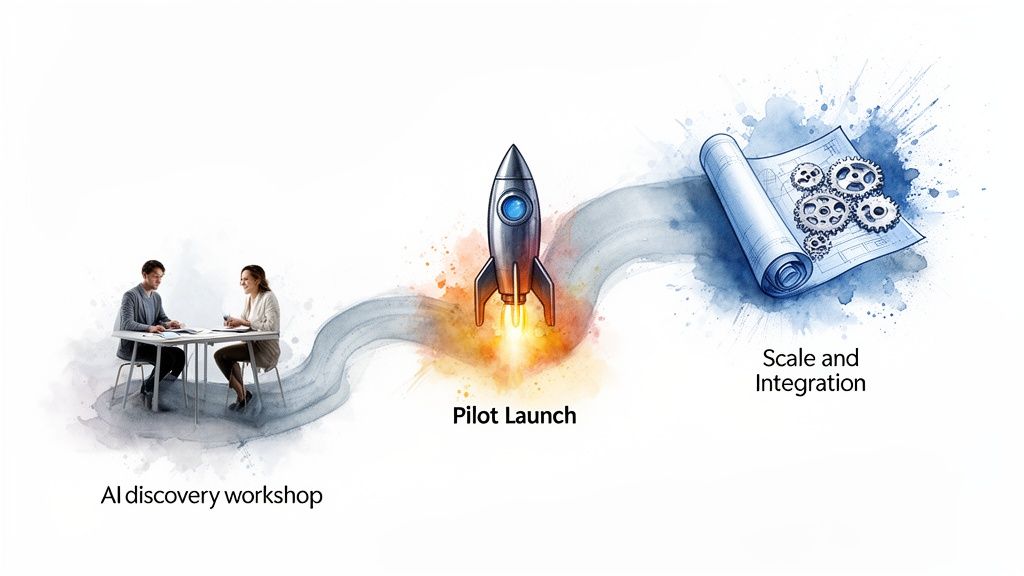
This isn't about chasing shiny objects. It's about making deliberate investments that actually solve business problems. Here’s a three-phase approach that works.
Phase 1: The AI Discovery Workshop
Your first move is to find the right problem to solve. I’ve seen too many teams fall into the trap of grabbing a cool AI tool first and then trying to find a use for it. That’s backward. The best way to avoid this is with an AI Discovery Workshop.
Get the right people in a room: project managers, senior devs, product owners, and map out your entire software development lifecycle. The whole point is to find the biggest headaches: the most painful bottlenecks, the most mind-numbing repetitive tasks, and the spots where human error costs you the most.
-
Map Your SDLC: Whiteboard every single stage, from the first user story all the way to post-deployment monitoring.
-
Hunt for Pain Points: Where do things always seem to grind to a halt? What tasks eat up your best developers' time? Is manual regression testing, for example, constantly delaying your releases?
-
Prioritize for Impact: Grade each potential AI use case on two simple scales: business impact and technical feasibility. This immediately points you toward a quick, high-value win.
This workshop forces you to aim your first AI initiative at a genuine pain point, which dramatically boosts your odds of success and makes it easier to get buy-in for what comes next. To get started, as we explored in our guide, you can get a sense of your organization’s AI readiness.
Phase 2: The Focused Pilot Project
With a high-value use case identified, it's time to launch a pilot project. Think of a pilot as your controlled experiment. It’s where you test your assumptions, measure the actual return on investment (ROI), and learn valuable lessons before you even think about a large-scale rollout.
A pilot project de-risks AI adoption. It allows you to experiment, fail fast, and validate both the technology and the business case on a small scale, providing the concrete data needed to justify broader investment.
Let's say your workshop flagged code quality as a major problem. Your pilot could be as simple as giving an AI-powered code analysis tool to a single development team.
-
Define What Winning Looks Like: Before you start, decide on your success metrics. This could be a specific percentage reduction in bugs, less time spent in code review, or a measurable improvement in application performance.
-
Pick the Right Tool for the Job: Select one AI tool that directly tackles the problem you’re trying to solve.
-
Measure and Analyze: Run the pilot for a defined period, say, two sprints, and track your metrics religiously. Comparing the pilot team's results against a control group is the best way to prove the AI's impact.
The hard data from this pilot is the proof you need to make a smart, informed decision about scaling up.
Phase 3: The Scaling Blueprint
Once you have a successful pilot under your belt, the final phase is to create a blueprint for taking the solution across the entire organization. This is about more than just handing out logins to a new tool. It demands a real plan for governance, training, and continuous improvement.
Your scaling blueprint must include:
-
Governance and Best Practices: Create clear, simple rules for using AI tools responsibly. This means protecting data privacy and having a process for validating the AI's output.
-
Training and Enablement: Your teams will have skill gaps. Address them head-on with targeted training on things like prompt engineering and how to critically evaluate AI-generated code or suggestions.
-
An Iterative Rollout: Don't go from one team to fifty overnight. Roll the solution out to a few more teams, listen to their feedback, fine-tune your process, and then plan the company-wide launch.
By following this phased approach, you can systematically build your organization’s AI capabilities, turning your development process into a true competitive advantage.
Frequently Asked Questions About AI in Software Development
As teams start to explore how AI and software development can work together, a lot of practical questions pop up. Moving toward AI-powered workflows is a big change, so it's only natural to have questions about how to get started, stay secure, and get your team ready. Here are some straightforward answers to the questions we hear most often, designed to give you a clearer path forward.
What Is the First Step to Integrating AI into My Existing Software Development Process?
The best way to start is with a tightly focused feasibility study or an AI Discovery Workshop. It’s tempting to create a huge, all-encompassing AI strategy right away, but that’s a mistake. Instead, you need to find one specific, high-impact spot in your current development lifecycle where you can get a quick, measurable win.
This could be anything from automating repetitive test cases to using an AI-powered linter for better code quality. You might even analyze customer feedback to help prioritize your backlog. By starting small with a well-defined pilot project, you can see the real ROI and learn valuable lessons before you think about a broader rollout. This approach builds momentum and gets people on board without taking on too much risk. An experienced AI solutions partner can help you run this discovery phase to make sure you pick the most valuable starting point for your business.
Will AI Replace Software Developers?
No, AI isn’t going to replace developers. It's quickly becoming a powerful sidekick – a true co-pilot. AI tools are fantastic at handling the tedious, time-consuming tasks like writing boilerplate code, generating unit tests, and spotting potential bugs before they become a problem.
This frees up your developers to focus on what really matters: tackling complex system architecture, solving tricky problems, and coming up with innovative features. The developers who learn to work effectively with AI tools will see their productivity and value skyrocket. But the need for human insight: understanding business logic, reading between the lines of user requests, and making critical design trade-offs, is more important than ever.
How Do I Ensure the Security and Quality of AI-Generated Code?
This is a huge concern, and it demands a serious, multi-layered defense. You simply cannot trust AI-generated code and push it straight to production.
First, you have to treat any code from an AI just like you would a third-party library. It needs to go through the exact same rigorous code reviews and QA processes as human-written code. A developer who understands the context must validate every single line.
Second, make sure automated security scanning tools (SAST/DAST) are built right into your CI/CD pipeline. These tools need to scan all code, no matter where it came from, to catch vulnerabilities early.
Establishing clear governance for using AI assistants is non-negotiable. The developer must always be the one accountable for the final code that gets committed, making sure it meets all security, performance, and quality standards.
Finally, you absolutely need a framework for using these tools ethically. As we explored in our guide on responsible AI principles, this means setting clear ground rules for your team. Working with experts in both AI and secure custom software development can help you build and maintain this critical foundation.
What Skills Does My Team Need to Effectively Use AI in Software Development?
For your team to really succeed with AI, they'll need a mix of rock-solid engineering fundamentals and some new, AI-specific skills. In fact, those core skills are now more important than ever.
-
Strong Fundamentals: A deep grasp of software architecture, system design, data structures, and algorithms is non-negotiable. You need these skills to properly guide the AI and challenge its suggestions.
-
Prompt Engineering: Developers need to get good at "prompt engineering" – the skill of writing clear and precise instructions to get the best, most relevant output from AI models.
-
Critical Evaluation: Your team must develop a sharp eye for reviewing AI-generated code. They need to check it for accuracy, security flaws, inefficiency, and whether it follows best practices.
-
Tool Proficiency: Getting comfortable with the specific AI tools you choose is essential. Knowing a tool's strengths and how to work around its weaknesses is a practical skill that only comes with hands-on experience.
-
ML Concept Awareness: A high-level, practical understanding of machine learning concepts helps developers know when AI is the right tool for the job and when it isn't, which stops them from trying to solve the wrong problems with it.
Building these skills will ensure your team uses AI as a powerful tool, not a crutch, leading to better software and more capable developers.
Ready to unlock the full potential of AI in your software development process? Bridge Global is your expert partner for creating intelligent, future-ready applications. From discovery workshops to full-scale AI development services, we provide the expertise to guide your journey and deliver measurable results.

About Preethi Saro Philip
Preethi Saro Philip is a Post Graduate Research Degree holder in Economics with more than 10 years of experience in writing, editing, research and teaching. She has an intense passion for content crafting and calls herself a ‘wordsmith’. She enjoys writing on wide-ranging topics including business, technology, health & lifestyle, education, environment etc.
View all posts by Preethi Saro Philip →