



Healthcare CRM Integration Solutions: A Practical Guide
A lot of healthtech teams are in the same spot right now. The CRM holds outreach history and service workflows. The EHR holds clinical truth. Billing sits somewhere else. Scheduling lives in another tool. Staff members compensate by copying data, opening too many tabs, and making decisions with partial context.
That setup breaks down fast once patient engagement becomes a strategic priority instead of a side process. CTOs feel it in integration backlogs, compliance reviews, duplicate records, and constant requests for “one dashboard” that never seems to stay accurate for long.
The practical question isn't whether healthcare CRM integration solutions matter. It's how to implement them without creating a fragile tangle of interfaces, privacy exposure, and data quality drift six months after go-live.
Why Healthcare CRM Integration Is No Longer Optional
Patients don't experience your organization as separate systems. They experience one brand, one care journey, and one set of interactions. When a call center agent can't see a referral update, when billing asks for information already captured in intake, or when care coordinators miss a follow-up because data is trapped in another platform, the patient sees a disconnected provider.
That friction usually comes from architecture, not effort. Teams work hard. Systems don't work together.
The market shift reflects that reality. Grand View Research estimated the healthcare CRM market at USD 17.87 billion in 2023, projecting it to reach USD 30.65 billion by 2030. It links that growth to patient-centered care, which requires CRM platforms to integrate data from EHRs, communication channels, and operational systems. In other words, CRM in healthcare has moved well beyond contact management.
What changed in practice
Healthcare organizations now expect CRM platforms to support more than campaigns and call logs. They need them to coordinate referrals, reminders, outreach, patient service, and operational reporting in ways that depend on current clinical and administrative data.
That changes the implementation standard.
-
Disconnected systems create operational lag: Staff members wait for updates, re-enter information, and verify details manually.
-
Fragmented records increase risk: Different systems can hold conflicting demographic, insurance, or interaction data.
-
Patient engagement requires context: Outreach only works when the CRM reflects the latest status from scheduling, billing, and care systems.
Practical rule: If your CRM can't see the same patient state your front-line teams are acting on, it won't improve the journey. It will just digitize confusion.
Why CTOs are revisiting CRM strategy
Many early CRM deployments in healthcare were bolt-ons. They supported admissions, marketing, or service operations in isolation. That was manageable when volumes were lower and patient experience programs were less ambitious. It doesn't hold up when organizations want coordinated communication, automation, and AI-assisted decision support.
In this context, custom healthcare software development becomes relevant. Off-the-shelf CRM capability may cover part of the workflow, but integration logic, data normalization, consent handling, and downstream orchestration often need deliberate engineering around the product.
Healthcare CRM integration is no longer a side project owned by one department. It's part of the clinical and operational backbone.
The Core Objective: Unifying the Patient Journey
Most integration discussions start with systems. A better place to start is the outcome. The objective is a single longitudinal patient record that people across the organization can trust.
That doesn't mean replacing every existing platform with one monolith. It means synchronizing the right patient data so staff can act from a unified view instead of piecing together fragments from multiple applications.
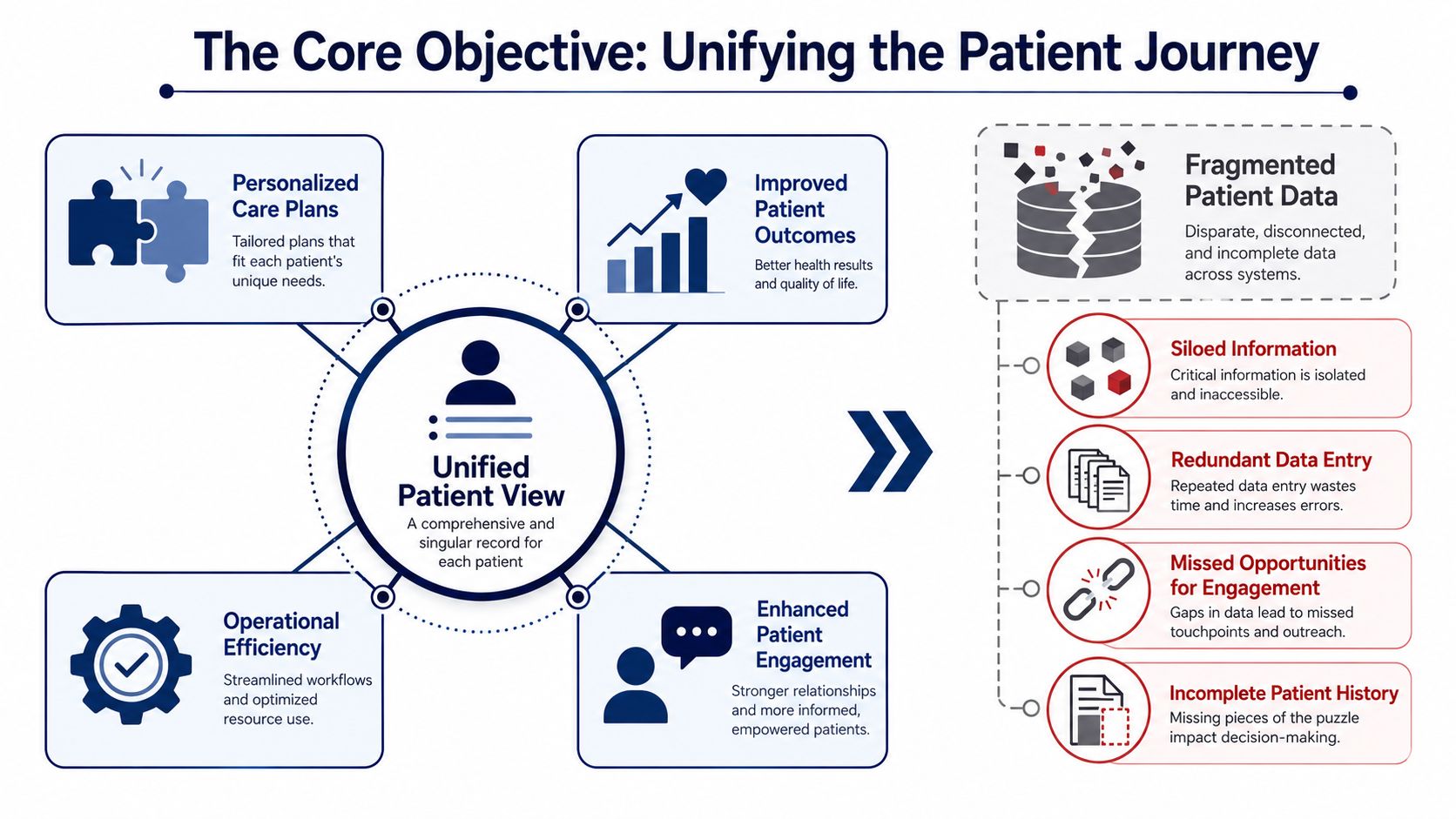
NetSuite notes that effective healthcare CRM integration creates a single longitudinal patient record by synchronizing demographic, insurance, billing, and clinical data with EHR/EMR systems, allowing staff to access a unified view without switching applications.
What a unified patient view actually means
A unified patient view is useful only if it helps a real person do a job faster and with fewer errors. In practice, that usually includes:
-
Front-desk teams seeing identity, coverage, appointment history, and open service issues in one place
-
Care coordinators understanding prior interactions, referral status, and next-step tasks without chasing records
-
Revenue teams working from synchronized demographic and insurance information instead of reconciling exceptions later
-
Patient engagement teams triggering outreach based on actual patient state, not stale exports
Consider it an air traffic control layer for patient operations. The planes still exist in different systems, but the people directing movement need one reliable view.
What doesn't work
A lot of projects fail here because the organization confuses visibility with unification.
Common examples:
| Approach | Why it falls short |
|---|---|
| CRM screen embeds | Users still depend on multiple systems and inconsistent fields |
| Nightly batch syncs only | Important status changes arrive too late for operational workflows |
| One-way exports to marketing tools | Engagement runs ahead of the current care or billing context |
| Broad “sync everything” strategy | Teams import noise, duplicates, and fields no one governs |
The right integration design is selective. You don't need every field everywhere. You need the fields that support action, trust, and accountability.
When teams say they want a 360-degree patient view, they usually mean something narrower and more useful: “Show me enough accurate context to do the next step correctly.”
Why this matters beyond operations
Once the patient record is unified, personalization stops being guesswork. Reminder flows can reflect real appointment state. Referral communication can align with care milestones. Service agents can respond with context instead of asking patients to repeat information.
For commercial teams in digital health, there's also a market-facing angle. If you're shaping growth motions around provider relationships and platform adoption, operational integration converges with go-to-market design. Some teams find it useful to compare CRM architecture with broader B2B health-tech GTM strategies because both depend on timely, trustworthy system data.
Choosing Your Integration Architecture
Architecture choices shape maintenance cost, delivery speed, and how painful future changes will be. In healthcare, they also shape how safely you can evolve interfaces when an EHR workflow changes or a new patient engagement tool gets added.
There isn't one correct pattern for every organization. The right choice depends on system count, internal integration maturity, compliance posture, and whether the CRM is supporting a narrow workflow or a broader operating model.
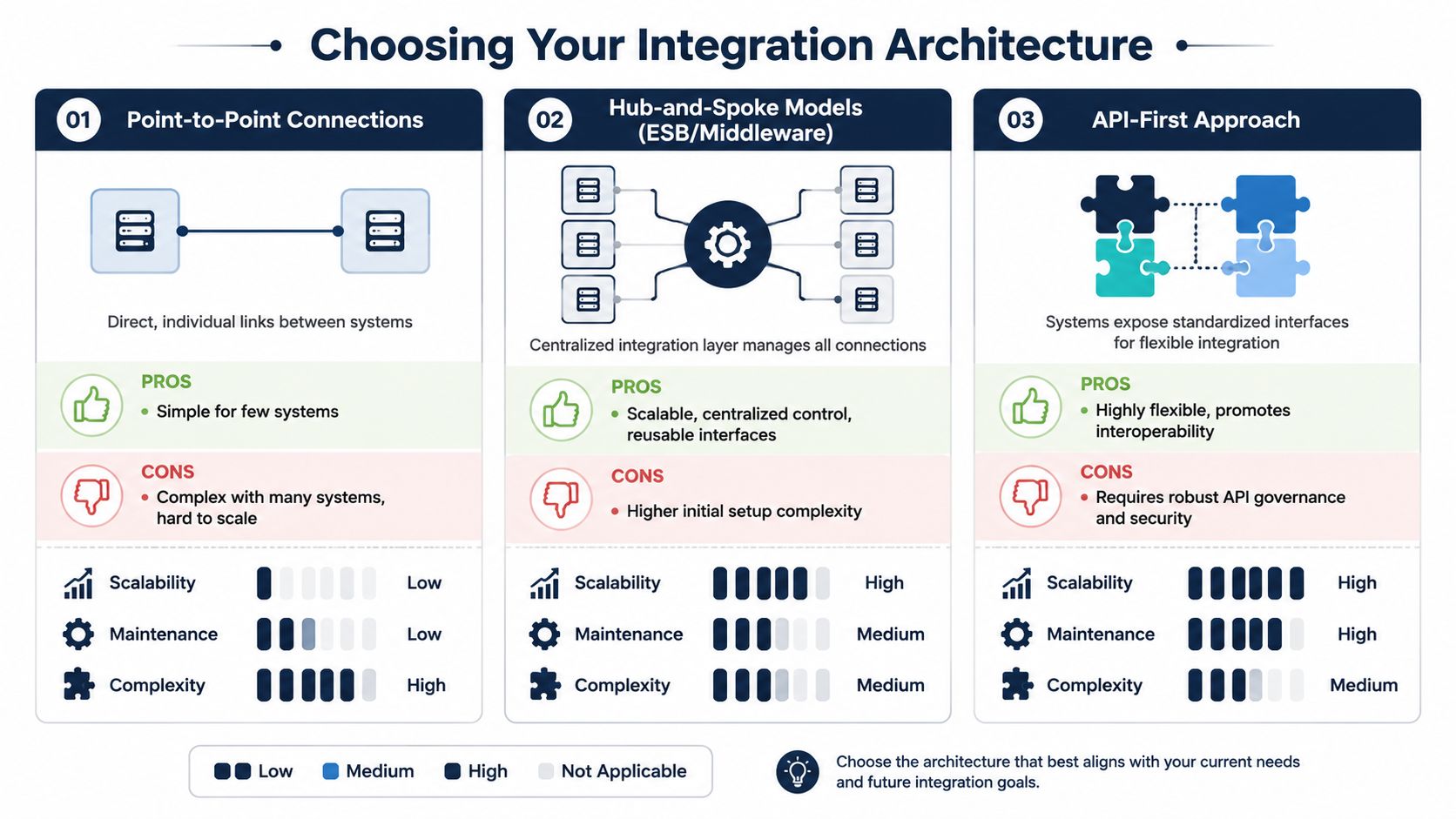
Point-to-point when scope is narrow
Point-to-point integration connects one system directly to another. For example, a CRM sends referral status requests to an EHR and receives updates back.
This can work when the use case is tightly bound, and the number of systems is small.
Pros
-
Fast to start: Good for a focused workflow with clear ownership
-
Lower initial overhead: Fewer platform decisions upfront
-
Simple troubleshooting at first: The path between systems is obvious
Cons
-
Maintenance grows quickly: Every new system adds more unique connections
-
Logic gets duplicated: Validation, mapping, and security rules spread across integrations
-
Change becomes risky: One source change can break several direct interfaces
Hub-and-spoke for operational control
A hub-and-spoke model adds middleware or an integration layer between the CRM and connected systems. That layer handles routing, transformations, monitoring, and often parts of governance.
For provider groups and scaling platforms, this is often the first architecture that feels sustainable.
| Pattern | Best fit | Trade-off |
|---|---|---|
| Point-to-point | Limited workflows, few systems | Hard to scale cleanly |
| Hub-and-spoke | Growing integration estate | More setup and stronger platform discipline |
| API-first | Product-oriented environments | Requires consistent API governance |
With a hub, teams can centralize mapping logic, retries, logging, and interface policies. That makes onboarding new endpoints easier and keeps integration behavior more consistent.
A cloud-based integration stack also matters here, especially if you're balancing SaaS CRM products, managed APIs, and healthcare-grade hosting controls. Many teams lean on custom software development patterns together with cloud services to separate business workflows from vendor-specific connectors.
API-first for long-term flexibility
API-first architecture works best when the organization wants reusable services instead of one-off interfaces. Patient lookup, appointment status, consent state, communication preferences, and referral events can become governed services that multiple applications consume.
That flexibility is powerful, but it isn't free.
-
You need contract discipline: Versioning, schema control, and consumer coordination matter.
-
You need security by design: Authentication, authorization, throttling, and auditability can't be improvised.
-
You need product thinking: APIs are products. Someone has to own them.
Choose the architecture your team can govern, not the one that looks most modern on a diagram.
A pragmatic path often starts with a middleware layer and evolves toward API-first capabilities as the integration estate matures.
Navigating Compliance and Data Standards
A CRM integration can pass testing and still fail in production the first time a patient updates consent in one system, changes a phone number in another, and triggers outreach from both. That is usually not a transport problem. It is a governance problem.
Healthcare teams often separate standards work from compliance work. In delivery, they are the same design conversation. If field definitions drift, identity matching weakens, consent states conflict, and audit trails become hard to defend. The project may still go live, but the operating risk stays high.
HL7 and FHIR in practical terms
HL7 v2 remains common because many EHRs, lab systems, and hospital platforms already depend on it for admissions, orders, results, and scheduling events. FHIR fits better where the CRM needs modern APIs, cleaner resource models, and selective data retrieval for apps, portals, and partner services.
For a CTO, the decision is usually about control, latency, and maintenance load.
-
HL7 works well for established clinical workflows: It often gets you connected faster if the source systems already expose mature interfaces.
-
FHIR supports cleaner service design: It is better suited to reusable APIs, mobile experiences, and event-driven integration patterns.
-
Mixed environments are normal: Many integration programs need mapping and translation between HL7 messages, FHIR resources, and CRM objects for years, not months.
That coexistence creates a practical trade-off. A pure canonical model can improve consistency, but forcing every workflow through a heavy normalization layer slows delivery and raises support effort. In many projects, the better pattern is selective standardization. Normalize the patient, encounter, consent, referral, and communication objects that drive cross-system workflows. Leave low-value edge cases closer to their source format until there is a clear reason to harmonize them.
HIPAA controls that must exist from day one
HIPAA compliance sits in the data path, not just in the application UI. Every interface, queue, cache, retry process, support tool, and log sink that touches protected health information belongs in scope.
The baseline controls are familiar. The implementation details are where teams get into trouble.
-
Encryption has to cover transit, storage, backups, and integration logs
-
Access control has to separate user roles, service identities, and vendor support access
-
Audit trails have to show who accessed, changed, exported, or transmitted data
-
Data minimization has to shape every sync, webhook, and downstream copy
-
Consent and communication preferences have to travel with the record, not live as side notes in one system
Digital intake is part of the same control surface. If patient forms feed the CRM or an orchestration layer, those artifacts need the same treatment as any other PHI-bearing interface. Teams that need to create HIPAA-compliant forms should evaluate how form payloads, file uploads, signatures, and consent metadata enter the broader integration flow, where they are stored, and how they are purged.
Post-integration governance is where many programs slip
Going live is not the hard finish line. It is the start of a long governance phase that determines whether the integration remains safe, explainable, and useful to the business.
The recurring failure modes are predictable:
-
Duplicate patient or contact records created by weak matching rules
-
Consent values overwritten by the wrong source system
-
CRM fields repurposed by operations teams without downstream schema review
-
AI models trained on incomplete, stale, or overexposed data sets
-
Access drift, where service accounts keep privileges long after the original use case is gone
This is where an AI-first operating model helps, provided the governance foundation exists first. AI can classify sensitive fields, detect anomalous data flows, flag schema drift, identify likely duplicate records, and surface policy violations before they turn into incidents. It can also help stewards review low-confidence identity matches or consent conflicts instead of forcing analysts to inspect every record manually. Without that guardrail layer, AI adds speed to a messy system. With it, AI improves control and reduces manual review effort.
Future-proofing without overengineering
Teams get into trouble when they try to model everything up front. The better path is narrower and more durable.
-
Define the system of record for each data domain
-
Set field-level rules for identity, consent, and communication preferences
-
Standardize only the objects that cross multiple workflows
-
Apply retention, logging, and access policies at the integration layer
-
Review schema and policy changes through a joint architecture and compliance process
At Bridge Global, this is usually the point where architecture decisions stop being abstract. The right model is the one your team can operate six months after go-live, with clear ownership of data definitions, policy enforcement, and AI oversight. That is how a healthcare CRM integration stays compliant and continues to produce value after the initial launch.
The AI Advantage in Integrated Healthcare Systems
Monday morning, the contact center opens with a backlog of refill requests, referral follow-ups, and scheduling changes. The CRM, EHR, and call workflow are connected, but the team still wastes hours sorting requests, checking context across systems, and deciding what needs urgent review. In that setting, AI can help. It can classify incoming work, summarize patient context for staff, and highlight cases that need manual attention first. It only does that safely when the underlying integration is already governed.
That is the practical advantage of AI in healthcare CRM integration. It improves decision support and workflow speed on top of clean identity, consent, audit, and routing rules. If those controls are weak, the same model will produce faster mistakes, noisier queues, and harder compliance reviews.
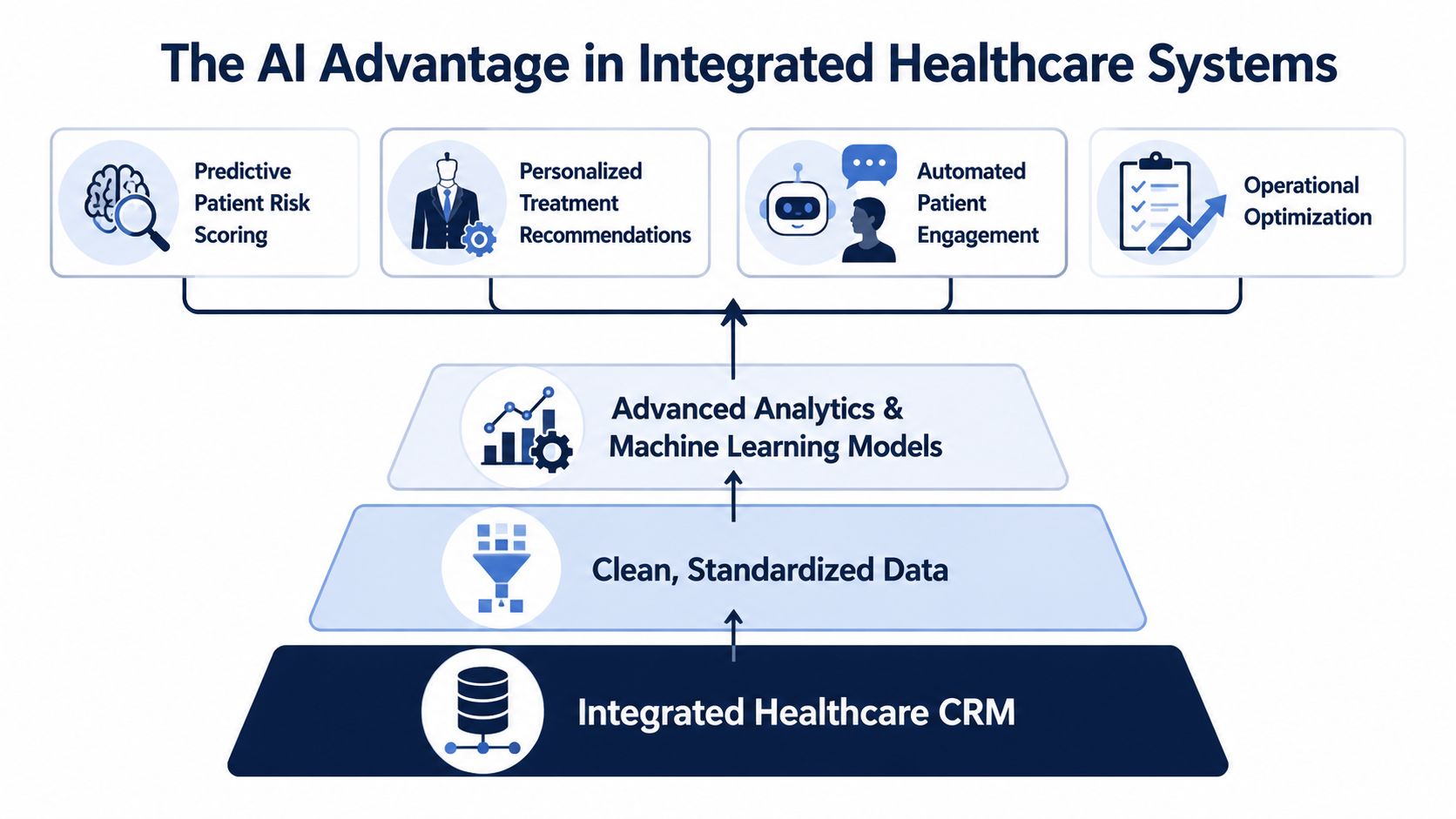
Where AI adds value first
The best early use cases are narrow, observable, and easy to review. In healthcare environments, that usually means operational support rather than full automation.
Strong early use cases
-
Triage and routing support: AI can classify inbound requests, assign work queues, and raise urgent items for staff review
-
Referral workflow optimization: Models can identify stalled referrals, likely bottlenecks, or records that need manual correction
-
Patient engagement orchestration: Systems can suggest message timing, channel choice, or next-best action using integrated patient and operational context
-
Administrative reporting: AI can summarize service patterns, flag anomalies, and help operations leaders spot capacity issues sooner
These use cases work because they keep a person in control of the decision while reducing repetitive review work.
A good selection rule is simple. Start with tasks where a wrong recommendation creates delay or rework, not patient harm.
Where AI creates risk
The failure point is rarely the demo. It shows up after deployment, when a model is fed duplicate records, stale referral status, incomplete consent data, or role permissions that no longer match current workflows.
That risk is well documented in healthcare AI governance research. The World Health Organization's guidance on ethics and governance for AI in health stresses transparency, accountability, risk management, and human oversight in health settings where automated outputs can influence care or access decisions. Those principles apply directly to CRM-driven workflows such as outreach prioritization, service triage, and referral escalation. See the WHO guidance on ethics and governance of artificial intelligence for health.
Ask harder questions before enabling AI in production:
| AI question | Why it matters |
|---|---|
| What source systems and fields drive the model? | Incomplete or duplicated data can produce unsafe or misleading suggestions |
| Can staff see why a suggestion appeared? | Explainability affects trust, reviewability, and escalation decisions |
| Is human approval required for sensitive workflows? | Oversight reduces compliance and patient safety risk |
| Are prompts, outputs, and actions logged? | Audit trails matter when recommendations influence patient-facing work |
| Can the rollout start with low-risk tasks? | A narrow scope limits disruption and makes validation easier |
What an AI-first approach should mean
An AI-first approach in healthcare does not mean adding a copilot to every screen. It means designing the integration so that governed data, workflow events, permissions, and review checkpoints are available from day one.
That changes delivery choices. Teams need event logging before optimization models. They need identity resolution before personalized outreach. They need clear ownership of model monitoring, prompt controls, and exception handling before putting generative features in front of agents. This is one reason many CTOs prefer a full-cycle delivery model for healthcare integration and AI rollout, where architecture, implementation, QA, MLOps, and post-go-live support stay under one operating plan.
For organizations evaluating build options, this may involve a mix of vendor tooling and custom engineering. Some teams use packaged CRM automation and add custom orchestration, analytics, or copilots through AI development services. Others need broader enterprise AI solutions across patient service, operations, and reporting. If the CRM is part of a platform business, AI decisions also intersect with SaaS product development because model behavior, tenancy boundaries, and audit controls have to fit the product architecture.
One practical option in this space is Bridge Global as a healthtech software development partner, particularly for teams that need AI-enabled workflow design layered onto compliant healthcare systems instead of generic AI add-ons.
Your Implementation Roadmap and Partner Selection
Most healthcare CRM integration failures don’t happen at the first connection. They happen later, when mappings change, source systems evolve, duplicates accumulate, and nobody owns the operational truth anymore.
That’s why implementation needs to be planned as a governed program, not a one-time interface project.
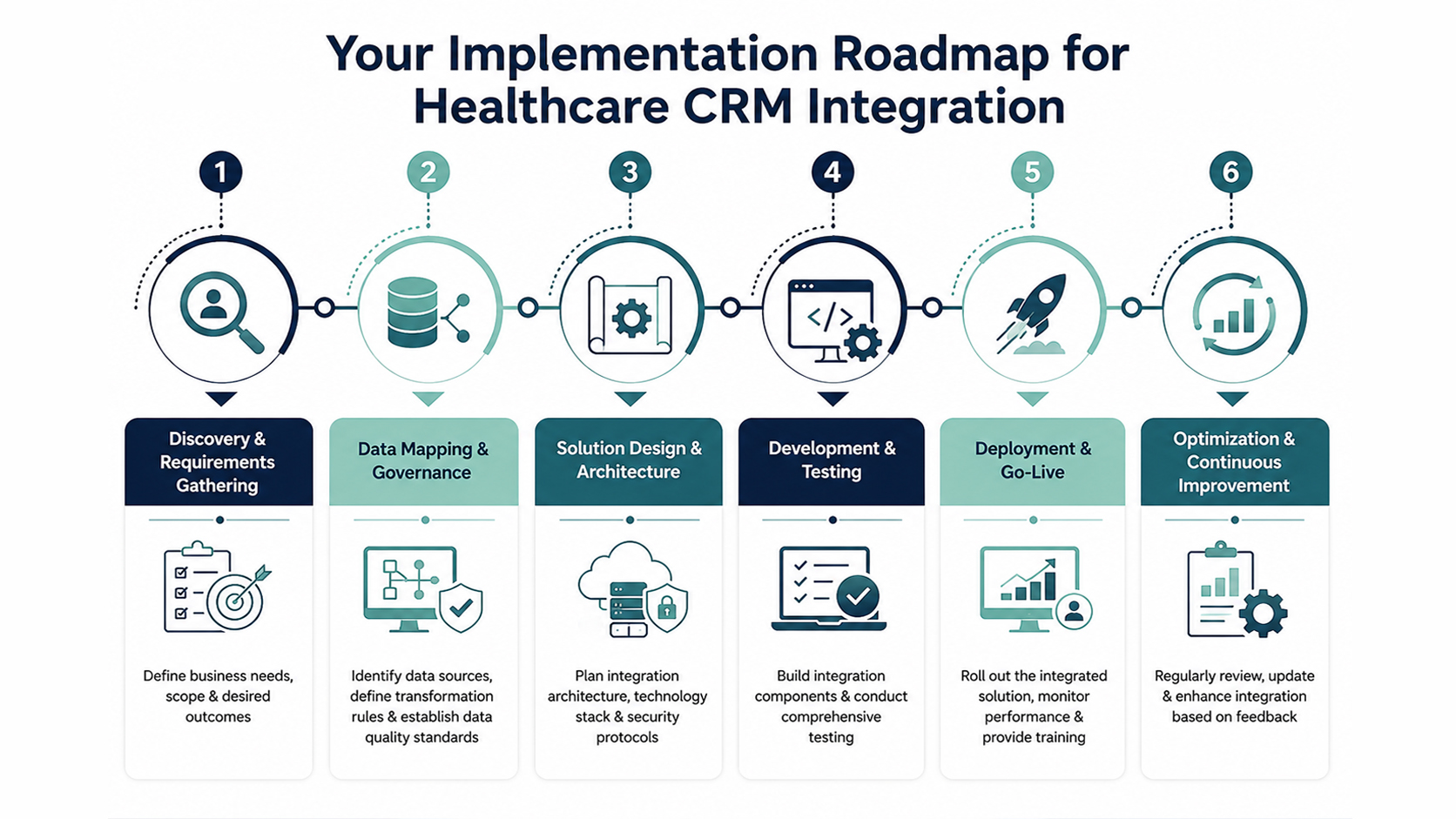
A phased roadmap that holds up after go-live
Independent healthcare integration guidance consistently points to the same issue. Successful EHR-CRM integration depends on continuous data governance, including data cleansing, standardization, and phased testing, because the real risk is not the initial connection but maintaining ongoing data quality and change control.
A practical roadmap usually looks like this:
-
Discovery and workflow alignment
Define which business workflows matter first. Appointment reminders, referral intake, patient service, care coordination, or growth operations will each need different data, latency, and controls. -
Data mapping and source ownership
Decide which system owns each core field. This includes patient identity, demographics, insurance, communication preferences, appointment status, service history, and derived operational fields. -
Data cleansing before synchronization
Don’t push bad data faster. Resolve duplicates, normalize formats, and retire fields no one trusts. -
Architecture and middleware selection
Match the pattern to your operating reality. A small deployment may start simple. A scaling platform usually needs stronger orchestration, observability, and version control. -
Phased testing
Unit tests alone aren’t enough. You need integration testing, workflow validation, edge-case checks, and user acceptance with real operational scenarios. -
Governed rollout and post-go-live controls
Track field changes, monitor failed transactions, review duplicate handling, and set change approval rules.
Post-integration governance is the real differentiator
This is the part that many teams under-resource.
After go-live, governance should cover:
-
Field mapping changes: Schema drift and renamed fields can subtly corrupt downstream workflows
-
Identity resolution: Duplicate patients and mismatched records need an ongoing stewardship process
-
Change control: CRM admins, EHR teams, and integration engineers must coordinate releases
-
Monitoring discipline: Failed syncs need triage ownership, not passive alerting
The best integration architecture still fails if nobody owns data quality after launch.
How to choose the right delivery partner
Technical capability matters, but healthcare CRM integration projects fail just as often on process maturity and governance fit.
Look for a partner that can show:
| Selection criterion | What to verify |
|---|---|
| Healthcare domain fluency | Experience with clinical, operational, and compliance-sensitive workflows |
| Integration depth | Familiarity with API design, middleware, message transformation, and monitoring |
| Data governance discipline | Clear approach to cleansing, source-of-truth design, and duplicate management |
| Delivery transparency | Documented software development service models and clear team responsibilities |
| AI planning maturity | A realistic AI implementation roadmap, not just feature promises |
| End-to-end execution | Ability to deliver through a structured full-cycle delivery model guide |
As we explored in our guide-oriented thinking across platform programs, the strongest partners don’t just build connectors. They help you govern change after the connectors are live.
Measuring Success and Proving ROI
A healthcare CRM integration project shouldn’t be judged only by whether messages flow between systems. Technical completion is the beginning, not the business result.
The right ROI model ties back to the operational problems that justified the project. If the original pain points were fragmented service workflows, poor patient follow-up, or too much manual reconciliation, your success measures should reflect those outcomes directly.
Metrics that matter to stakeholders
For executive teams, useful success measures usually fall into a few categories:
-
Operational efficiency: Time spent on manual entry, reconciliation effort, queue handling, and status lookup
-
Service quality: Faster response handling, fewer handoff issues, and cleaner follow-up execution
-
Patient experience: Fewer repeated questions, more consistent communication, and smoother transitions between touchpoints
-
Data reliability: Lower duplicate volume, fewer sync failures, and stronger confidence in reporting
-
Commercial effectiveness: Better campaign targeting, cleaner lead or referral attribution, and more usable engagement history
A CTO should also track architectural health. If every new workflow requires custom rewiring, the integration is delivering short-term output with long-term drag.
How to make the business case credible
Don’t overpromise on projected gains you can’t defend. Build your case around before-and-after operational evidence inside your own environment.
A practical approach is to compare:
-
Baseline workflow friction before integration
-
Adoption of unified workflows after rollout
-
Exception volume and manual intervention rate
-
Decision speed for staff who depend on patient context
-
Whether AI-assisted workflows reduce administrative burden without adding review risk
That gives finance, operations, and product leaders a shared view of value.
If leadership wants proof that delivery partners can handle this level of complexity, reviewing relevant client cases is usually more helpful than generic feature lists. The useful signal is whether the partner has delivered governed software, integrations, and operational outcomes in environments with real constraints.
Frequently Asked Questions
How long does healthcare CRM integration usually take?
It depends on scope, system complexity, data quality, and governance readiness. A narrow workflow can move quickly. A multi-system program with identity issues, legacy interfaces, and compliance review will take longer. The fastest way to delay the project is to skip source-of-truth decisions and data cleanup.
Should we integrate the CRM directly with the EHR?
Sometimes, yes. If the workflow is narrow and stable, direct integration can be reasonable. If multiple systems need the same patient and operational data, a middleware or API-led approach is usually easier to govern and extend.
What’s the biggest technical risk after go-live?
Ongoing data quality drift. Field mappings change, duplicate records return, and source systems evolve. Teams often focus on initial connectivity and underinvest in change control, monitoring, and stewardship.
Is AI worth adding in phase one?
Usually only for low-risk, high-volume tasks. Good candidates include routing, prioritization, reminders, summarization, and operational insights. Avoid using AI first in workflows where output errors could create safety, compliance, or trust issues.
Do we need FHIR for every integration?
No. Many healthcare environments still rely on mixed standards. The better question is which standard fits each source system and workflow. A practical architecture often supports both legacy and modern exchange patterns.
When should we choose custom development over native CRM features?
Choose custom work when the business workflow, compliance needs, data orchestration, or product experience goes beyond what native configuration can support cleanly. If admins are stitching together workarounds that keep breaking, that’s usually the signal.
If you’re evaluating healthcare CRM integration solutions and need an engineering partner that can handle compliant architecture, AI-enabled workflows, and long-term governance, Bridge Global can help you assess the right integration model, define a practical delivery path, and build a system your teams can trust after go-live.

About Preethi Saro Philip
Preethi Saro Philip is a Post Graduate Research Degree holder in Economics with more than 10 years of experience in writing, editing, research and teaching. She has an intense passion for content crafting and calls herself a ‘wordsmith’. She enjoys writing on wide-ranging topics including business, technology, health & lifestyle, education, environment etc.
View all posts by Preethi Saro Philip →