



Magento ERP Integration: A Practical Architecture Guide
An order appears in Magento, the ERP reduces stock, and both systems report success. Then customer service finds that the order status differs between platforms, the warehouse has no matching fulfillment record, and the available quantity shown to shoppers is wrong. The API calls worked. The business process didn't.
That's the risk behind Magento ERP integration. The hard part isn't moving records; it's deciding which system owns each fact, how events relate, and how teams detect and repair differences after launch.
Why Magento ERP Integration Is an Architecture Decision

A connector can transfer an order and still leave the business with an unresolved question: which system's status is authoritative? Perhaps Magento accepted the order, the ERP created a sales record, and a later inventory update failed. Unless the integration preserves the relationship between those events, staff may see a valid order in one system and a different operational reality in the other.
That problem expands as commerce operations grow more complex. A basic order flow can become a network of product publication, customer records, stock by location, prices by website, local taxes, warehouse allocation, shipment updates, invoices, cancellations, refunds, and returns. Each exchange brings choices about timing, identifiers, and responsibility. A field that both systems can edit without an agreed owner is a conflict waiting to happen.
A useful design starts with business states that must remain true, not a list of API endpoints. For example, an accepted order needs a traceable counterpart in the ERP, and every stock adjustment needs a known source. Teams should also define what happens when only part of a batch succeeds, an order is cancelled during fulfillment, or two systems receive competing updates.
Practical rule: A successful response confirms that a request was accepted or processed. It doesn't prove that both systems now represent the same business event.
Treat the integration as an operating system with documented contracts, accountable owners, monitoring, and reconciliation. Before approving a demo, ask how it handles duplicate messages, delayed updates, partial shipments, and discrepancies that surface after a retry. Those answers reveal whether the proposed solution can support the business after go-live.
Build the Core Integration Model
Magento and an ERP don't need to own the same things. Magento, or Adobe Commerce, typically runs the digital storefront, checkout, and customer-facing order workflow. The ERP commonly manages operational records such as purchasing, suppliers, finance, invoices, fulfillment, and some product or customer data. The right ownership boundary depends on the company's processes, not a universal template.
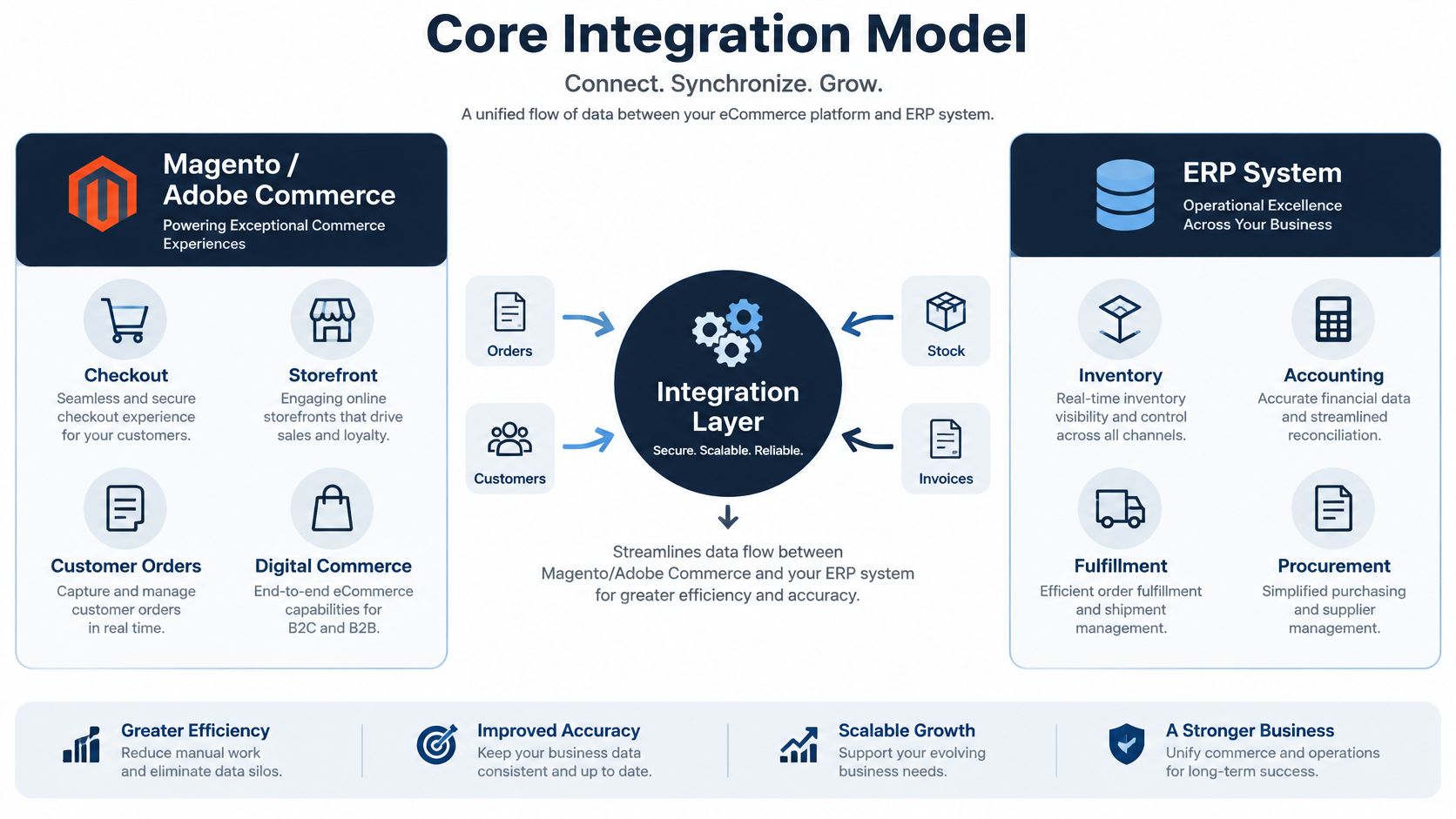
Think of the architecture as four cooperating parts. Magento is the commerce experience, the ERP is the operational authority for whichever records the business assigns to it, the integration layer translates and routes events, and a control plane gives people visibility into status, errors, and reconciliation. The integration layer can transform identifiers and formats, but it shouldn't become a second source of truth.
Adobe provides REST and GraphQL Web APIs for third-party software integrations. Using those APIs creates a governed boundary for authentication, validation, transformation, and logging instead of coupling an ERP to direct database access.
Trace the business flow, not just the payload
A customer might register in Magento, with selected account data sent to the ERP. Product information may flow from the ERP or another master-data system into Magento, while storefront-specific descriptions or merchandising attributes remain commerce-owned. Stock changes need location context. An order starts in Magento, then moves to the ERP for operational processing; shipment and invoice details may return to Magento so the customer and service team can see progress.
Cancellation, refund, and return flows need their own rules. A cancellation can happen before or after warehouse work begins. A refund can have a financial effect that differs from a physical return. If the integration treats these events as simple status overwrites, it can erase the distinction that finance and operations need.
Document the source and direction of each flow, along with its trigger, identifier, expected result, and failure owner. Where a middleware or integration service is involved, specify which transformations it performs and what record it keeps for tracing. That shared vocabulary gives engineering, operations, and finance a basis for connector selection and acceptance testing.
Choose the Right Integration Pattern
No execution pattern is ideal for every data domain. A checkout action that needs an immediate answer has different requirements from a catalog import or a stock refresh. Choose based on how quickly the business needs a result, the amount of work involved, and what the team can observe and recover.
Match execution to the event
Synchronous REST calls are useful when a process needs a direct response, such as validating a small update. They keep the interaction straightforward, but a slow downstream ERP can hold up the request and increase timeout exposure. Keep synchronous work narrow, and don't make checkout wait on a large or unpredictable operational process unless the business requires that dependency.
Asynchronous work separates request acceptance from execution. Adobe Commerce's asynchronous endpoints put requests on a message queue, return a UUID, and rely on consumers to process the queued messages. Its bulk API accepts an array of operations and returns an operation identifier that can be tracked.
That model helps with larger exchanges, but an accepted request isn't a completed business transaction. Persist the operation identifier, correlate each record to a Magento SKU or entity ID, and check the results. If a batch partly fails, retry only eligible records and send unresolved ones to a reconciliation workflow. Use idempotency controls to prevent a replay from creating duplicate orders or adjustments.
Scheduled batches can suit data that doesn't need an immediate update, such as a planned catalog synchronization. They're easier to reason about when the source data is stable, and the business accepts a delay. Their trade-off is that a problem may remain unnoticed until the next run unless teams monitor job status and data divergence.
Choose the connection shape
A direct ERP-to-Magento API connection can be a reasonable fit when the scope is narrow, and the teams can maintain the mapping, retries, and operational visibility. It avoids another platform to administer, but protocol differences and business rules can become scattered across the ERP and Commerce code.
A middleware or integration service can centralize transformations, routing, retries, and logs when multiple systems or complex mappings are involved. It adds a component with its own configuration, ownership, and failure modes. Middleware isn't automatically simpler; it works when the team knows who maintains its flows and how changes are tested. For a closer look at centralized integration architecture, see Bridge Global's ERP integration platform article.
| Pattern | Best fit | Main strength | Primary risk | Required controls |
|---|---|---|---|---|
| Synchronous API | A small operation requiring an immediate response | Direct request and response | Downstream delay can affect the caller | Timeouts, clear failure responses, and idempotency |
| Asynchronous queue | Larger or longer-running exchanges | Separates submission from processing | Accepted work may fail later | UUID tracking, result checks, retries, and reconciliation |
| Scheduled batch | Data with an acceptable update window | Predictable bulk processing | Stale data between runs | Run monitoring, delta rules, and missed-record checks |
| Direct API connection | Narrow scope with clear technical ownership | Fewer integration components | Logic and monitoring may become fragmented | Versioned contracts, logs, replay, and named support owners |
| Middleware or integration service | Multiple systems or complex transformations | Central routing and visibility | Platform dependency and configuration overhead | Configuration control, access management, and upgrade tests |
Map Data and Business Invariants
An API call can return success while writing the wrong price to the wrong storefront. The integration ran; the business outcome was wrong. A synchronization contract prevents this class of failure by recording field ownership, scope, identifiers, event meaning, and the end state each system should reach after every exchange.
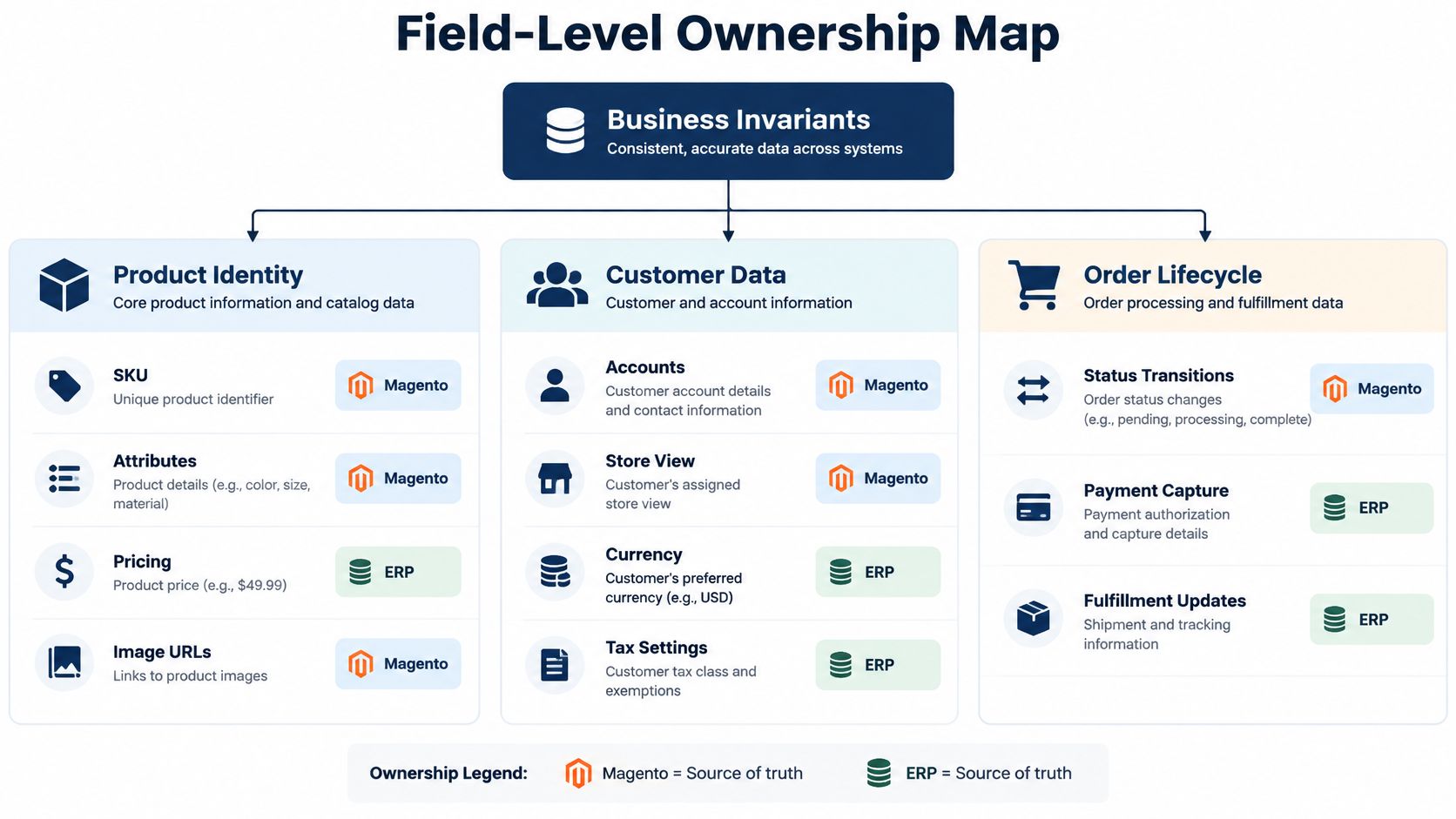
Assign ownership at field level
Build an ownership map covering product identity and attributes, pricing, customer accounts, store views, currency, tax, warehouses, stock sources, order states, invoices, shipments, refunds, and returns. Every field or business concept gets one authoritative owner. Some organizations pull product attributes from the ERP; others run a separate product information system and let Magento own storefront content. Either model works. What fails is ambiguity: two systems writing the same field, or a connector that cannot say who owns a value.
Scope deserves the same rigor as ownership. A SKU may be shared across storefronts while price, visibility, and merchandising differ by website or store view. Customer records can carry different tax or account context per sales channel. A connector that assumes one global record per entity will write correct data into the wrong context, and the error surfaces as a storefront defect rather than an integration failure.
Maintain a canonical identifier map across SKU, ERP product ID, customer account ID, Magento entity ID, and warehouse or source code. Store it with version information, transformation rules, timestamps, and event IDs. Where the ERP and Magento use different identifiers, persist the relationship explicitly instead of matching on names or other mutable attributes.
Define invariants before transformations
An invariant is a business condition the integration must preserve on every run, including retries. Practical examples:
-
One order carries one authoritative financial status.
-
Every inventory adjustment traces back to a source event.
-
A retried message never produces a second order, shipment, or invoice.
-
A cancellation propagates to a defined terminal state in both systems.
Rules like these let a team verify a flow produced the correct outcome, a stricter test than confirming it executed.
Inventory warrants separate treatment because Adobe Commerce models it across several states: physical sources, stocks tied to sales channels, aggregate salable quantity, and reservations that hold stock during checkout. A single global ERP quantity cannot replace those states without a deliberate mapping. Commerce also accepts quantity updates originating from an external ERP, so the contract must state whether the ERP publishes source-level on-hand quantities, consumes fulfillment events, or participates in scheduled reconciliation.
Edge cases are where contracts fail first. A partial shipment, backorder, bundled product, subscription renewal, promotion, marketplace order, or refund can mean different things in the ERP and in Magento. Specify the event and expected state transition for each case before connector code is written. Teams sorting through the data-quality dependencies this mapping exposes can draw on Bridge Global’s guidance on data migration problems and how to fix them.
Select and Govern the Connector
Connector selection is a lifecycle choice, not a contest to find the most feature-rich product. A packaged connector can reduce custom work when its mappings match the business. A configured integration platform can help centralize flows. A custom integration service offers room for unusual rules, but the team owns its testing and maintenance. Direct custom development can keep the design focused, though it may leave monitoring and transformation logic split between systems.
Compare options against the workflows that create risk: product scope across stores, custom price rules, partial order failures, cancellations, refunds, inventory reservations, and replay. Don’t approve a proof of concept that demonstrates only a clean product import. The purpose is to test whether the connector can express the semantics the business uses.
Adobe Commerce bulk REST requests put individual messages on a queue for independent processing. Implementations need to correlate records, retrieve operation results, and direct partial failures into controlled retry or reconciliation workflows. Ask a connector vendor to demonstrate those controls with realistic failure cases, not just describe them.
Questions for procurement and engineering
Before committing, establish who owns transformations and what happens when a source schema changes. Ask where errors are stored, how staff can inspect and replay an individual record, and who validates compatibility after an ERP or Commerce upgrade. Also confirm whether the configuration is versioned, how support responsibility is divided, and what access the vendor needs to customer and order data.
A connector that works only while its mapping stays untouched is not a finished integration. It’s a dependency with an undocumented change process.
Custom code should place domain rules behind explicit contracts so an external API change doesn’t spread throughout the solution. Configured connectors need the same discipline: treat mappings as controlled artifacts, review changes, and test them before release. Teams comparing engineering partners can use a Magento development company selection guide to structure those discussions.
Some providers package ERP connectors as maintained, fixed-price products rather than one-off projects. Glanser’s ERP integration approach, for example, prices each ERP connection upfront and keeps product data, prices, stock levels, and order flows synchronized as the connected systems are updated. Whichever model you choose, confirm who maintains the mappings after each Commerce or ERP upgrade.
Secure and Test the Integration Lifecycle
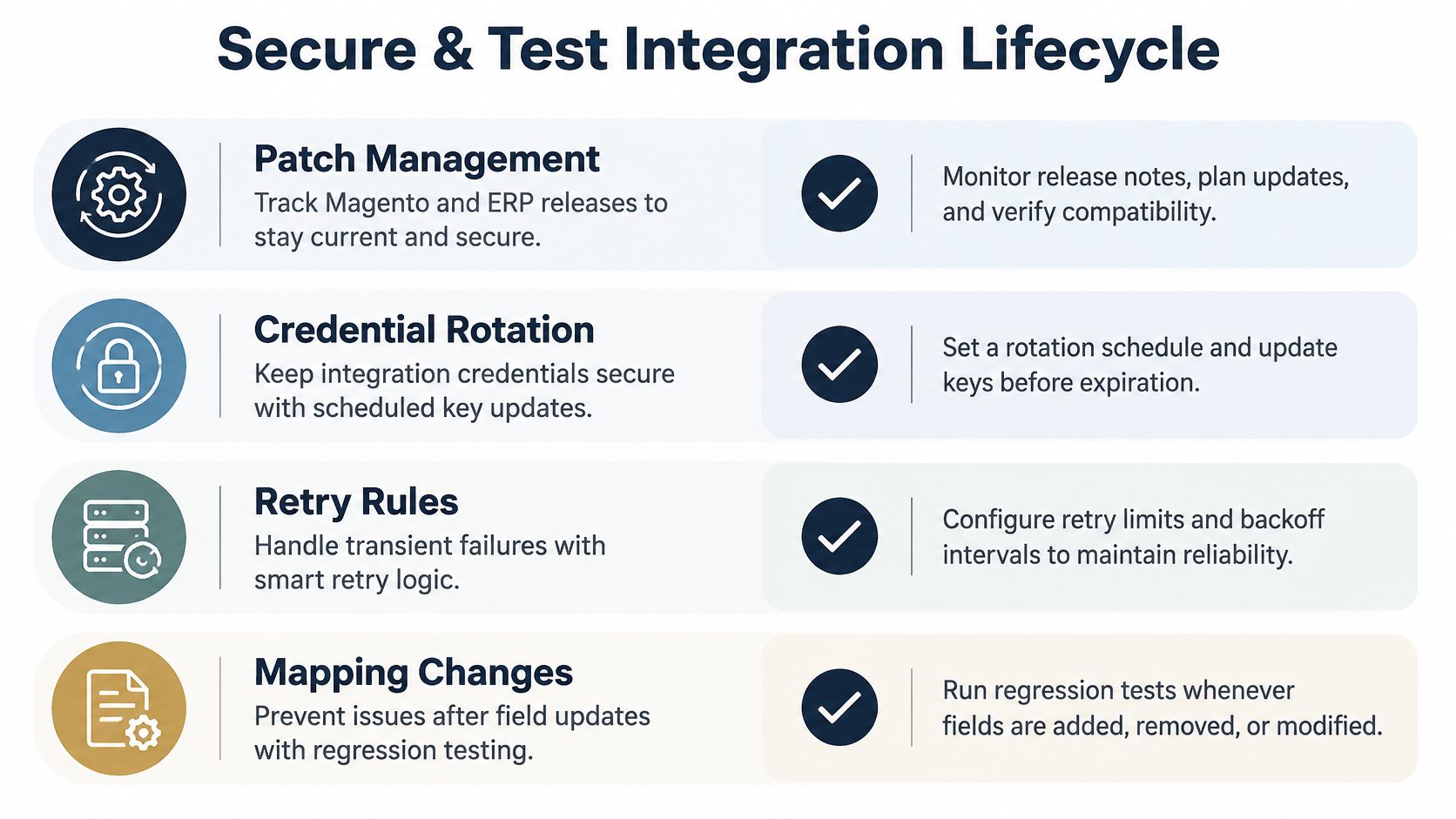
Credentials, customer records, orders, and fulfillment messages cross system boundaries, so security belongs in the integration design. Patching Commerce or changing an ERP mapping can affect behavior just as surely as a code change. Make each release a controlled event with security review, regression tests, and a way to recover.
In September 2025, Adobe published security bulletin APSB25-88 for CVE-2025-54236, a critical Commerce vulnerability with a CVSS score of 9.1. It affects Adobe Commerce and Magento Open Source 2.4 releases up to 2.4.8-p2, and Adobe later updated the bulletin to report exploitation in the wild. For integration owners, the practical point is that platform maintenance can change the security assumptions around exposed APIs. Keep patch review and integration regression testing in the same release process.
Protect access and message handling
Use service accounts with only the permissions the integration requires. Store credentials in an approved secrets manager, rotate them, restrict which endpoints the integration can call, and verify signed webhooks before processing them. Protect against replay with event identifiers and idempotency keys, and retain audit trails that let authorized staff trace a transaction without exposing more customer data than necessary.
Define what happens when a downstream system is unavailable. Transient failures may be retried with a backoff policy, but repeated failures should move into a dead-letter path with an owner and a repair procedure. Don’t let an automated retry loop hide a permanent mapping error or produce duplicate business transactions.
Test the whole operating path
Build QA in layers. Contract tests check that system interfaces still match expected structures. Mapping and unit tests validate transformations. Integration tests exercise actual system boundaries, while end-to-end scenarios follow business events from storefront action through ERP processing and back. Include concurrency tests for checkout and ERP stock updates, security-patch regression tests, performance validation against expected workloads, and reconciliation checks that compare system states.
Monitor queue depth, processing lag, failed operations, retry counts, latency, schema changes, and divergence between key records. An asynchronous request can be accepted and still fail during processing, so dashboards and alerts must distinguish submission from completion. Set an escalation owner for each alert and document how staff can inspect, replay, or manually repair a failed record.
Use release gates that require the team to show that access controls are approved, event handling is idempotent, non-happy-path scenarios pass, monitoring is active, and recovery procedures work. Re-run those checks after relevant Commerce patches, ERP releases, credential changes, and mapping updates. That gives operations a repeatable basis for deciding whether a change is safe to release.
Plan Implementation Timelines and Costs
A product-and-order flow with stable identifiers, clear ownership, and standard workflows is a different project from a multi-entity program involving custom pricing, several storefront contexts, complex returns, legacy data migration, and multiple ERP environments. Both may be called Magento ERP integration, but the number of decisions and dependencies differs sharply. A proof of concept should test the hardest relevant workflow before a team accepts a fixed scope.
Plan the work around decisions and evidence: discovery and ownership, data mapping and architecture, connector setup or build, environment configuration, business-scenario testing, security and performance validation, phased launch, and post-launch stabilization. Don’t estimate only the development time. Include the effort to prepare test data, validate ERP-side behavior, train support teams, and produce recovery instructions.
Cost drivers include entity and data-flow count, data quality, custom transformations, legacy versions, deployment model, number of environments, security review, observability, migration scope, team composition, and ongoing support. Confirm the deployed Magento edition, hosting model, API behavior, and support lifecycle before planning. Adobe ended support for Magento 1 in June 2020, and the commercial edition is now sold as Adobe Commerce, so platform generation and support status are part of integration planning.
Ask every vendor to state its assumptions, deliverables, acceptance criteria, exclusions, and boundaries for post-launch support. A headline estimate has little value if it doesn’t say who owns ERP changes, data cleanup, test environments, or operational monitoring.
Build a Buyer-Ready Implementation Checklist
Six weeks after go-live, an order fails to reach the ERP, and nobody notices until a customer calls. That scenario is what the checklist exists to prevent. Before launch, assemble a single release artifact that names the accountable owner for each system, the approved integration pattern, field mappings with canonical identifiers, event contracts, store and warehouse scopes, monitoring signals, reconciliation steps, release gates, and rollback responsibilities. A list without owners is documentation, not control.
Attach a named person to every item. Security controls and credential rotation need an owner, as do escalation paths and the decision to roll back. Test evidence should confirm catalog data is correct, orders can be created end to end, and stock stays accurate under concurrent updates, with fulfillment, refunds, and partial failures visible to support staff instead of buried in logs.
The inventory distinction matters at this stage as much as during mapping. Adobe Commerce accepts ERP-originated quantity changes, but as noted earlier, the integration still has to separate physical stock, source-level inventory, reservations, and salable quantity, or support will spend weeks chasing phantom oversells. Observability should let someone trace a failed event from source to outcome without opening three consoles. Bridge Global works on custom ecommerce platforms and ERP integrations, and its client cases offer context on its software delivery work.
Bridge Global provides software engineering and ecommerce development for organizations connecting Magento with ERP, CRM, warehousing, inventory, payment, and shipping systems. If you’re planning an integration or reassessing one that’s difficult to operate, share your architecture and business constraints with Bridge Global to discuss a practical delivery approach.
Frequently Asked Questions
Should we choose a prebuilt connector or custom integration?
Choose a prebuilt connector when its supported workflows and mappings fit your processes without extensive workarounds. Custom integration is more appropriate when business rules, ERP configuration, or multi-system flows don’t fit the connector’s model, provided your team can own ongoing maintenance.
Do we need middleware for Magento ERP integration?
It depends on the exchange. A direct API connection suits a narrow, stable flow, while middleware can centralize transformations and monitoring across more complex ones. Whichever route you choose, define who owns failures, replay, configuration changes, and upgrades.
How long does a Magento ERP integration take?
The timeline depends on data ownership, system scope, data quality, custom rules, testing needs, and deployment constraints. Ask vendors to state their assumptions and what done looks like, then validate the hardest workflows in discovery or a proof of concept before fixing the plan.
When is custom development justified?
Custom development makes sense when the integration must preserve business rules or data semantics that a standard connector can’t represent reliably. It also requires clear ownership for security, testing, monitoring, and maintenance after go-live.

About Upendra Jith
Upendrajith completed his Master's in English and has been a commercial content developer for the past three years. He's more inclined to develop content with a 'street-smart' delivery on topics such as technology, media, or anything he can get his hands on. He has a fixation on lyrics, dark poetry, media, technology, and flow arts.
View all posts by Upendra Jith →