


A Practical Guide to EMR Software Development
EMR software development is all about creating the digital systems that manage patient records for a single healthcare practice. Think of it as building a secure, digital version of a patient’s chart – one that holds everything from diagnoses and treatment plans to lab results, all neatly organized within one clinic’s walls. This is the bedrock of modernizing any clinical operation.
Building the Future of Digital Health Records
In today’s fast-paced healthcare world, paper charts are quickly becoming a thing of the past. The move from bulky filing cabinets to digital records isn’t just a matter of convenience; it’s a fundamental shift toward safer, more efficient, and patient-focused care. This is where EMR software development comes in, providing the essential blueprint for the systems that track a patient’s health journey within a specific hospital or clinic.
The market numbers tell the story. The global Electronic Medical Records (EMR) market is on track to hit USD 46.34 billion by 2031, with a steady growth rate of 5.04%. This isn’t just about going digital; it’s about getting specific. Specialty-focused EMRs are seeing the fastest growth of all, with a 6.49% CAGR, because a one-size-fits-all approach just doesn’t work in medicine. Discover more market growth insights from Mordor Intelligence.
EMR vs. EHR: What Is the Practical Difference?
People often use the terms EMR and EHR (Electronic Health Record) interchangeably, but they represent two very different concepts. Getting this right from the start is absolutely critical for any development project.
-
EMR (Electronic Medical Record): This is the patient’s digital chart at one specific doctor’s office or clinic. It’s a log of their medical history and treatments within that single practice, designed to help clinicians make better decisions right then and there.
-
EHR (Electronic Health Record): This is the big-picture view. An EHR is built to be shared, pulling together a patient’s information from all the different providers they see, from their primary care doctor to specialists to the local hospital.
You can think of it like this: An EMR is like a detailed diary of a patient’s visits to their family doctor, while an EHR is the patient’s complete health autobiography, co-authored by every specialist, lab, and hospital they’ve ever visited.
This distinction changes everything. Building an EMR is about fine-tuning the internal workflows of a single practice. Creating an EHR, on the other hand, requires a massive focus on interoperability so that data can move securely between different systems.
For any organization taking this on, teaming up with an expert AI solutions partner can offer the strategic insight needed to handle these complexities from day one. In the sections that follow, we’ll dive into the core features and architectural choices that are essential for effective healthcare software development.
Designing an EMR Clinicians Will Actually Use
An EMR system can have a thousand features, but if clinicians find it clunky, slow, or counterintuitive, it’s practically worthless. The real measure of success for any EMR software development project isn’t the feature list; it’s user adoption. If the software gets in the way of a doctor’s workflow, it will be met with resistance, leading to a wasted investment and a frustrated care team.
The point isn’t just to digitize paper records. It’s to build a tool that feels like a natural extension of how a clinician already thinks and works. This means we have to move past a simple checklist of functions and put user experience at the absolute center of the design process. For a closer look at what goes into creating interfaces people actually want to use, our guide to UI/UX design services offers some great insights. When planning custom software development, these user-focused features are not just options; they’re essential.
The Functional Backbone of a Modern EMR
A truly effective EMR is built on a handful of core components that tackle the daily headaches of healthcare professionals head-on. These aren’t just “nice-to-haves.” They are the pillars that make the entire system work, driving efficiency, boosting patient safety, and delivering clear, actionable information.
These are the non-negotiable features that form the backbone of any EMR worth building:
-
Intuitive Patient Charting: This is the heart of the system. Doctors and nurses need a clean, logical way to see a patient’s history, document today’s visit, and track their progress over time. Things like customizable templates for different specialties (a cardiologist needs different fields than a pediatrician) and voice-to-text dictation can slash documentation time, letting clinicians focus on the person in front of them.
-
Integrated e-Prescribing (eRx): No more scribbling on a pad. An eRx module gets rid of handwritten scripts, which cuts down on dangerous errors and helps patients actually pick up their medication. It should instantly show a patient’s medication history, flag potential drug interactions, and send the prescription directly to the pharmacy.
-
Intelligent Clinical Decision Support (CDS): A modern EMR should be an active partner in care. A good CDS system provides real-time alerts for things like allergies, duplicate prescriptions, or out-of-range lab results. It can even suggest treatment guidelines based on the latest medical evidence, acting as a critical safety net.
-
Efficient Computerized Provider Order Entry (CPOE): CPOE is how clinicians digitally order lab tests, X-rays, and other procedures right from the EMR. This simple feature eliminates transcription mistakes, gets the order processed faster, and makes sure everything is logged and tracked properly.
An EMR should work like a skilled medical assistant: anticipating needs, organizing information flawlessly, and flagging potential issues before they become problems. Its design should reduce cognitive load, not add to it.
Before diving into the features, it helps to see how they all connect. This table breaks down the essentials, their core purpose, and why they matter so much to a healthcare practice.
Essential EMR Feature Breakdown
| Feature | Primary Function | Key Benefit |
|---|---|---|
| Patient Charting | Centralizes all patient medical history, notes, and progress. | Provides a single source of truth, improving care continuity and reducing charting time. |
| e-Prescribing (eRx) | Allows for digital creation and transmission of prescriptions. | Increases patient safety by reducing errors and improves medication adherence. |
| Clinical Decision Support (CDS) | Provides real-time alerts and evidence-based guidelines at the point of care. | Acts as a safety net, preventing adverse events and promoting best practices. |
| CPOE | Enables digital ordering of labs, imaging, and other medical procedures. | Eliminates transcription errors, speeds up order fulfillment, and improves tracking. |
| Patient Portal | Gives patients secure online access to their health information. | Empowers patients, reduces administrative calls, and improves communication. |
| Analytics & Reporting | Aggregates EMR data into dashboards for operational insights. | Helps optimize clinic workflows, identify trends, and improve overall performance. |
Each of these components plays a critical role, but together, they create a system that doesn’t just store data; it actively improves the delivery of care.
Extending the EMR Beyond the Clinic Walls
While the core clinical tools are the foundation, an EMR’s value truly skyrockets when it connects the clinic to the patient and provides leadership with data-driven insights. Two features, in particular, have become standard for any modern system.
Patient Portals: Putting patients in the driver’s seat is a huge part of modern healthcare. A secure patient portal gives them direct access to their own medical records, lab results, and appointments. It also offers a secure way to message their doctor, which cuts down on phone tag and streamlines communication. For example, a patient can log in, see their latest blood test results, and send a quick, secure question about them without having to book another visit.
Analytics and Reporting Dashboards: An EMR is a data goldmine. A powerful analytics dashboard transforms all that raw data into something useful. Clinic managers can track key metrics like patient wait times, no-show rates, and billing cycles. This information is crucial for optimizing operations, spotting bottlenecks, and making informed decisions to improve care. For instance, a dashboard might show that one doctor’s schedule is always overbooked on Tuesdays, allowing an administrator to proactively adjust appointment timing.
Choosing the Right EMR Technical Architecture
Beyond the slick user interface and fancy features, the real engine of an EMR system is its technical architecture. This is where foundational decisions are made that will dictate how the system performs under pressure, how easily it can grow, and how resilient it is to future challenges. Get this right, and you have a system that can serve a healthcare organization for a decade. Get it wrong, and you’re looking at a costly, disruptive overhaul in just a few years.
It all starts with a solid plan for the data. Think of effective data modeling as creating a perfectly organized filing system before a single patient record is ever entered. It ensures every piece of information, from patient demographics to lab results, has a logical, designated home, making data retrieval fast, accurate, and reliable.
This diagram shows how the core components of an EMR, like charting, prescribing, and analytics, are all interconnected.
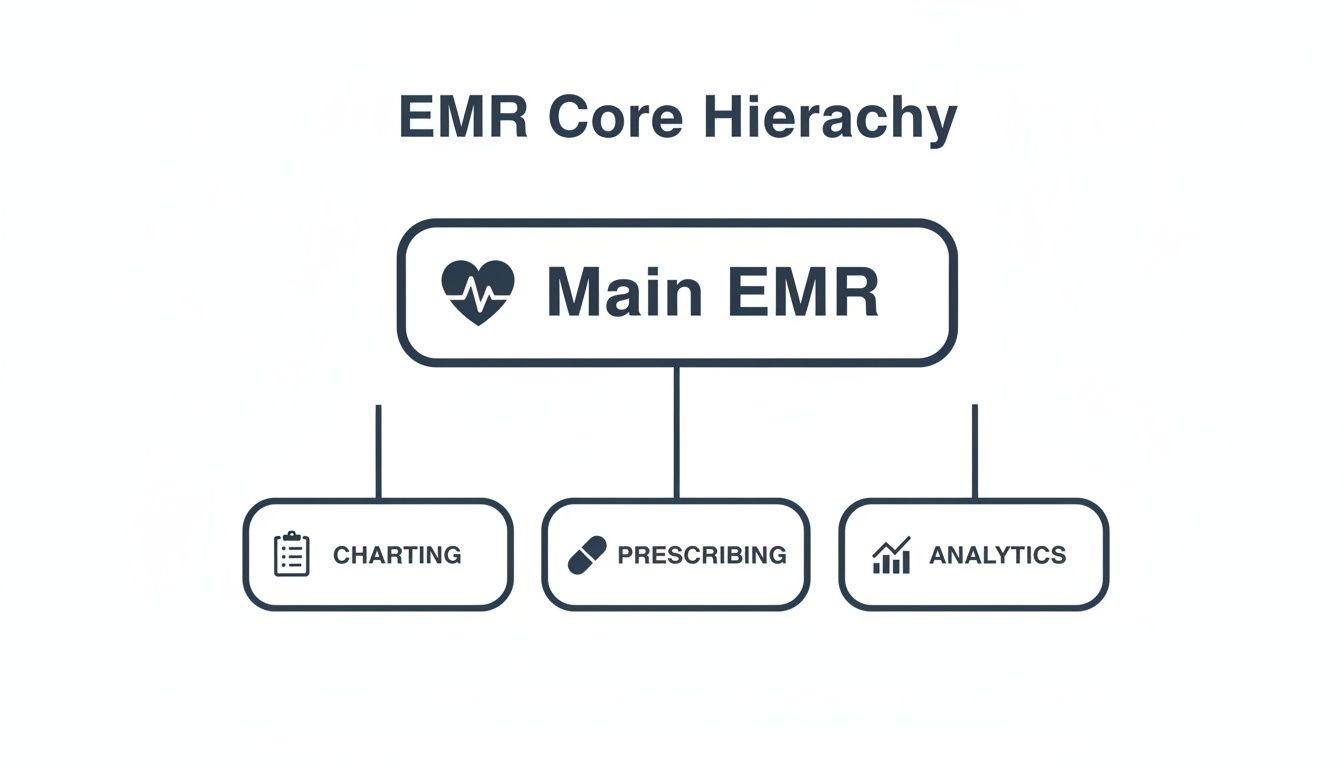
This structure is a great reminder that while each module has its own job, the underlying architecture must support all of them, allowing them to communicate and work together without a hitch.
Monolithic vs. Microservices Architecture
One of the first major forks in the road for any healthcare software development project is the choice between a monolithic or microservices architecture. It’s a bit like deciding whether to build a traditional house or construct something with LEGO bricks.
-
Monolithic Architecture: This is your traditional house. Everything is built into a single, large, tightly interconnected codebase. It’s often simpler to get off the ground and deploy initially. But if you want to change one small thing in the “kitchen” (say, the billing module), you might have to test and redeploy the entire house.
-
Microservices Architecture: This is the LEGO approach. Each core function: patient scheduling, billing, and e-prescribing, is its own independent service, or “brick.” These bricks talk to each other through APIs but can be developed, updated, and scaled completely on their own.
A monolithic system can be faster to launch for an MVP. However, a microservices architecture provides the flexibility and scalability needed for a complex, evolving EMR system that must adapt to new regulations and technologies over time.
While microservices introduce some complexity at the beginning, the long-term payoff is huge. Teams can innovate faster, and the system becomes far more resilient. If the “billing brick” has a problem, the “charting brick” keeps working just fine.
Cloud Deployment Models: SaaS, PaaS, and IaaS
How your EMR is hosted is just as critical as how it’s built. On-premise servers are a thing of the past for most new projects. The cloud has become the industry standard, offering security, accessibility, and cost-efficiency that’s hard to beat.
The market data tells a clear story. The closely related EHR software market is on track to hit USD 45 billion by 2033, and cloud-based models are expected to claim a massive 83.40% of that market share. This isn’t just a trend; it’s a fundamental shift. You can explore the full market research on EHR deployment models to see the data for yourself.
When you go to the cloud, you generally have three models to choose from:
-
Software as a Service (SaaS): This is the “rent-it” model. The vendor manages everything: the software, servers, and maintenance. You just pay a subscription and log in. It’s the easiest way to get started, but it offers the least room for customization.
-
Platform as a Service (PaaS): Here, the cloud provider handles the hardware and operating system, giving your development team a ready-made platform to build and run your EMR application. You get more control than SaaS without the headache of managing the underlying infrastructure.
-
Infrastructure as a Service (IaaS): This is the “build-it-yourself” model. The provider gives you the raw computing resources: servers, storage, networking, and your team manages everything from the operating system up. It offers maximum control and flexibility, making it the best fit for large, highly customized EMR projects.
Getting Your System to Talk to Others, And Stay Out of Trouble
Building a great E-M-R is only half the battle. If it can’t communicate with other systems or protect patient data, it’s practically useless. This is where two massive concepts come into play: interoperability and compliance.
Think of it this way: a system that can’t share a lab result with another hospital creates a dangerous information silo. On the flip side, an EMR that leaks patient data can trigger crippling fines under laws like HIPAA, not to mention a total collapse of patient trust. These aren’t just features; they’re the foundation of the entire platform.
The Universal Languages of Healthcare Data
So, how do you get different systems, built by different companies, to speak the same language? That’s what interoperability is all about. You need a common tongue, a set of rules for exchanging information so that a patient’s allergy information from one clinic’s EMR can be understood perfectly by a hospital’s system across town.
For a long time, the go-to standard was Health Level Seven (HL7). It was the workhorse that set the rules for packaging and sending health data, like admission notices or lab results. It worked, but getting two systems to talk often involved a lot of custom, behind-the-scenes engineering.
Today, the standard is shifting to Fast Healthcare Interoperability Resources (FHIR). Pronounced “fire,” FHIR is a game-changer because it uses the same modern API technology that powers the apps on your phone. It’s far more intuitive for developers to work with.
Here’s a simple way to think about it:
-
HL7 is like a structured, detailed fax. The information gets there, but the format is rigid and feels a bit dated.
-
FHIR is more like a modern messaging app. Data is broken into small, logical chunks called “resources”, like a patient, a medication, or an observation, that are easy to request and use.
A perfect real-world example is when a patient uses a health app on their phone to pull up their latest lab results from their hospital. That app is making a secure FHIR API call, asking the hospital’s EMR for the “Lab Results” resource for that specific patient. The EMR sends back just that information in a clean, standardized format. That seamless flow is pure FHIR.
The Non-Negotiable Checklist for HIPAA and GDPR
If interoperability is about connecting systems, then compliance is about protecting the people whose data flows between them. In the U.S., the big one is the Health Insurance Portability and Accountability Act (HIPAA). In Europe, it’s the General Data Protection Regulation (GDPR). As we explored in our guide, understanding how to balance digital health development speed with compliance is essential.
You can’t just “add” compliance at the end of a project. It has to be baked into every decision, every line of code, right from the start.
Security in healthcare software isn’t just a feature; it’s a prerequisite for trust. A data breach erodes the fundamental confidence patients place in their providers and the systems they use.
So, what does this look like in practice? Here’s a checklist of things you absolutely have to get right.
Key Compliance Requirements
-
Strict Access Controls: Implement Role-Based Access Control (RBAC). This ensures people can only see the information they absolutely need to do their jobs. A nurse doesn’t need billing records, and the front desk staff shouldn’t be reading a doctor’s clinical notes.
-
End-to-End Data Encryption: All Protected Health Information (PHI) must be encrypted. This means when it’s just sitting in the database (at rest) and when it’s being sent over a network (in transit). Encryption makes the data completely unreadable to anyone without the key.
-
Comprehensive Audit Trails: Your system has to log every single thing that happens to patient data. Who looked at it? What did they do? When did they do it? These logs are your first line of defense when investigating a potential breach.
-
Secure Patient Authentication: A simple password is not enough. You need multi-factor authentication (MFA) for both clinicians and patients. It adds a critical layer of security that’s tough to break.
-
Business Associate Agreements (BAAs): Using a third-party service like a cloud host? You must have a signed BAA. This is a legal contract that holds your vendors to the same strict HIPAA security standards you follow.
-
Secure Data Disposal: You need a rock-solid process for permanently deleting patient data once you’re no longer legally required to keep it. And “deleted” has to mean it’s gone for good, with no chance of recovery.
By building these requirements into your development DNA, you’re not just creating a functional EMR. You’re building a secure and trustworthy guardian of some of the most sensitive information in a person’s life.
How AI Gives Your EMR System a Brain
An EMR shouldn’t just be a digital filing cabinet. The most powerful systems today act more like a clinical co-pilot, and that intelligence comes from integrating Artificial Intelligence (AI) and Machine Learning (ML). We’re not talking about science fiction here; these are real-world tools that can chew through mountains of data, spot patterns humans might miss, and automate the soul-crushing administrative work that burns out so many clinicians.
The whole point is to create an EMR that doesn’t just store information, but helps you figure out what to do with it. Understanding how to leverage AI for your business is the first step toward this transformation.

This is where working with a team that specializes in AI development services can make all the difference. When you build intelligence directly into the clinical workflow, you end up with an EMR that tangibly improves patient care and makes the entire operation run more smoothly.
Making Sense of Messy Clinical Notes with NLP
Think about where the most valuable patient insights are often hidden: in the free-text, unstructured notes from doctors, nurses, and specialists. These narrative entries are a goldmine of information, but they’re also notoriously difficult for traditional software to parse.
This is a perfect job for Natural Language Processing (NLP), a field of AI that teaches computers to read and understand human language. By letting NLP loose on clinical notes, your EMR can suddenly:
-
Spot undiagnosed conditions: The AI might connect symptom descriptions scattered across multiple entries that point toward a potential diagnosis that hasn’t been formally made.
-
Pull out crucial data: It can automatically extract specific details like medication side effects, family history, or social factors that are buried deep inside a paragraph.
-
Catch critical errors: NLP can cross-reference a doctor’s notes against structured data, flagging, for instance, a newly prescribed drug that conflicts with a noted allergy.
Suddenly, all that narrative text is no longer just a passive record. It becomes an active, searchable source of clinical intelligence.
Seeing Trouble Coming with Predictive Analytics
Another game-changer is using AI for predictive analytics. You can train machine learning models on years of historical patient data, teaching the EMR to recognize the subtle signals that often precede a major health crisis. It’s like giving clinicians a crystal ball.
For example, an AI model could continuously monitor a hospitalized patient’s vitals, lab results, and demographic info to generate a real-time risk score for developing sepsis. If that score starts climbing, the EMR can send an immediate alert to the care team, often hours before the classic symptoms become obvious to a human observer.
This is how an EMR goes from being a system of record to a system of prevention. It gives clinicians the power to get ahead of problems, not just clean them up after the fact.
Taking the Administrative Burden Off Your Staff
Let’s be honest: the administrative side of medicine can be a nightmare. Medical coding, billing, and scheduling are repetitive, prone to human error, and a major source of frustration. AI-powered automation is the perfect antidote.
-
Automated Medical Coding: Instead of having a human read every chart, an AI can analyze the clinician’s documentation and suggest the right ICD-10 or CPT codes. This makes billing faster, more accurate, and helps ensure proper reimbursement.
-
Smarter Scheduling: ML algorithms can analyze patterns to predict which patients are most likely to be no-shows, allowing staff to proactively confirm appointments and optimize the schedule to minimize gaps and reduce wait times.
-
Conversational AI: For those looking to implement this, as we explored in our guide on how to build an AI chatbot, these bots can handle routine patient questions, help schedule follow-ups, or even walk patients through pre-visit paperwork, freeing up your front-desk staff to focus on more complex, high-touch interactions.
Planning Your EMR Project Timeline and Budget
Let’s talk about what it really takes to bring an EMR system to life. You need a clear-eyed view of the time, money, and talent involved. Without a realistic plan, even the best ideas for EMR software development can get bogged down by scope creep, blown budgets, and missed deadlines. Nailing down a solid framework from the very beginning is the only way to ensure your investment becomes a clinical tool that people actually use and value.
The journey from a concept on a whiteboard to a fully functioning EMR is best handled in stages. You can get a Minimum Viable Product (MVP), think core features like patient charting and e-prescribing, built and launched in about 6 to 9 months. This is a great strategy because it gets the software into users’ hands quickly, allowing you to gather real-world feedback and improve it.
On the other hand, if you’re aiming for a full-featured, enterprise-grade system with advanced analytics, a patient portal, and a bunch of third-party integrations, that’s a much bigger mountain to climb. You’re realistically looking at 18 to 24 months of focused work.
Key Drivers of EMR Development Costs
Figuring out what drives your budget is absolutely critical. The total cost is so much more than just the time spent writing code. It’s a mix of several interconnected factors that you need to think through carefully.
Here’s what will have the biggest impact on your bottom line:
-
Team Composition and Size: The number of developers, project managers, QA engineers, and UX designers on the clock directly sets your monthly burn rate.
-
Technology Stack: Your choices here matter. Different cloud providers (like AWS or Azure), databases, and programming languages come with their own licensing fees and affect how easy it is to find skilled talent.
-
Third-Party Integrations: Connecting your EMR to labs, pharmacies, and insurance clearinghouses isn’t a simple plug-and-play. It requires specialized API development and often comes with its own licensing or per-transaction fees.
-
Compliance and Security: Meeting the strict standards of HIPAA and GDPR is non-negotiable. This means a significant investment in security audits, penetration testing, and building a secure infrastructure from the ground up.
-
Ongoing Maintenance and Support: The spending doesn’t stop at launch. You have to budget for regular updates, security patches, user support, and the recurring costs of hosting everything.
Choosing Your Development Model: In-House vs. Outsourced
One of the first major decisions you’ll face is whether to build your EMR with an in-house team or to partner with a specialized development firm. Building it yourself gives you direct control, but it also means absorbing the high costs of recruiting, salaries, and benefits for a full-time team.
Outsourcing to an expert partner, on the other hand, gives you instant access to a seasoned team that already has deep expertise in healthcare software development. This approach can seriously speed up your timeline and often turns out to be more cost-effective, a pattern we’ve seen in many of our client cases. No matter which path you choose, it’s vital to lock in expectations with a solid Software Development Agreement to define deliverables and protect everyone involved.
Budgeting for an EMR implementation is a serious undertaking, with costs that can average thousands per user. But the return on investment is huge; studies have shown it can lead to a 50% reduction in paperwork. The global EHR market is on track to hit USD 44.39 billion by 2034, and it’s telling that professional services like customization and implementation account for 32.34% of that market. This just underscores the value expert partners bring in making these systems work efficiently. Learn more about how providers should budget for EHR software.
A well-planned budget and timeline aren’t just administrative hurdles; they are the strategic guardrails that keep a complex EMR project aligned with clinical needs and business objectives.
Ultimately, the right choice depends entirely on your organization’s resources, long-term goals, and how much risk you’re comfortable taking on. A thorough evaluation of these models is one of the most important first steps you can take.
FAQ on EMR Software Development
What’s the real difference between EMR and EHR?
An Electronic Medical Record (EMR) is the digital version of a patient’s chart within a single practice. It’s an internal tool for diagnosis and treatment. An Electronic Health Record (EHR) is a comprehensive record designed to be shared securely across different healthcare providers, creating a complete patient health story.
How long does it take to build a custom EMR?
A Minimum Viable Product (MVP) with core features can take 6 to 9 months. A full-featured, enterprise-level EMR with advanced integrations and analytics can take 18 to 24 months or more.
What are the biggest challenges in EMR development?
The three biggest hurdles are ensuring interoperability (making the EMR talk to other systems), maintaining strict compliance with regulations like HIPAA and GDPR, and achieving high user adoption among clinicians by designing intuitive workflows.
How much does custom EMR software development cost?
Costs vary widely based on complexity. An MVP could start around $50,000, while a comprehensive, enterprise-grade system can easily exceed $500,000. The final cost depends on feature scope, technology stack, team size, and ongoing maintenance needs.
Why is AI important in modern EMR systems?
AI transforms an EMR from a simple data repository into an intelligent clinical partner. It uses Natural Language Processing (NLP) to analyze clinical notes, predictive analytics to identify at-risk patients, and automation to reduce administrative tasks, ultimately improving patient outcomes and operational efficiency.
Ready to build an intelligent, compliant, and user-friendly EMR system? Bridge Global is your expert AI solutions partner, offering specialized AI-driven custom software development to bring your vision to life.

About Shreesha Chandrabose
Shreesha Chandrabose is a commerce graduate with a growing passion for content writing and digital media. With a curious mind and a creative approach, she enjoys transforming ideas into simple, relatable, and engaging narratives. She loves poetry, photography, and editing, and enjoys bringing ideas to life through words and visuals.
View all posts by Shreesha Chandrabose →