



How to Develop an Enterprise Mobile App the Right Way
You're probably already in the middle of it: one team wants a customer portal, another wants a field app, security is asking for controls, and someone in operations is still waiting on the SAP integration that was promised in the last steering meeting. That's the enterprise mobile problem. It's not “can we build an app,” it's “can we build the right app, connect it to the right systems, and govern it well enough that it survives contact with the business.”
Enterprise mobile has moved into a rapidly scaling market, not a niche side project. One independent forecast estimates the market at USD 54.40 billion in 2024 and projects growth to USD 688.86 billion by 2034, with a 28.90% CAGR across 2025–2034, while another estimate places it at USD 56.56 billion in 2026 and USD 342.44 billion by 2035 at 22.23% CAGR. That kind of growth tells you something bluntly: enterprises are investing because mobile now sits inside workflow, security, and service delivery, not just employee convenience.
If you want to develop enterprise mobile app programs that actually last, stop thinking in features and start thinking in governance, architecture, and delivery discipline. The teams that win define the smallest useful release, wire in identity and integration early, and treat security and accessibility as release criteria, not cleanup work.
Why Enterprise Mobile App Projects Fail Before They Ship
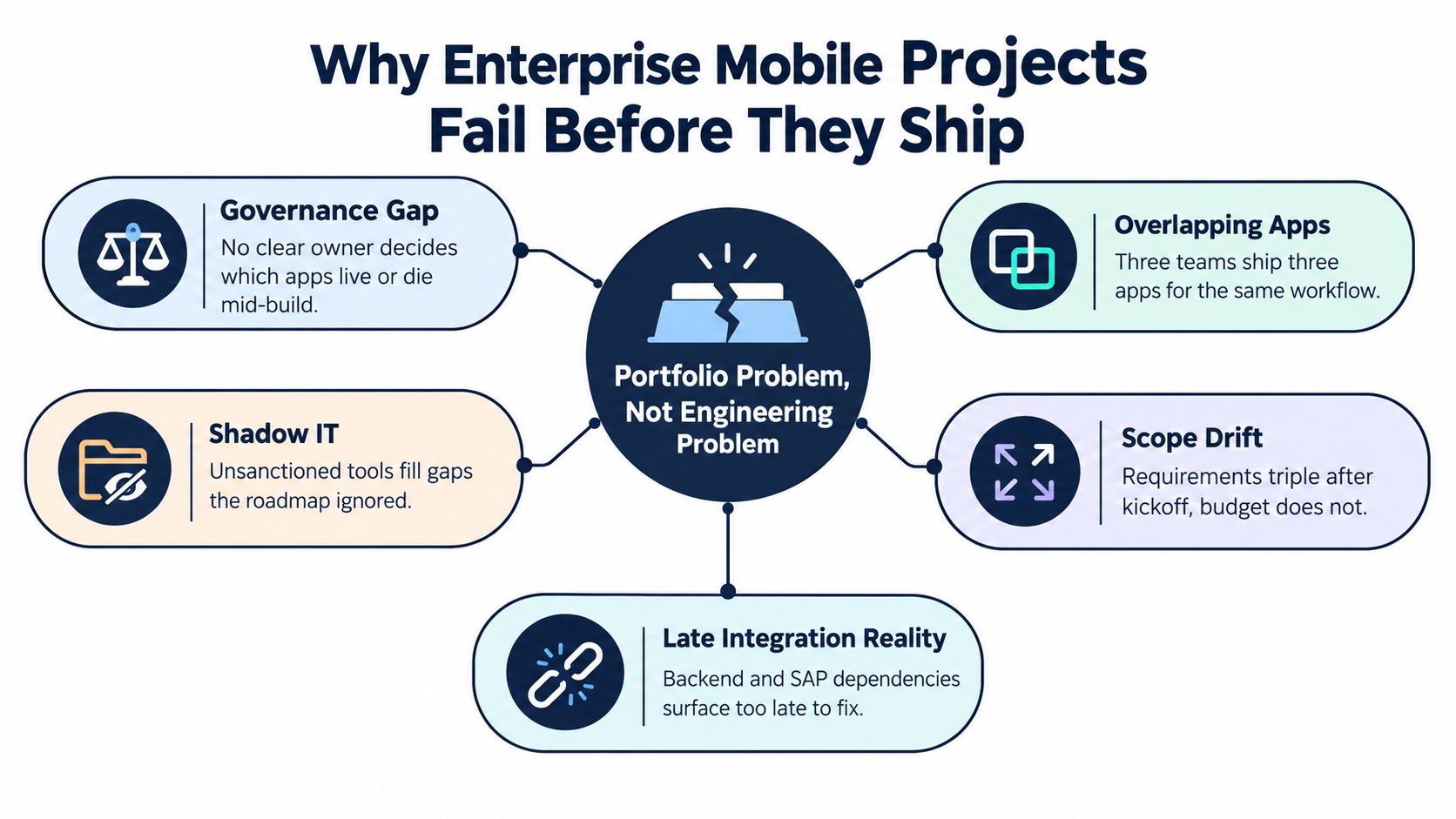
Most enterprise mobile failures don't start in the codebase. They start in the steering committee, where nobody can answer who owns the app, which system is the source of truth, or which existing workflow gets retired when the new mobile one launches. That's why mobile needs to be managed as a portfolio problem, not a single build.
The hidden failure pattern
The pattern is always the same. Multiple groups want different versions of the same workflow, legacy backends aren't ready, and everyone assumes the app can sit on top of brittle APIs without changing the operating model underneath. By the time a project looks healthy in status decks, the team is already carrying technical debt, integration debt, and governance debt at once.
A practical reminder from project management is worth keeping close when the backlog keeps growing, and the org keeps saying yes to everything, especially if you're trying to manage resource limits effectively. Mobile teams don't fail because they lack talent. They fail because no one forces trade-offs early enough.
Practical rule: if a mobile program can't name its sponsor, its primary user, and the system owner for every integration, it's not ready to build.
Warning signs appear before launch. Scope expands, compliance review arrives late, and the app is treated like a UI shell over whatever the backend team could expose that quarter. That approach produces fragile software and a false sense of progress.
Validating the Use Case Before Writing a Single Line of Code
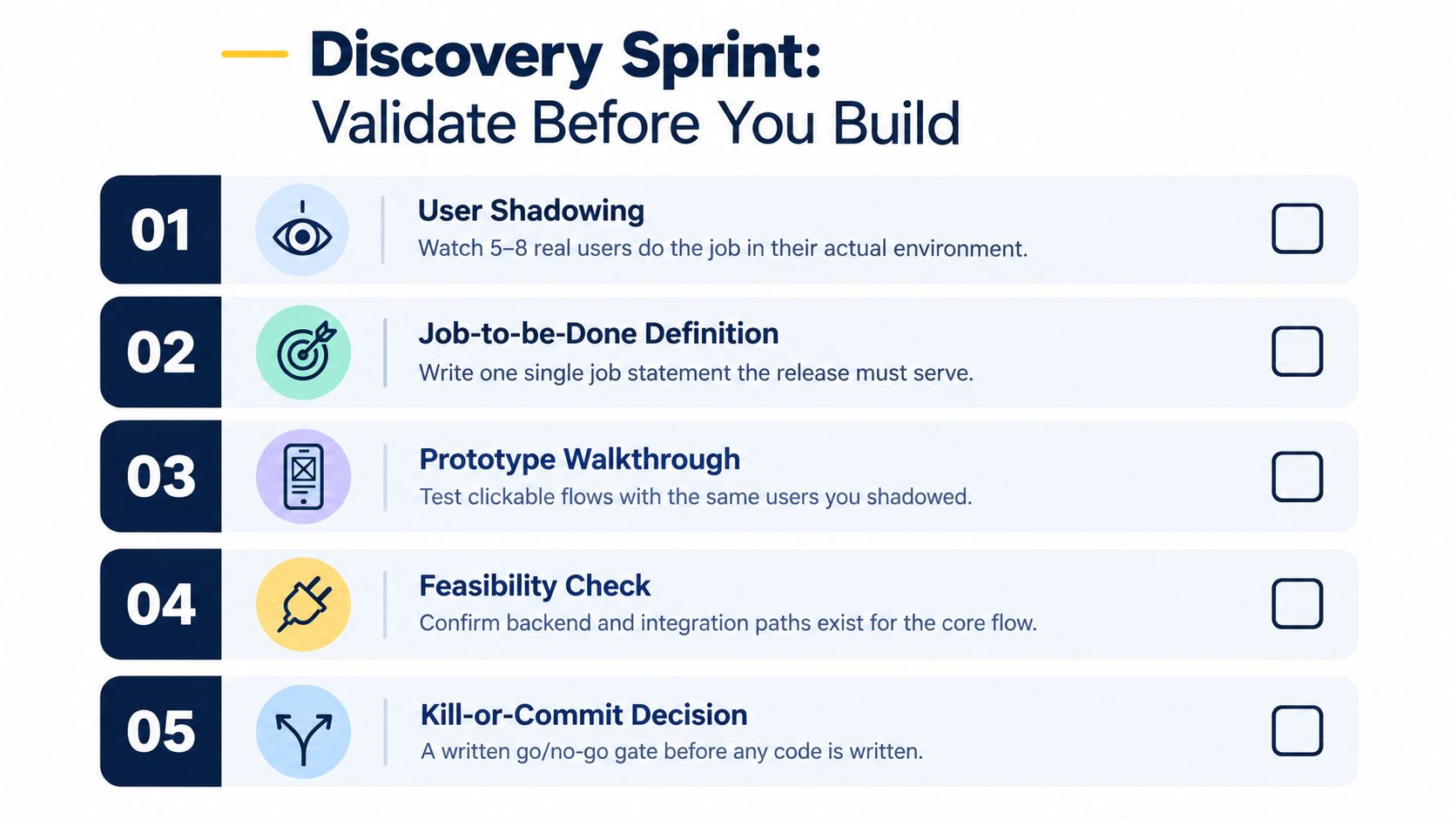
Start with one job, one persona, one release. If you try to solve six jobs in version one, you'll ship none of them well. A disciplined discovery sprint forces that cut before engineering gets trapped in assumptions.
What a real discovery sprint looks like
First, shadow real users in the environment where the work happens. Then define a single job-to-be-done that this release must serve, and make that job concrete enough to score. A field service app might focus on mean-time-to-repair. A sales app might focus on quote turnaround. Those are operational outcomes, not vanity metrics.
Next, test a clickable prototype with the same people you observed. You're looking for friction, not applause. If users can't explain the workflow back to you without help, the design isn't ready.
Do this before code: write the sponsor's sign-off, the integration readiness check, the security classification, and the kill-or-commit criteria on one page. If any of those are missing, the release isn't greenlit.
There are three traps worth calling out. Don't mirror every desktop workflow on a phone. Don't add social features just because they sound modern. Don't defer compliance review until after a pilot, because then you're forcing product, security, and legal to argue under time pressure.
A lightweight validation checklist
-
Sponsor clarity: One business owner can approve scope changes.
-
Persona focus: One primary user group, not a blended audience.
-
Integration readiness: The core system path exists and is testable.
-
Security review: Data sensitivity and auth model are defined.
-
Exit criteria: You know what success, failure, and stop mean.
Choosing the Right Architecture for Real Enterprise Demands
Architecture is where mobile programs either earn their keep or become expensive demos. Pick the wrong stack, and you'll spend the next two years arguing about platform limits, reviewability, and release speed. Pick the right one and the mobile team can move without creating risk downstream.
Choose by constraint, not by taste
Native development in Swift or Kotlin is still the right default for apps that need deep device access, stronger performance, or tighter security review. If the app depends on OS-level behavior, scanners, cameras, offline capture, or hardened device management, native is the safer choice. The cost is obvious. You're maintaining more platform-specific code.
Cross-platform options like React Native or Flutter work when the app is a line-of-business tool with moderate complexity and shared logic across platforms. Kotlin Multiplatform is attractive when teams want to share core logic while keeping platform-native UI and device integration where needed. The weakness appears when the app needs deep OS APIs or unusual device behavior, because the abstraction starts to leak.
Hybrid or web-wrapper approaches look cheap until a security review opens the embedded webview and starts asking hard questions. In regulated environments, that's where the shortcut becomes a liability.
| Approach | Offline Reliability | Security Reviewability | Integration Depth | 5-Year Maintainability |
|---|---|---|---|---|
| Native | Strong | Strong | Strong | Strong |
| Cross-platform | Moderate to strong | Moderate | Moderate | Moderate to strong |
| Hybrid | Weak to moderate | Weak | Weak | Weak |
A good internal reference point is Bridge Global's discussion of monolithic vs microservices architecture, because the same trade-off logic applies here. Don't over-engineer the mobile client, but don't pretend a thin shell solves backend complexity either.
If you need a specialist profile to make the decision cleanly, it's often worth using a recruiter that can find LATAM mobile architects with enterprise delivery experience. The wrong architect will optimize for code elegance. The right one will optimize for integration survivability.
Designing the Backend and Integration Layer That Holds Everything Up
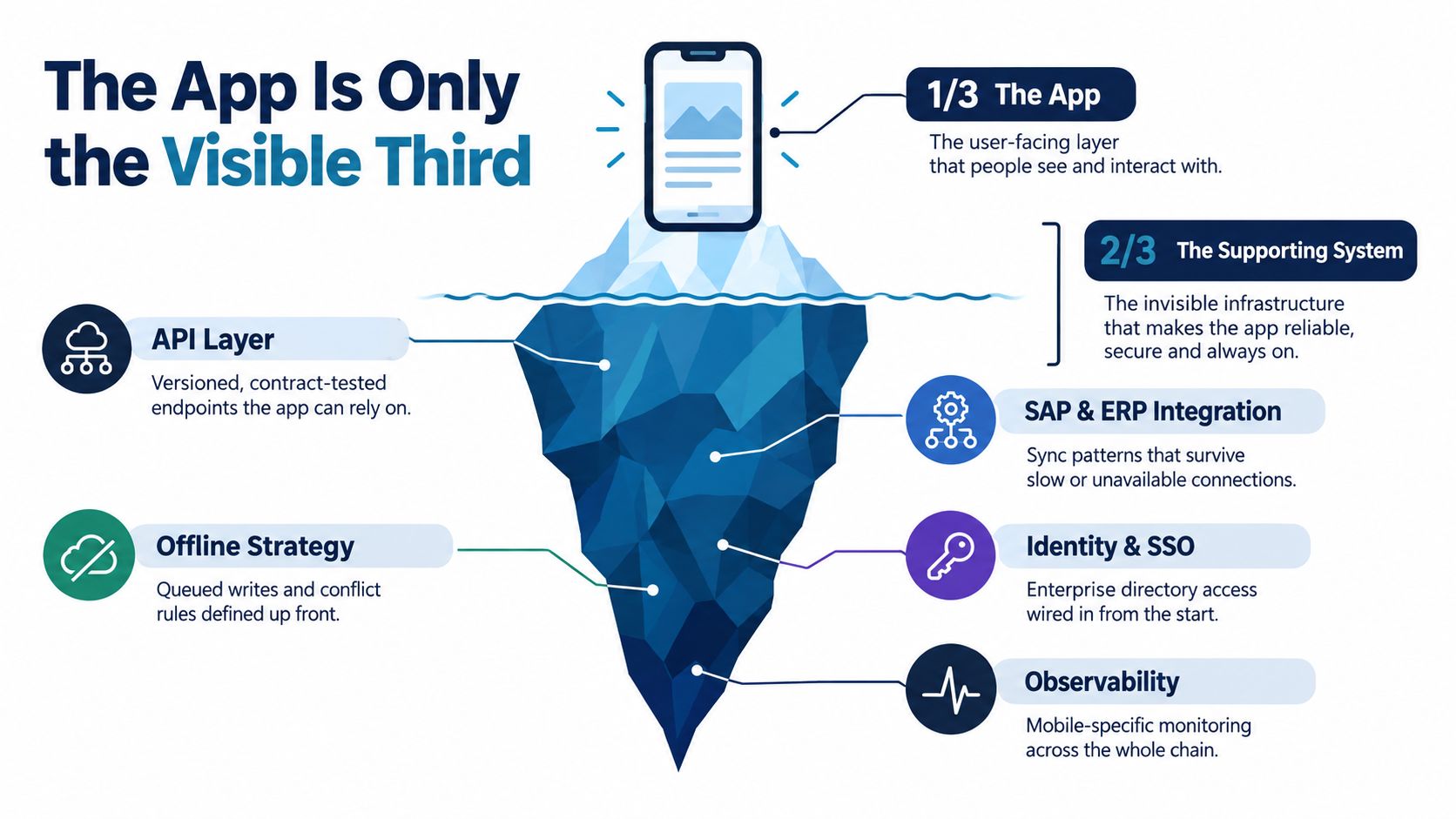
The mobile app is only the visible third of the system. The backend and integration layer decide whether the program works in practice or collapses the moment it meets SAP, Salesforce, Workday, or a legacy mainframe.
Design the contract first
Start with the API style that fits the mobile job, not the one the backend team prefers. REST is usually the simplest place to begin for mobile-facing contracts. GraphQL helps when the client needs shape control over multiple resources. gRPC is better reserved for service-to-service calls, not general mobile consumption. The point is to minimize payload waste and reduce client complexity.
A Backend for Frontend pattern is often the right move for enterprise mobile. It keeps mobile-specific aggregation, shaping, and session logic out of core services, which lets you optimize for the app without polluting upstream systems. Add gateway responsibilities for auth, throttling, versioning, and observability. Then make idempotency and retry behavior explicit so a bad network doesn't create duplicate actions.
Identity and sync need to be designed together
Enterprise mobile identity usually needs SSO through SAML or OIDC, with mobile-friendly token lifecycle handling and refresh logic that won't break mid-session. If your organization uses MDM, certificate policies and authentication flows need to be aligned from the start, not bolted on after the pilot. Offline sync also needs a conflict strategy up front, because queued writes without rules become support tickets later.
Rule of thumb: if the integration layer can't explain how it behaves when SAP is slow, the mobile app doesn't have a real backend yet.
Avoid ESB-first thinking for mobile. Large integration buses can make enterprise architects feel safe, but they often slow mobile programs down and hide failure modes until late. Put a mobile-friendly API layer in front, keep the contracts strict, and let the integration spine do the heavy lifting behind it.
Engineering Delivery Pipelines for Mobile at Enterprise Scale
Treat mobile delivery like DevOps, not a release-day ceremony. If your team still packages everything by hand and hopes the app store review goes smoothly, you don't have a pipeline; you have a ritual. Enterprise mobile needs reproducibility, traceability, and fast rollback paths.
Build the release flow like a production system
Use trunk-based development with feature flags so you can keep the mainline healthy and release functionality independently of deployment timing. Automate signing, build generation, and store submission as far as possible. Tools like fastlane are common here, but the exact tool matters less than the discipline around it. Phased rollouts and crash-gated promotion should be standard, not special cases.
Your test matrix needs to cover more than unit tests. Include contract tests for APIs, UI tests for critical paths, accessibility checks, performance checks, security checks, and device-farm runs on real iOS and Android hardware. Emulators are useful, but they don't replace the behavior of actual devices under load, on low battery, or on imperfect networks.
Governance has to travel with the artifact
Security and procurement will ask for traceability, so build it in. Generate an SBOM, scan dependencies, sign artifacts, and keep audit trails that show what changed and who approved it. Reproducible builds matter because they give your CISO a verifiable chain from source to release.
If you're defining success for the delivery system, measure the pipeline itself, not just app installs. Lead time, change failure rate, mean time to recovery, and rollback readiness tell you whether the process is stable enough for enterprise use.
| Pipeline Stage | What It Does | Required Tooling or Practice | Governance Control |
|---|---|---|---|
| Source and branch control | Keeps code reviewable and traceable | Trunk-based development, protected branches | Change approval trace |
| Build and signing | Produces release artifacts | Automated signing, reproducible builds | Artifact integrity |
| Test execution | Verifies behavior before release | Unit, contract, UI, accessibility, device-farm tests | Test evidence retention |
| Release orchestration | Pushes controlled releases | Feature flags, phased rollout, store automation | Release approval logs |
| Monitoring and rollback | Detects and reverses failures | Crash analytics, alerting, rollback hooks | Incident traceability |
Security, AI Governance, and Accessibility Built In From Day One
Security can’t be a final checklist item in enterprise mobile. It has to be part of the definition of done from the first sprint, especially now that AI features are entering mobile products faster than many governance teams can review them.
Build against a real security standard
Use OWASP MASVS as the baseline for mobile security requirements, because it gives you a concrete verification framework rather than a vague “be secure” slogan. Pair it with OWASP MASTG for hands-on testing so the team can validate storage, cryptography, authentication, network communication, platform interaction, code quality, and anti-tampering in a repeatable way. You can also use the internal reference on all about mobile application security to align the team on what needs to be tested and why.
Then get specific. Decide how local storage is encrypted, how jailbreak or rooting is handled, what certificates are pinned, and which third-party SDKs are allowed to touch enterprise data. Supply-chain risk is now a mobile product issue, not just a backend concern.
Govern AI features like production systems
The security gap gets wider when mobile apps embed AI. Recent survey data shows 95% of organizations now use AI in mobile apps, 37% say they can’t see what the AI is doing, and 81% of developers report AI-generated code has introduced new vulnerabilities. That’s the warning sign. If the app uses an LLM or on-device model, you need to define what data leaves the device, what gets logged, how prompt injection is controlled, and what the manual fallback is when the AI misbehaves.
If your team needs support on managing AI compliance risks, get that expertise involved before the release candidate, not after an audit finding. AI in mobile is useful. Opaque AI in mobile is a governance failure.
Accessibility belongs in the release gate
Accessibility is not just for websites. W3C’s guidance on applying WCAG 2.2 to mobile apps covers native, mobile web, and hybrid apps, and the UK Government requires public sector mobile apps to meet WCAG AA criteria under the 2018 accessibility regulations. That means labeled controls, contrast, text scaling, and error handling belong in the first build, not the accessibility retrofit.
Security, AI governance, and accessibility are the same conversation at release time. If one is missing, the release isn’t enterprise-ready.
Choosing a Partner and Getting the Next 90 Days Right
Vendor selection is a risk decision. Don’t treat it like procurement paperwork. A partner either lowers execution risk or adds another layer of it, and CTOs need to ask questions that expose the difference fast.
What to demand before you sign
Ask for proof of regulated deployments, not just a polished sales deck. Ask who owns the CI/CD pipeline, who writes the security controls, and how knowledge transfers to your internal team. If they can’t answer those without hand-waving, keep looking.
Use the contract structure to match the delivery risk. Fixed-price works only when scope is tight and the integration surface is small. Time-and-materials is better when discovery is still active. Managed capacity makes sense when you want sustained engineering throughput and ongoing product evolution. Protect IP, code access, and data handling in the contract, and don’t skip source-code escrow where the risk justifies it.
Bridge Global fits naturally here as a technology partner that delivers software development service models across product build and modernization work, including mobile programs that need integration with enterprise platforms. Use that kind of partner only when the team can stay close to your architecture, not when you want a black box.
A solid 90-day plan is straightforward. Weeks one through four go to discovery, architecture baselining, and security review. Weeks five through eight produce a clickable prototype backed by a hardened API slice. Weeks nine through twelve ship a pilot to a controlled cohort with telemetry, crash reporting, and a feedback loop already in place.
The leadership behavior that changes outcomes
The programs that move are the ones with one accountable owner, a protected engineering backlog, and a willingness to measure adoption and stability instead of feature count. If roadmap churn keeps interrupting the team, the release will wobble. If the owner can’t make trade-offs, the app will sprawl.
If you want to pressure-test partner fit, review the internal guidance on how to choose a perfect mobile app development partner and compare it with the questions above. The gap between a vendor and a partner shows up fast in enterprise mobile.
If you’re planning an enterprise mobile program and want a team that can handle architecture, integrations, security, and delivery discipline together, visit Bridge Global. The right conversation starts with the workflow, the systems behind it, and the governance rules that keep the release stable. Bridge Global can help you shape that plan and turn it into software your teams can run.

About Preethi Saro Philip
Preethi Saro Philip is a Post Graduate Research Degree holder in Economics with more than 10 years of experience in writing, editing, research and teaching. She has an intense passion for content crafting and calls herself a ‘wordsmith’. She enjoys writing on wide-ranging topics including business, technology, health & lifestyle, education, environment etc.
View all posts by Preethi Saro Philip →