



HIPAA-Compliant Software Development: An Audit-Ready Guide
A lot of teams hit the same moment. The product roadmap is moving, a pilot customer wants security answers, engineering wants to choose the stack, and someone asks, “How do we make this HIPAA compliant without slowing everything down?”
That question usually comes too late.
HIPAA-compliant software development works best when it starts as an architecture decision, not a legal cleanup exercise. If your platform will create, receive, store, or transmit protected health information, you're not just building features. You're building a system that has to prove who accessed data, restrict exposure, recover under failure, and hold that posture over time.
The good news is that this isn't only about avoiding mistakes. Teams that treat compliance as part of product design usually end up with better systems: clearer data boundaries, stronger identity controls, cleaner auditability, and fewer surprises during enterprise sales and security reviews. If you're evaluating a long-term healthtech software development partner, that's the difference that matters.
Building for Trust, Not Just for Compliance
A CTO building a patient-facing app, care coordination platform, or clinical workflow system usually faces two competing pressures. One side wants release speed. The other wants compliance confidence. In healthcare, the wrong move is treating those as separate tracks.

The stakes are concrete. One industry source reports civil monetary penalties ranging from $141 per violation to as much as $2,134,831 annually, while an industry guide estimates compliant build costs from $30,000 for a simple app to $400,000+ for a custom EHR system, with telemedicine software often falling around $150,000 to $250,000 (Censinet's HIPAA compliance clinical software development guide). Those numbers change how you plan architecture, staffing, testing, and vendor selection from day one.
Trust is the core product requirement. Patients expect privacy. Providers expect auditability. Procurement teams expect evidence. Investors expect risk control. That's why serious custom healthcare software development starts with data flow decisions, access boundaries, and operational discipline before feature expansion.
Why trust starts in the architecture
Founders often ask whether HIPAA is a barrier to innovation. In practice, it's a filter. It exposes whether the team understands how healthcare systems operate.
A useful primer on the critical role of health information systems helps frame this well. Health software isn't an isolated app. It becomes part of a larger care, billing, records, and communication environment. That means reliability and security choices ripple outward.
Practical rule: If a control feels expensive during design, it usually becomes much more expensive after customers and data are already in the system.
Teams that get this right don't talk about “adding compliance later.” They design for least privilege, traceability, recovery, and clear ownership from the first architecture review. That's what makes a product audit-ready, and it's also what makes it credible in the market.
The Foundation Risk Assessment and Safeguards
Most compliance failures start with a simple mistake. The team begins building before it understands where electronic protected health information will live, how it will move, and who can touch it. That's why the first serious step isn't coding. It's risk analysis.
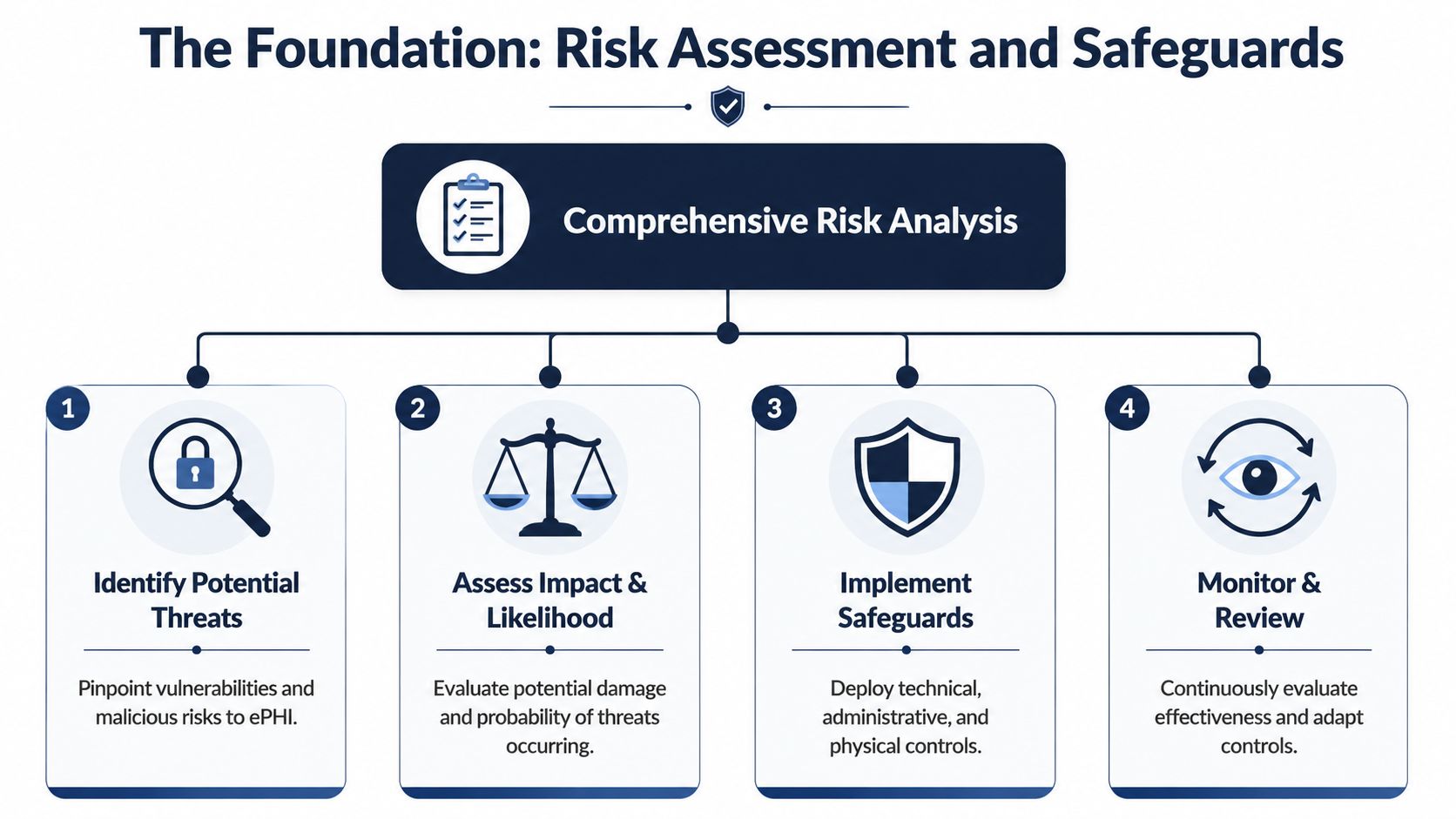
A practical workflow starts before coding. Perform threat modeling and PHI data minimization in design reviews, then specify controls for each feature because technical safeguards need to be embedded into the architecture rather than bolted on later, as described in Vanta's guidance on developing HIPAA-compliant software.
Start with the data map
Before choosing frameworks or cloud services, map four things:
-
Where PHI enters
Patient intake forms, telehealth sessions, uploaded documents, support workflows, API imports, and admin tools are common entry points. -
Where PHI is stored
Primary databases are obvious. Search indexes, file storage, backups, logs, analytics events, queues, and support systems are where teams get into trouble. -
Where PHI moves
Internal services, third-party APIs, notification systems, developer tools, and reporting pipelines need scrutiny. -
Who can access it
Patients, clinicians, billing staff, support staff, engineers, DevOps, and vendor personnel should never be treated as one broad access group.
A good threat model session should produce specific abuse cases. Not “unauthorized access” in the abstract. More like “support agents can view full patient notes through the admin panel” or “appointment reminder payloads expose sensitive metadata in a messaging service.”
Translate the safeguards into engineering work
HIPAA safeguards are often described as administrative, physical, and technical. For software teams, that language becomes much more useful when turned into concrete delivery tasks.
| Safeguard area | What it means in practice |
|---|---|
| Administrative | Policies, role approvals, workforce training, vendor review, incident process, access review cadence |
| Physical | Device controls, workstation security, office handling rules, hosting environment responsibilities |
| Technical | Authentication, RBAC, encryption, integrity controls, logging, backup, recovery, monitoring |
Administrative safeguards are where many startups underinvest. They assume strong code can compensate for missing processes. It can't. If nobody owns access approvals, nobody reviews vendor risk, and nobody trains staff on PHI handling, the software will eventually reflect that disorder.
What to decide before development starts
A useful pre-build checklist looks like this:
-
Define PHI boundaries so engineers know which services, tables, storage buckets, and workflows are in scope.
-
Minimize data collection by removing fields and flows that aren't operationally necessary.
-
Assign owners for security decisions, incident handling, and vendor approvals.
-
Set environment rules so development, staging, and production don't mix sensitive data.
-
Document assumptions during architecture review, especially around emergency access, backup, and user provisioning.
The strongest healthcare platforms usually have boring security foundations. Clear access rules, clear ownership, clean data separation, and no mystery workflows.
Where teams usually get it wrong
Three patterns show up repeatedly:
-
They threat-model too late: By then, sensitive workflows are already spread across the system.
-
They over-collect data: Product teams often gather more PHI than the feature needs.
-
They assume cloud selection equals compliance: Managed hosting helps, but configuration and system design still determine your posture.
If the risk assessment is shallow, the rest of the program becomes reactive. If it's done well, architecture decisions become much easier to defend.
Architecting for Compliance Core Technical Controls
Security architecture in healthcare should work like a fortress with controlled gates, protected valuables, and a reliable record of every meaningful action. Teams often focus on one wall, usually encryption, and miss the rest. HIPAA-compliant software development fails when controls are isolated instead of layered.
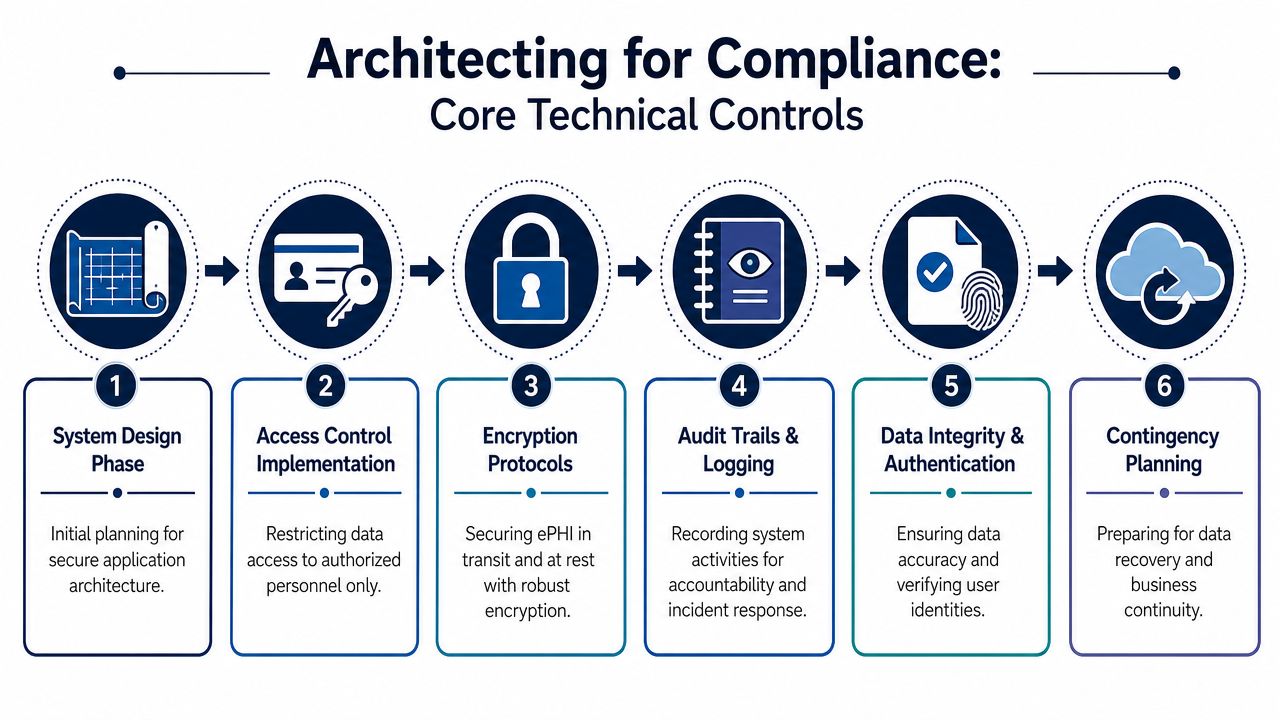
A compliant healthcare system needs identity controls, access controls, auditability, integrity protections, secure transmission, and recovery planning working together. If one layer is weak, the rest carry too much load.
Identity and access control
Unique user identification matters because shared accounts destroy accountability. In practice, every human and service actor should have their own identity, permissions, and audit trails.
For application users, start with role-based access control. But don't stop at broad roles like admin, staff, or patient. Most health systems need more precise boundaries, such as a clinician, scheduler, billing specialist, read-only auditor, support agent, or tenant administrator. Otherwise, “RBAC” becomes a polite label for over-permissioning.
Multi-factor authentication belongs anywhere privileged access exists. That includes admin consoles, back-office tools, production dashboards, and remote operational access.
A simple comparison helps:
| Weak pattern | Strong pattern |
|---|---|
| Shared admin credentials | Named accounts with tracked privilege grants |
| Broad staff role | Fine-grained roles tied to real job functions |
| One-time access approval | Access approvals plus periodic review |
| Support can see everything | Masked views and break-glass workflows for exceptions |
For infrastructure, apply the same discipline through IAM policies, short-lived credentials where possible, and tightly scoped service permissions. If you're working with a team that also handles cloud hardening, cyber security services should align with application-level controls rather than sit in a separate silo.
Encryption and protected data handling
Encryption is necessary, but the implementation details matter. Data in transit should move through secure channels between clients, APIs, internal services, background workers, and external integrations. Data at rest needs protection across databases, object storage, backups, exported reports, and cached files.
The common failure isn't usually the primary database. It's the secondary systems around it.
-
Logs can accidentally capture patient identifiers or clinical context.
-
Temporary exports can sit unencrypted in the wrong storage path.
-
Search indexes can replicate sensitive fields into a less protected service.
-
Backups can be retained without the same access boundaries as production.
A mature architecture treats PHI as a classification problem, not just a storage problem. Every system component either can hold PHI or it cannot. That decision should be explicit.
Audit logging and integrity
Many teams say they have logs when what they really have are developer logs. That's not enough. Audit-ready logging must answer practical questions quickly: who accessed a patient record, what changed, when it happened, from which interface, and whether the action was successful.
Build audit trails at the domain level, not only at the server level. “User opened patient chart” is more useful than “request returned 200.”
A strong audit design usually includes:
-
Authentication events such as sign-in, failed attempts, session revocation, and MFA activity
-
PHI access events tied to user identity and patient context
-
Administrative actions like role changes, export creation, and configuration edits
-
Integrity-sensitive changes, including record updates, approvals, and deletions
These logs should be tamper-resistant, searchable, and separated from standard application noise. The same principle applies to data integrity. Validation rules, signed actions where needed, and clear change history are part of trustworthy clinical software.
Cloud architecture choices that help
AWS and Azure can both support compliant designs, but only if you use them with discipline. In practice, good patterns include segmented networks, private service boundaries where possible, strict security groups, isolated production environments, controlled secrets management, and infrastructure defined as code so changes stay reviewable.
This is especially important for SaaS product development in healthcare. Multi-tenant convenience can't come at the cost of weak tenant isolation, vague audit ownership, or inconsistent permission models. If your tenant boundary is messy in version one, it will be painful in version three.
Secure Development and Testing in Your SDLC
A normal CI/CD pipeline is built for speed and repeatability. A HIPAA-aware pipeline needs those things plus proof. It has to show that risky code was reviewed, vulnerable components were identified, environment changes were controlled, and security checks weren't optional.
That changes how teams work sprint to sprint.
What a compliant pipeline does differently
In a typical product team, a feature moves from ticket to branch to pull request to deployment with tests focused on behavior and regressions. In healthcare, that same path needs security gates tied to PHI exposure and user privilege.
A useful pattern is to add review points where risk naturally changes:
-
Before coding, when user stories define PHI handling, role visibility, retention impact, and integration behavior
-
During coding, when secure coding standards, peer review, and secret-handling rules are enforced
-
During build, when SAST and software composition analysis scan custom code and dependencies
-
Before release, when QA verifies logging behavior, access boundaries, error handling, and sensitive data redaction
-
After release, when monitoring confirms expected behavior and flags anomalies
This is where software development service models matter. A team extension model, dedicated pod, or managed delivery setup can all work, but healthcare projects need one thing regardless of structure: explicit ownership for security review and release approval. If nobody owns that gate, it becomes ceremonial.
Secure coding standards that actually stick
Teams frequently say they follow OWASP guidance. Fewer teams turn that into a living engineering practice. The gap usually shows up in code review quality.
A useful secure coding checklist should include questions like:
-
Is PHI validated and sanitized at every boundary?
-
Could this endpoint expose records across tenants or roles?
-
Does the response leak identifiers in errors or metadata?
-
Are secrets, tokens, or credentials handled only through approved mechanisms?
-
Does this feature create a new logging, export, or retention risk?
Static analysis is useful, but it won't catch business logic mistakes like clinicians seeing the wrong patient panel or support staff exporting more data than they should. That requires human review with a healthcare context.
Testing beyond functional correctness
Functional QA answers, “Does it work?” Security QA must also answer, “Does it fail safely?”
That usually means adding security-specific verification to your release criteria:
| Test area | What to verify |
|---|---|
| Access control | Users can't view or modify data outside their role or tenant |
| Session behavior | Expired sessions, logout, revocation, and re-authentication work correctly |
| Logging | Sensitive events are recorded without leaking PHI into noisy logs |
| Error handling | Exceptions don't reveal internal details or patient data |
| Third-party flows | External APIs and webhooks don't bypass controls |
Penetration testing and dynamic testing are valuable, but they work best when they validate a secure baseline rather than discover avoidable issues late. If your app still mixes admin and user concerns, stores PHI in convenience fields, or lacks clear role boundaries, offensive testing will only confirm the architectural debt.
CI/CD should enforce policy, not just automate delivery
The healthiest pattern is simple. If a build introduces a serious issue, the pipeline blocks it. If a dependency fails policy, the team triages before shipping. If an infrastructure change opens exposure, it gets reviewed like application code.
That's how custom software development should operate in regulated products. Security checks can't depend on memory, heroics, or whoever happens to be on call that week.
A release process is only trustworthy if it prevents bad changes by default. In healthcare, “we meant to review that” is not a control.
The AI and Integration Minefield BAAs and Secure Data Exchange
A lot of teams still treat AI as a separate innovation track and integrations as a technical plumbing task. In healthtech, both are compliance decisions. The key isn't avoiding them. The key is controlling data flow tightly enough that they remain usable.
The common misconception is that AI tools are too risky for HIPAA environments, so the safest path is to ban them. That's lazy governance. The better approach is to separate safe use cases from unsafe ones and design the boundaries clearly.
A major gap in existing guidance is the practical boundary between acceptable and unacceptable AI use. One guide on this topic notes that recent recommendations increasingly point teams toward private or VPC-deployed AI models so PHI never reaches public services, rather than stopping at generic advice about encryption and BAAs (WebMavens' HIPAA-compliant software development guide).
Where AI can fit safely
Some AI usage is relatively low-risk if handled well:
-
Developer assistance on non-PHI code, such as boilerplate generation, test drafting, or documentation support
-
Internal knowledge assistants trained on sanitized policies, implementation guides, and architecture notes
-
Operational summarization on de-identified or fully redacted content
-
Private-model workflows where prompts, outputs, logs, and retrieval sources stay inside controlled infrastructure
The dangerous pattern is obvious once you look for it. Engineers copy production errors into public copilots. Support agents paste ticket content containing patient context into general-purpose chat tools. Product teams prototype summarization by sending real clinical notes to a public API. That's not innovation. That's uncontrolled disclosure risk.
A practical AI governance checklist
If a team wants to use AI in a HIPAA-relevant environment, ask these questions first:
-
Will PHI appear in prompts, retrieved context, logs, or model outputs?
-
Is the model public, vendor-hosted under contract, or privately deployed?
-
Do prompts and outputs get stored anywhere outside approved boundaries?
-
Can the workflow run on redacted or synthetic data instead?
-
Who reviews outputs before they affect users, records, or clinical decisions?
An AI implementation roadmap for healthcare should include those checks as standard governance, not as an exception review after a prototype already exists. The same goes for AI development services and enterprise AI solutions. Their value depends on where data flows, who controls the environment, and whether human oversight remains in place.
One practical option is to keep AI limited to private environments and approved retrieval sources, then treat prompt templates, redaction logic, and inference logging as controlled assets. Bridge Global supports AI-driven software delivery and transformation work in that broader category, but the same rule applies to any vendor: if the PHI boundary is unclear, the tool isn't ready.
BAAs and vendor decisions
A Business Associate Agreement is not paperwork to finish later. It's the legal boundary that should exist before PHI moves through a vendor-controlled service. That includes cloud hosting, monitoring, storage, support systems, messaging tools, and any AI or analytics platform that can handle protected data.
What works:
-
Vendor-by-vendor data flow review
-
Clear inventory of which services can process PHI
-
Contract alignment before activation
-
Operational controls that match the contract
What doesn't work:
-
Assuming enterprise tier means approved use
-
Sending PHI into trial accounts
-
Letting support, analytics, or copilots ingest sensitive data by default
Integration security is usually where the messy reality shows up
Most healthcare products need external connections. EHRs, payer systems, lab platforms, imaging systems, pharmacies, and identity providers all increase system value. They also widen the attack surface and complicate auditability.
For secure healthcare integrations, focus on practical discipline:
-
Validate every field crossing the boundary
-
Authenticate every integration actor distinctly
-
Limit each connection to the minimum required scopes
-
Log import, export, sync, and failure events clearly
-
Handle retries carefully so duplicate or stale data doesn't create integrity problems
Good integration architecture isn't glamorous. It's explicit, narrow, and boring. That's exactly what you want when patient data is moving between systems.
Deployment Maintenance and Incident Response
Launch day doesn't mark the end of compliance work. It marks the moment your controls start facing real traffic, real operators, real customers, and real failure conditions. If your team treated HIPAA as a pre-sales hurdle, production will expose it quickly.
The strongest healthcare systems are built for stable operations, not just secure release.
Deployment needs to be repeatable and reviewable
Manual environment changes are a long-term liability. They create drift, weaken evidence, and make incident investigation harder. Infrastructure as Code is useful here because it turns deployments, permission changes, and environment configuration into versioned artifacts that can be reviewed and traced.
That matters in practical ways:
-
Environment consistency reduces “works in staging, fails in production” surprises.
-
Change history helps investigators see what changed before an incident.
-
Controlled rollout lowers the odds of accidental exposure during urgent fixes.
A deploy process should also account for rollback, secret rotation, and emergency access paths without bypassing all normal controls. Healthcare teams often discover during outages that the only people who can restore service are using improvised credentials or undocumented procedures. That's a process flaw, not bad luck.
Monitoring has to support response, not just uptime
Basic dashboards aren't enough. You need monitoring that helps operators distinguish between performance noise, suspicious access, broken integrations, and user behavior that deserves investigation.
Useful signals include:
| Monitoring area | Why it matters |
|---|---|
| Authentication anomalies | Detects unusual login behavior and privilege misuse |
| PHI access patterns | Helps identify inappropriate viewing or export activity |
| Integration failures | Prevents silent data sync problems from turning into operational risk |
| Configuration changes | Shows whether a deployment or admin change preceded a problem |
Continuous monitoring only helps if alerts are actionable. Teams that alert on everything train themselves to ignore the system. Focus on meaningful events tied to access, data movement, and service continuity.
Incident response is part of the product, not a side document
Every healthtech team needs a tested incident response plan. Not a PDF written for procurement. A working process with owners, escalation paths, evidence handling steps, communication rules, and decision criteria.
A practical plan usually covers:
-
Detection through alerts, reports, or operational review
-
Containment to stop further exposure or damage
-
Investigation using logs, system changes, and affected workflows
-
Remediation with code, config, vendor, or process fixes
-
Documentation so that the event becomes usable evidence and a learning loop
HIPAA adds an important long-term discipline here. Records tied to mandatory security standards must be retained for six years from creation or the date last in effect, which makes documentation and traceability central to compliant software operations across backup, recovery, and monitoring lifecycles, as explained in the HIPAA Journal overview of software development compliance.
If your logs, runbooks, and change records won’t make sense six years from now, they probably won’t help much during next quarter’s audit either.
Recovery planning separates mature teams from hopeful ones
Backups matter, but recovery matters more. A team should know how to restore service, verify data integrity, and operate in emergency mode when a primary component fails. That means rehearsed procedures, not assumptions.
The difference is visible during stress. Mature teams can answer who does what, where the evidence lives, and how long key functions remain available. Everyone else starts searching the chat history.
Audit-Ready Documentation and Continuous Improvement
A lot of teams build decent controls and still struggle in audits because their evidence is scattered. Security decisions live in tickets, vendor approvals live in email, and policy updates live in someone’s desktop folder. That’s not an audit package. That’s archaeology.
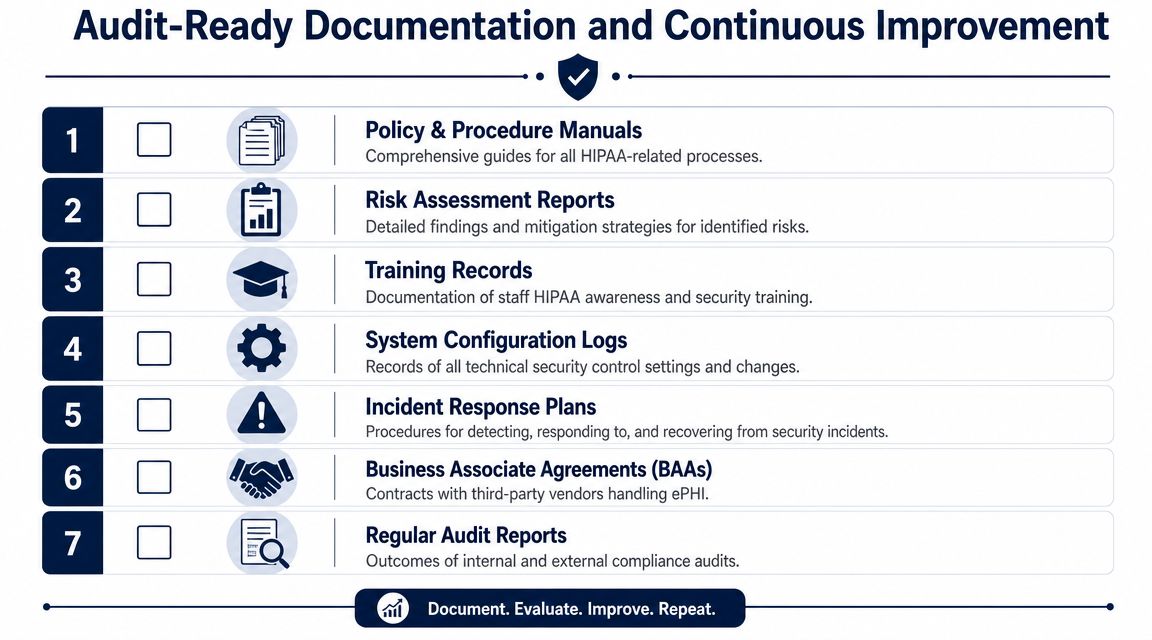
Think of documentation as your audit defense kit. It should show what you decided, why you decided it, who approved it, when it changed, and how you know it’s still working.
The core documents you need available
At a minimum, keep these artifacts current and easy to retrieve:
-
Risk analysis records with identified threats, decisions, owners, and mitigation status
-
Policies and procedures for access control, incident response, secure development, backup, recovery, and vendor management
-
Training records that show workforce awareness and completion
-
BAA inventory with covered vendors and service scope
-
System configuration evidence for key controls and meaningful changes
-
Audit and access logs that can support investigations and reviews
-
Incident records with timeline, impact, response, and remediation
A clean documentation system beats a heroic one. Store records in a structured repository with ownership, version history, and review cadence. If your audit evidence depends on one security lead remembering where everything sits, the process is too fragile.
Build a light but disciplined review loop
Continuous improvement doesn’t require bureaucracy. It requires rhythm.
A workable cadence often includes:
-
Regular policy review when architecture, vendors, or workflows change
-
Access review cycles for privileged roles and operational accounts
-
Vendor reassessment when tools add features or expand data handling
-
Log review patterns for high-risk workflows and admin activity
-
Post-incident updates so lessons change the system rather than disappear into meeting notes
For teams looking to strengthen their operating model, practical reading on compliance monitoring strategies can help frame how ongoing review becomes a normal discipline instead of a scramble before audits.
Good documentation isn’t busywork. It’s how you prove that security wasn’t accidental.
Keep the evidence close to delivery
The best documentation programs generate evidence as work happens. Pull request approvals, infrastructure changes, policy attestations, training completion, access reviews, and incident actions should leave usable records by default.
That’s also where reference material helps. A focused resource on compliance-oriented digital health delivery, like this digital health speed and compliance whitepaper, can be useful when aligning product, engineering, and operations around the same evidence model. If you want to see how teams apply those practices in real projects, reviewing client cases can also help ground the process.
Frequently Asked Questions
Does HIPAA compliance begin after development starts?
No. The strongest approach starts before coding with threat modeling, PHI minimization, and feature-level control design. Retrofitting security after core architecture is in place usually creates more rework, more exceptions, and weaker evidence.
Is encryption enough for HIPAA-compliant software development?
No. Encryption matters, but it’s only one part of the system. You also need user authentication, access control, audit logging, integrity protection, contingency planning, documentation, and operational discipline.
Can we use AI tools while building healthcare software?
Yes, but only with clear boundaries. The safest pattern is to keep PHI out of public AI services, prefer private or VPC-based model deployments for sensitive workflows, redact data where possible, and define review rules for prompts, outputs, and logs.
Do all vendors need a BAA?
Any vendor that will handle PHI on your behalf needs to be evaluated carefully, and if they are in that chain, the legal agreement needs to be in place before PHI flows. Teams often focus on cloud hosting and forget support tools, analytics, logging systems, or AI services.
What makes a product audit-ready?
Audit readiness comes from evidence, not claims. You need current risk analysis, policy records, access controls, logs, incident procedures, vendor agreements, and a repeatable operating model that people follow.
How should a startup prioritize its first HIPAA decisions?
Start with PHI boundaries, user roles, vendor screening, secure architecture, and SDLC controls. Don’t begin with surface features like polished dashboards or convenience integrations if the data model and access model are still vague.
If you’re planning a healthcare platform and want a practical path to secure delivery, Bridge Global can support the work from architecture and SDLC design to AI-aware compliance decisions, integrations, and long-term product engineering.

About Shreesha Chandrabose
Shreesha Chandrabose is a commerce graduate with a growing passion for content writing and digital media. With a curious mind and a creative approach, she enjoys transforming ideas into simple, relatable, and engaging narratives. She loves poetry, photography, and editing, and enjoys bringing ideas to life through words and visuals.
View all posts by Shreesha Chandrabose →