



Healthcare Digital Assistants: A Practical Guide for CTOs
The triage nurse has a patient on speakerphone who’s describing shortness of breath, a fever, and a medication change from last week. A real healthcare digital assistant doesn’t just answer that call; it captures the symptoms, checks context, pre-fills the chart, and leaves the clinician with a structured starting point before the visit even opens. That’s why this category no longer looks like a website chatbot; it looks like workflow software sitting inside the care delivery stack.
For CTOs, that shift changes every decision. You’re not buying a friendly FAQ layer; you’re deciding how an assistant will fit into documentation, intake, triage, coding, scheduling, and the EHR itself. The teams that build these systems well usually work with a healthtech software development partner because the work lives in integration, compliance, and workflow design, not in a polished chat window.
Why Healthcare Digital Assistants Are Now Core Infrastructure
A triage call can show what this category now does in practice. The patient speaks in fragments, the assistant extracts symptoms, the scheduling logic routes the case, and the intake summary lands in the chart with enough structure for a clinician to use immediately. That is a very different role from a front-end FAQ bot. The assistant is shaping the encounter, not just replying to it, and the core value appears when it sits inside the EHR workflow rather than outside the care delivery stack.
That shift explains why market growth matters. Independent reports place the global digital assistants in healthcare market at USD 1.48 billion in 2024–2025 and project it as high as USD 8.17 billion by 2031 at 32.94% CAGR, or USD 10.05 billion by 2030 at 34.21% CAGR. Another estimate puts it at USD 2.31 billion in 2025 and USD 12.7 billion by 2031 at 32.84% CAGR. The signal is consistent. Healthcare assistants have moved from pilots and narrow front doors into software with operational weight.
What buyers are really purchasing
A mature assistant cuts friction across the clinical day. It can help with intake, symptom checking, scheduling, prior authorization, documentation, and patient engagement, but only if it is wired into real systems and real policies. The useful buyer question is not whether it chats well; it is where it sits in the workflow, what system it writes back to, and how it handles exceptions when the chart, the policy, and the patient story do not line up.
The market is also moving toward deeper operational use. One forecast puts the healthcare virtual assistants market at USD 1.7 billion in 2025, rising to USD 19.5 billion by 2035 at 30.1% CAGR. That points to a category that is becoming part of the infrastructure providers rely on to move patients through care, including underserved users who need guidance in plain language and clinicians who need ambient documentation that does not slow the visit down.
Practical rule: If the assistant does not change what happens after the conversation, it is probably not a healthcare digital assistant yet.
Defining Healthcare Digital Assistants and the Three Core Properties
A clinician is finishing a visit, the patient portal is open, and the next task is already waiting. A healthcare digital assistant sits in that workflow and uses natural language plus contextual data to help patients, clinicians, or administrators complete the work inside the system they already use. The research that matters points to three core properties: context-awareness, interactivity, and adaptiveness. If one of those pieces is missing, the product usually falls back into a script with a chat interface.
Three properties that separate an assistant from a bot
Context-awareness means the system keeps the patient-specific facts that matter, beyond the last prompt. Interactivity means it responds in real time instead of sending users through a static decision tree. Adaptiveness means it changes behavior based on prior interactions, structured data, or a clinical model, instead of repeating the same reply forever.
That is why scripted bots fail in healthcare. They may work for hours, locations, or insurance FAQs, but they break down when a patient says, “The pain started after I changed meds” or “My language preference changed since last visit.” A true assistant can keep that context alive across turns and hand it back to the workflow. In practice, that is what makes it useful for underserved users who need plain-language guidance and for clinicians who need ambient documentation that does not slow the visit. For teams setting up those workflow links, FHIR integration services from Bridge Global usually matter more than the chat layer itself.
The three categories that matter in practice
Clinical assistants are the ones people notice first, and for good reason. Suki Assistant is described as capturing the full patient-clinician conversation, generating structured notes, pulling in vitals, allergies, and labs from systems like Epic, Oracle Cerner, athenahealth, and MEDITECH Expanse, then writing the finalized note back into the chart. Administrative assistants are quieter, but they often reach value faster because they handle scheduling, coding support, and prior authorization routing. Patient-facing assistants cover intake, symptom checking, and chronic care coaching, and the Ayu assistant has been evaluated for history collection and triage support in patient case studies.
The distinction matters because the workflow changes by user group. A nurse wants note quality and chart write-back. A revenue cycle team wants fewer handoffs. A patient with limited health literacy wants a system that can explain next steps without sending them back to a generic FAQ page. Partners building that layer often need specialized hiring support, including LatAm NLP developer hiring, because the hard part is usually the integration work, not the demo.
A true assistant is persistent, contextual, and operational. If it forgets the chart, ignores prior interactions, or can’t change the next step in the workflow, it has ambition but not persistence.
The Technical Stack from NLP to EHR Integration
A bedside assistant that ships has to do more than generate text. It has to hear the user, keep state across the session, ground its output in clinical context, and write back into the record without creating a new safety problem. The failure pattern I see most often is predictable: teams build the conversation layer first, then discover that permissions, write-back rules, and chart context decide whether the pilot can move past demo mode.
The four layers that have to work together
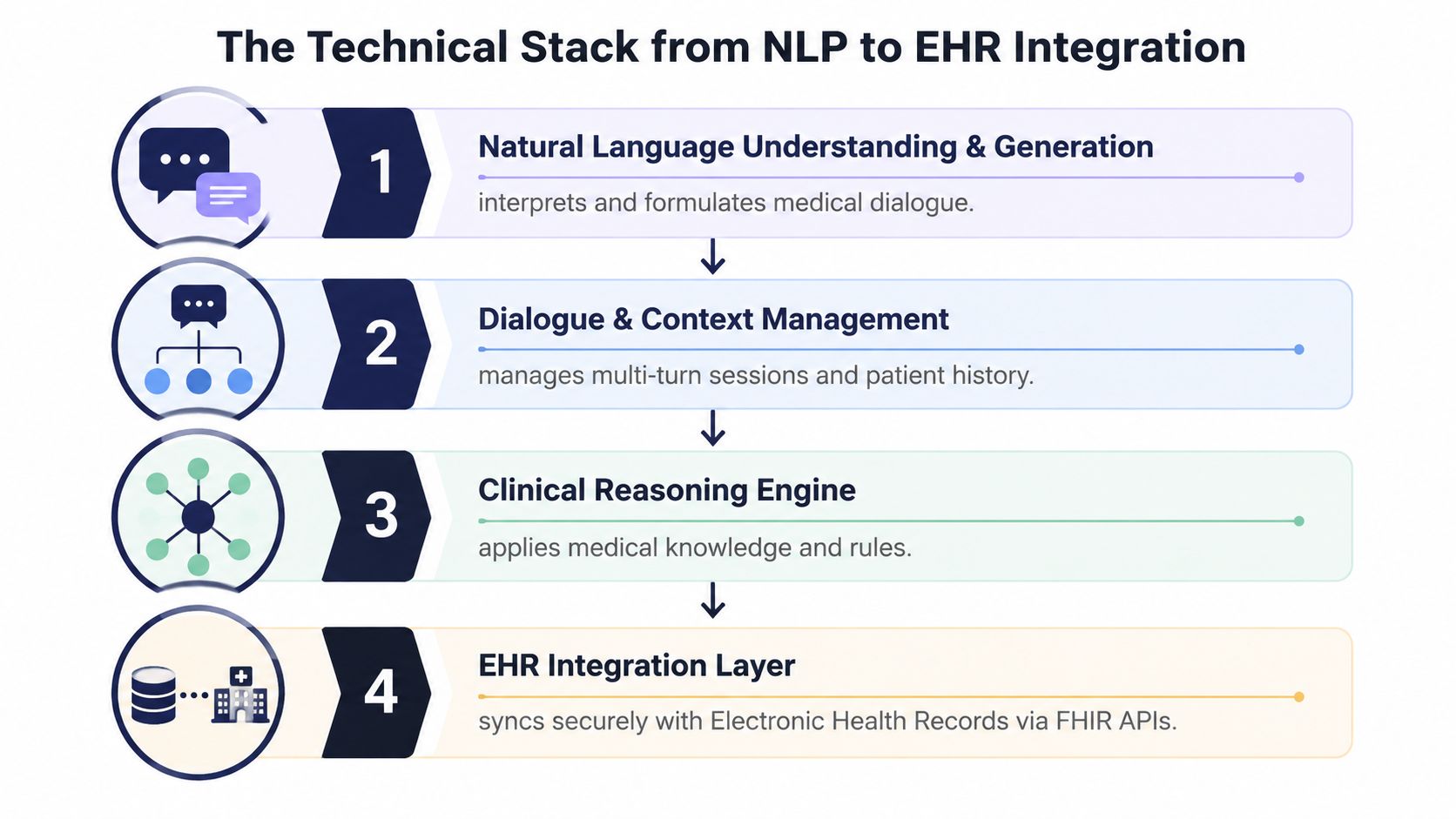
The first layer is natural language understanding and generation, which turns free text or speech into structured output. The second is dialogue and context management, which keeps a multi-turn interaction coherent and preserves the patient history that matters for the current task. The third is a clinical reasoning and knowledge grounding layer, which anchors outputs to accepted rules, structured data, or a controlled medical model. The fourth is the EHR integration layer, where standards like HL7 FHIR, SMART on FHIR, and HL7v2 determine whether the assistant can operate inside production workflows.
A clinician dictating a visit is the clearest test. The assistant should produce a structured note, suggest ICD-10 and E/M codes, and stage the note for review before it reaches Epic. That is the workflow layer in practice, not a chatbot sitting on a separate website. If the permission scopes are off, if slot filling breaks under real conversation, or if code suggestions drift into hallucination, rollout stops fast.
Integration patterns matter here, and the right approach usually starts with the chart, not the interface. A team that has already mapped routing, permissions, and write-back behavior through FHIR integration services can usually see the production path more clearly than one that is still treating connectivity as an afterthought. The same applies to broader healthcare integrations, because real deployments live or die on handoffs, not on polished demos.
What breaks in the real world
Brittle slot filling is a classic failure. The assistant asks rigid questions, the patient answers outside the template, and the workflow falls apart. Hallucinated codes are worse, because they sound authoritative until a human reviews them. FHIR permission scopes can also block production in subtle ways, especially when a system can read chart data but cannot write the finalized note back.
Teams in emerging markets often underestimate how much of this work is systems engineering. If you need specialized NLP talent for clinical workflows, a LatAm NLP developer hiring resource can help with sourcing, but the more important question is whether the team knows how to ground language output in the EHR safely.
Architecture rule of thumb
Build the assistant around the chart, not around the chat bubble. If you cannot explain where data enters, where context persists, and where the final artifact lands, the system is not ready for production.
Compliance, Security, and Data Governance Essentials
Healthcare assistants don’t fail only because of model quality. They fail because teams treat privacy and access control like paperwork instead of product requirements. If the assistant touches PHI, governance has to start in the first sprint.
The four buckets a CTO has to operationalize
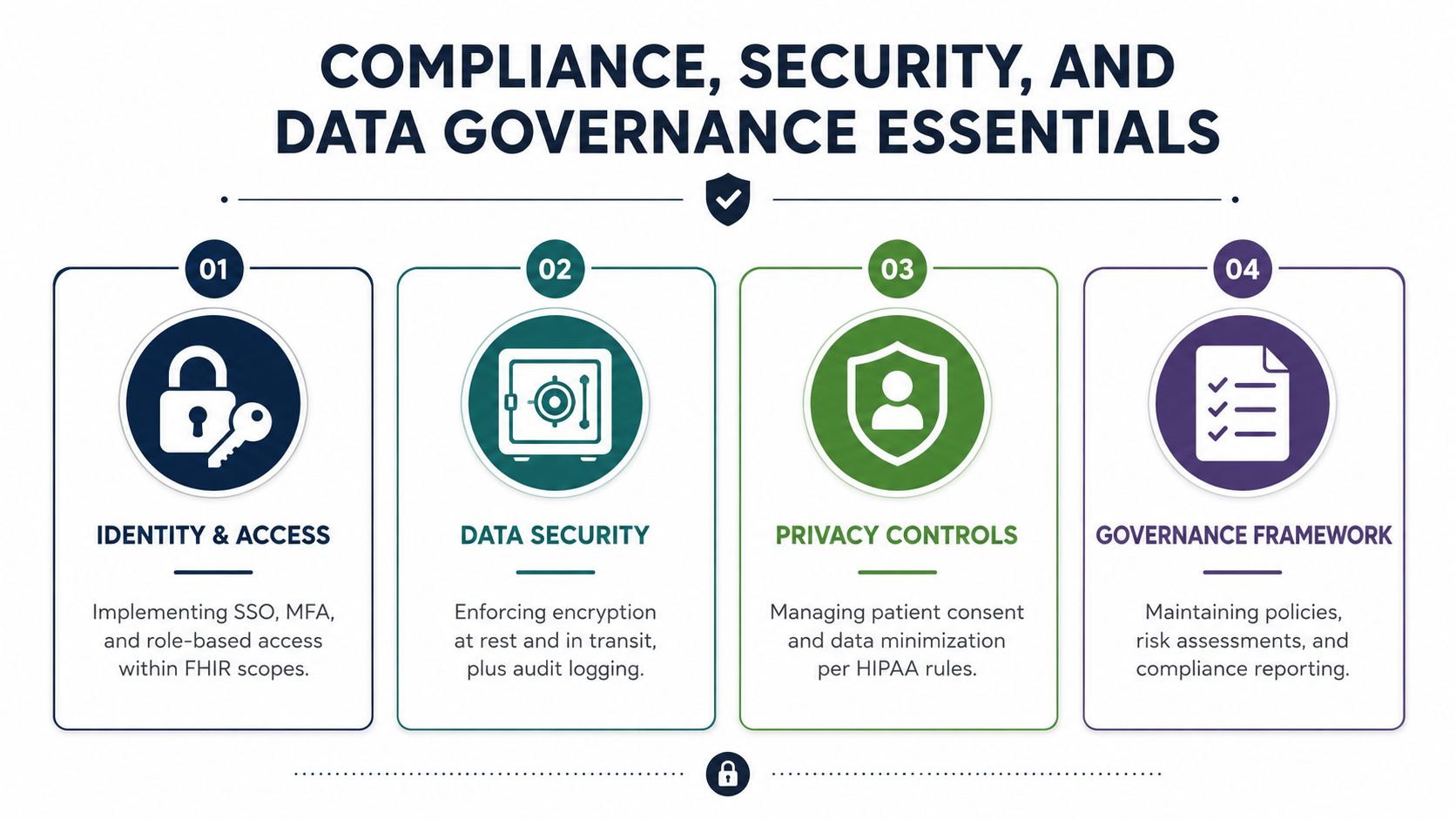
Identity and access comes first. SSO, MFA, and role-based access control need to line up with FHIR scopes, because the assistant should only see and write what the user is allowed to touch. Data minimization and PHI handling mean the system should redact what it does not need, retain only what policy allows, and respect residency rules. Auditability means immutable logs of prompts, retrievals, outputs, and write-backs, because you need a defensible trail when something goes wrong.
The fourth bucket is safety guardrails. Human-in-the-loop review is required for any clinical action that could affect care, and the escalation path has to be obvious when the assistant is uncertain. Hallucination monitoring belongs on the production checklist, in the model lab.
The compliance conversation gets sharper when clinical decision support is in scope. FDA Software-as-a-Medical-Device questions can apply when the assistant influences diagnosis or treatment, while most administrative assistants stay outside that boundary. If your organization already works through enterprise AI solutions, the same governance patterns used in regulated environments can be adapted here.
Where production deployments fail
Brittle slot filling is a classic failure. The assistant asks rigid questions, the patient answers outside the template, and the workflow falls apart. Hallucinated codes are worse, because they sound authoritative until a human reviews them. FHIR permission scopes can also block production in subtle ways, especially when a system can read chart data but cannot write the finalized note back.
Teams in emerging markets often underestimate how much of this work is systems engineering. If you need specialized NLP talent for clinical workflows, a LatAm NLP developer hiring resource can help with sourcing, but the more important question is whether the team knows how to ground language output in the EHR safely.
Architecture rule of thumb
Build the assistant around the chart, not around the chat bubble. If you cannot explain where data enters, where context persists, and where the final artifact lands, the system is not ready for production.
What to ask before any deployment
Ask who can view prompts, who can approve write-backs, and who can disable the assistant if it starts drifting. Ask whether logs are searchable by patient, encounter, and user, because operations teams need to trace issues quickly. Ask what the retention policy is for raw transcripts, because storing everything forever is usually the fastest way to create risk.
The practical standard is simple.
Compliance is a product feature. If it isn’t designed into the workflow, it becomes an incident later.
A useful reference point for teams mapping privacy requirements into engineering controls is the HIPAA-compliant software development guidance used by organizations building regulated systems.
A Phased Implementation Roadmap from Pilot to Scale
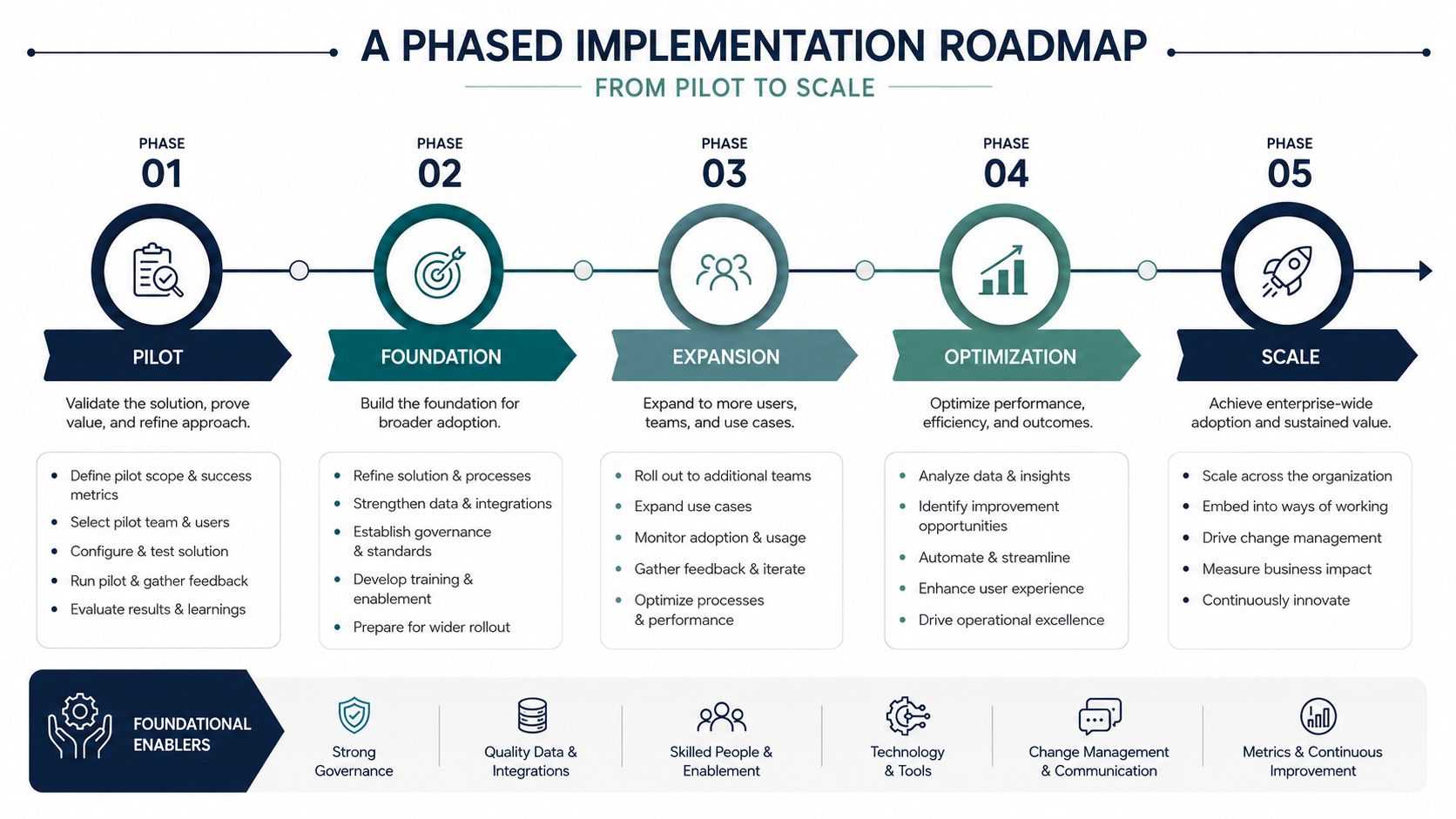
A healthcare digital assistant fails fast when teams try to spread it everywhere at once. A better launch treats each phase as a gate with a clear exit criterion, so clinical, security, and product owners are judging the same evidence before they approve the next step.
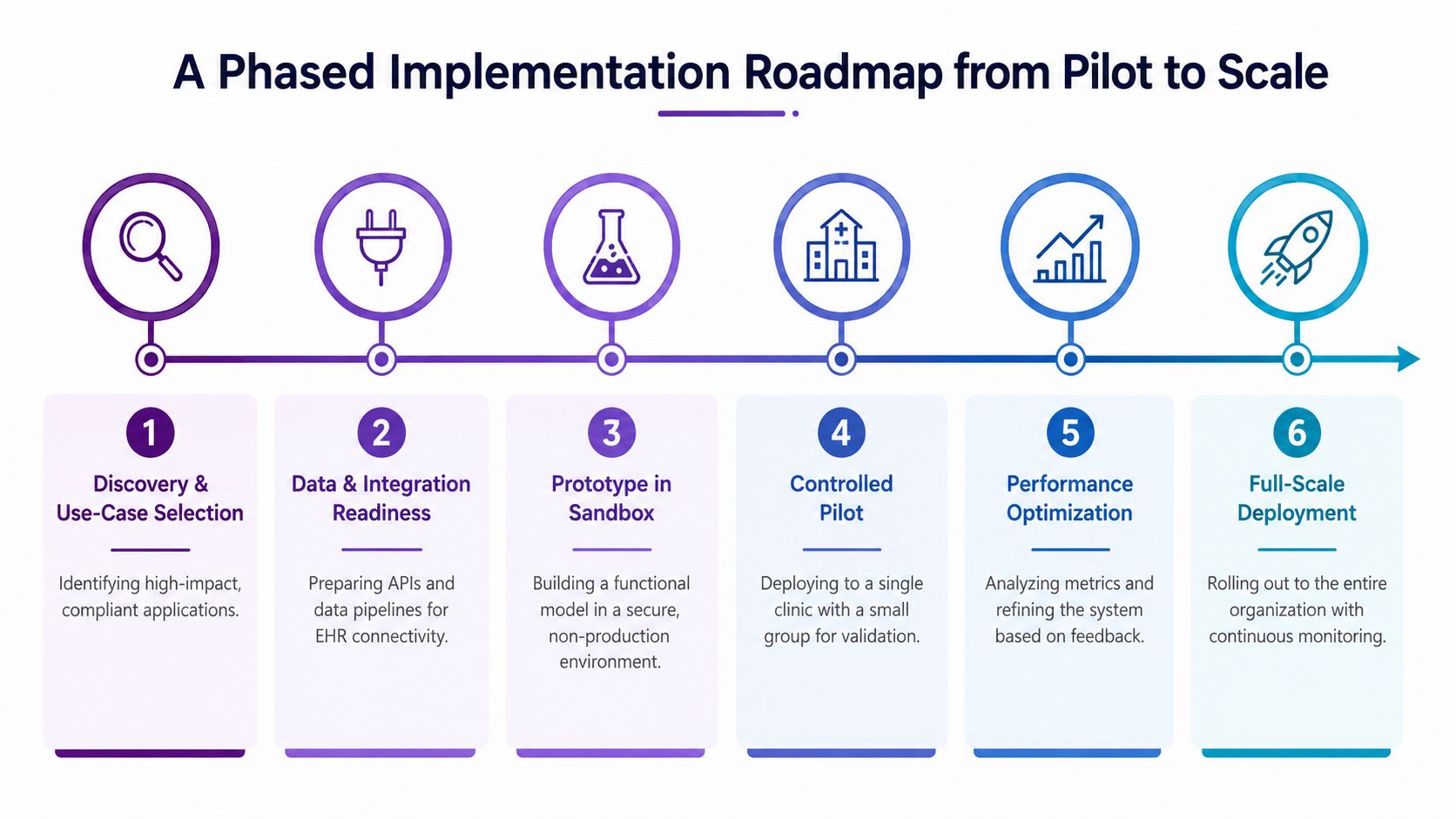
Six phases that keep the rollout sane
Discovery and use-case selection should begin with a narrow, high-friction workflow rather than a wishlist. Start where staff loses time every day, where documentation is inconsistent, or where underserved users get the least support. The exit criterion is a use case that both a clinical owner and an operational owner agree is worth automating.
Data and integration readiness means APIs, chart access, identity controls, and workflow dependencies are mapped before the build starts. The assistant has to sit inside the EHR flow, not sit beside it as a separate chatbot. The exit criterion is that it can reach the systems it needs without manual workarounds or hidden data entry.
Prototype in a sandbox is where the team proves conversation handling and retrieval logic without production risk. Real clinical examples belong here, but they need to be handled in a controlled environment. The exit criterion is a working flow that behaves safely on representative cases.
Controlled pilot means one clinic, one department, or one workflow with a small user set. Measure how it behaves during normal use, how often users have to correct it, and where it breaks down under documentation pressure. The exit criterion is measured reliability under normal use, not a polished demo.
Performance optimization should focus on errors, context loss, and workflow friction. Ambient documentation needs special attention here, because assistants that sound fine in a demo can still fail when a clinician is moving fast, switching tasks, or serving patients who already face access barriers. The exit criterion is predictable performance that is good enough for expansion.
Full-scale deployment only starts when monitoring, ownership, and support are already in place. That includes escalation paths for bad outputs, a way to pause write-back behavior, and clear accountability for model drift. The AI implementation roadmap pattern helps teams avoid mistaking a proof of concept for an operating workflow.
Good checkpoint: if you can’t name the owner for rollout, monitoring, and rollback, the pilot isn’t ready.
What to ship first and what to defer
Ship narrow intake, documentation support, and scheduling before broad clinical reasoning. Those are the workflows that usually create the fastest operational value and the least clinical exposure. Defer anything that looks like diagnosis unless the review process and regulatory posture are already mature.
In healthcare, scope control is a feature, not a limitation.
Choosing Vendors, Partners, and Build Versus Buy
The right vendor fits the workflow, clears the compliance bar, and keeps working after it is embedded inside the EHR. A polished demo does not tell you whether the product can handle real charting, real handoffs, and the pace of a busy care team. As noted earlier in this guide, integration depth and operational fit matter more than interface polish.
A five-criterion selection frame
Start with clinical depth and workflow fit. If the product does not match how clinicians document, route tasks, or close encounters, adoption stays shallow. Then check integration coverage across the EHR and the surrounding systems, because a tool that cannot write back cleanly will end up as another screen to abandon. After that, pressure-test compliance posture and auditability, since weak logs and unclear permissions become operational blockers later. Compare customization versus configuration speed next, because some use cases need specific logic while others need fast deployment. Finish with total cost over a three-year horizon, including implementation services, support, data egress, and ongoing change work.
The engagement model matters just as much. Turnkey SaaS works when the workflow is common, and the organization wants speed. Platform with configuration fits teams that need more control without starting from zero. Custom build makes sense when the assistant sits inside a proprietary workflow, and that is where custom healthcare software development or custom software development becomes relevant.
Vendor and Partner Selection Criteria
| Criterion | What to evaluate | Why it matters |
|---|---|---|
| Clinical depth and workflow fit | Does it match intake, documentation, coding, or scheduling reality? | Poor fit kills adoption even if the model is strong |
| Integration coverage | Does it connect cleanly to the EHR and adjacent systems? | Without write-back, the assistant becomes a dead-end tool |
| Compliance posture and auditability | Are logs, access controls, and approvals built in? | Healthcare teams need defensible records |
| Customization versus configuration | Can the workflow be tailored without breaking upgrades? | Determines speed, maintenance burden, and long-term flexibility |
| Three-year total cost | Include services, support, and integration overhead | Cheap pilots can become expensive platforms |
For product companies building a hosted offering, a SaaS product development path can fit the operating model. Delivery teams often compare build capacity, internal staffing, and external partners through their delivery model choices, especially when they need to keep clinical scope, compliance work, and release cadence aligned. The practical question is simple. Who can own the workflow inside the EHR without creating a maintenance burden the team cannot carry?
The answer usually comes down to whether the vendor can handle ambient documentation, task routing, and edge cases for underserved users, not just the happy path in a sales demo. If your assistant is expected to support multilingual patients, low-bandwidth settings, or clinicians who cannot afford extra clicks, those constraints belong in vendor selection from the start. The implementation details matter more than the pitch.
When teams are deciding how to staff or extend delivery, they should compare internal build capacity against external support through software development service models. That choice affects speed, governance, and how quickly the assistant can be kept current once it is inside the clinical workflow.
Equity, Ambient AI, and the Questions Most Plans Skip
A lot of assistant roadmaps assume the user has a stable phone, reliable broadband, and enough digital literacy to use a conversational system. In practice, that is the wrong baseline. Recent evidence says many underserved healthcare communities sit in U.S. digital deserts with limited high-speed internet access, and broader digital-health equity research shows rural, low-income, racial and ethnic minority, and linguistically diverse groups still face adoption barriers.
The accessibility gap is the product constraint
Low-connectivity and low-literacy users are a design constraint. If the assistant only works well in a stable, well-resourced environment, it widens the access gap it was supposed to reduce.
Voice-first and ambient AI are promising because they reduce typing, streamline capture, and fit naturally into clinical work. A 2025 paper argues that LLM-powered voice agents could help close economic and accessibility gaps in digital health delivery, while equity analysis warns that ambient AI still needs careful auditing for language coverage and for who benefits. The current ambient clinical intelligence guide makes that same point from an implementation perspective. In practice, the assistant should sit as a workflow layer inside the EHR, since that is where documentation, routing, and chart write-back either help staff or add friction.
Questions to ask before you deploy
-
Language coverage: Does it work in the languages your patients use?
-
Low-bandwidth behavior: What happens when the connection is weak or inconsistent?
-
Accessibility: Can users with disabilities complete the task without workarounds?
-
Benefit distribution: Which teams, patient groups, or service lines gain the most from the rollout?
-
Workflow fit: Can the workflow be customized without breaking upgrades?
The most dangerous mistake is deploying something that only works for digitally fluent users and calling it equitable. If the assistant does not serve the people who struggle most with access, it becomes another polished layer for the already-served.
A CTO Checklist and Frequently Asked Questions
A launch only turns into a stable operating rhythm when leadership watches the right signals. Documentation time per visit, coding completeness, patient deflection from call centers, clinician satisfaction, hallucination rate on coded outputs, and equity coverage by language and connectivity profile belong on the same dashboard. If those metrics move the wrong way, the problem is usually workflow design or governance, not model quality alone.
CTO checklist after launch
-
Workflow ownership: Name the clinical, technical, and operational owners for each assistant flow.
-
Audit readiness: Confirm every prompt, retrieval, and write-back is logged and searchable.
-
Safety review: Require human review for any action that changes care decisions or chart content.
-
Equity checks: Track language support, low-bandwidth usability, and accessibility performance.
-
Integration health: Monitor EHR connectivity, failed write-backs, and access scope drift.
-
Model quality: Review incorrect suggestions, missing context, and coded-output errors regularly.
For delivery decisions, compare your options through software development service models, then review client cases to see how similar work has been delivered in practice.
FAQs
How long does a typical pilot take?
It depends on integration complexity, governance, and workflow scope. A narrow scheduling or intake pilot moves much faster than a chart-writing assistant embedded in multiple systems.
How do you estimate ROI without overselling it?
Tie the estimate to measurable operational work, like documentation time, handoff friction, and call-center deflection. Avoid projecting clinical outcome gains unless you have a controlled way to measure them.
Does every assistant need FDA review?
No. Administrative assistants usually don’t. The threshold shifts when the tool starts influencing diagnosis, treatment, or clinical decision-making, so the review path should be decided early with clinical and regulatory stakeholders.
If your team is planning a healthcare digital assistant that needs to live inside the chart, support clinicians, and stay defensible under audit, Bridge Global can help with architecture, integration, AI delivery, and regulated software engineering. Visit Bridge Global to discuss the workflow you want to automate, the systems you need to connect, and the deployment model that fits your organization.

About Stephanie Cornelissen
Stephanie Cornelissen is a Technical Solutions Consultant with strong experience helping organizations navigate complex digital change. She works closely with teams to align business goals with practical, scalable technology solutions. With expertise in system architecture, integrations, and emerging technologies, she focuses on solving real-world problems through thoughtful execution. She enjoys working where technology meets business strategy and measurable growth.
View all posts by Stephanie Cornelissen →