



Developer Productivity Guide for High-Performing Teams
A lot of teams are living the same story right now. The sprint board looks active, pull requests keep moving, Slack is noisy, and yet releases still feel slower, riskier, and harder to predict than they should. Product leaders see motion. CTOs see drag.
That gap is why developer productivity matters more now than it did a few years ago. In regulated sectors such as healthcare, insurance, and finance, shipping software isn't just about writing code fast. Teams also have to prove correctness, protect data, manage approvals, support integrations, and keep systems stable after release. A developer can type quickly and still be unproductive if the work gets stuck in review, blocked by unclear requirements, or delayed by compliance checks.
AI has made that tension sharper. It can accelerate drafting, code suggestion, testing support, and repetitive work. It can also push effort into verification, debugging, and governance. For product leaders, that means the old shortcut definition of productivity no longer holds up. More output doesn't always mean more progress.
Introduction: Why Developer Productivity Matters Now
A common pattern shows up in scaling software teams. Engineering adds new tools, adopts AI assistants, increases commit activity, and still misses release goals. Nobody is idle. Everyone is busy. But the product roadmap keeps slipping because the hidden work sits elsewhere: handoffs, approvals, environment issues, retesting, documentation, and review cycles.
That's especially true in healthtech. A feature that looks finished in a ticket may still need data mapping, audit checks, access controls, and interoperability validation before it's safe to ship. For a CTO, the question isn't “Are developers coding enough?” It's “What's slowing value from moving safely into production?”

Busy teams can still deliver slowly
Think of a hospital emergency department. Staff can be working at full intensity, but patient flow still slows if triage, imaging, or discharge coordination backs up. Software delivery works the same way. Coding is only one station in the system.
That's why developer productivity is better treated as a system property than an individual speed test. Teams improve it by reducing friction across the workflow, not by pressuring people to produce more visible activity. If you're also thinking about interface bottlenecks, this piece on streamlining front-end workflows is a useful companion because it focuses on one of the places where delivery often stalls.
Productivity drops when coordination costs rise faster than coding speed.
Why this matters now
Three pressures are colliding at once:
-
AI is changing the work mix: Some tasks get faster, but review and oversight often grow.
-
Compliance is moving upstream: Teams have to validate quality and correctness earlier.
-
Modern stacks are integration-heavy: Delivery depends on APIs, vendors, and cross-team alignment.
For leaders building platforms with a healthtech software development partner or planning broader custom software development, the practical challenge is to measure productivity in a way that matches real delivery. That means moving past vanity metrics and understanding where time goes.
What Developer Productivity Really Means
Most confusion starts with the wrong mental model. People hear “productivity” and think volume: more tickets closed, more code written, more hours logged. That's tempting because those signals are easy to count. They're also incomplete.
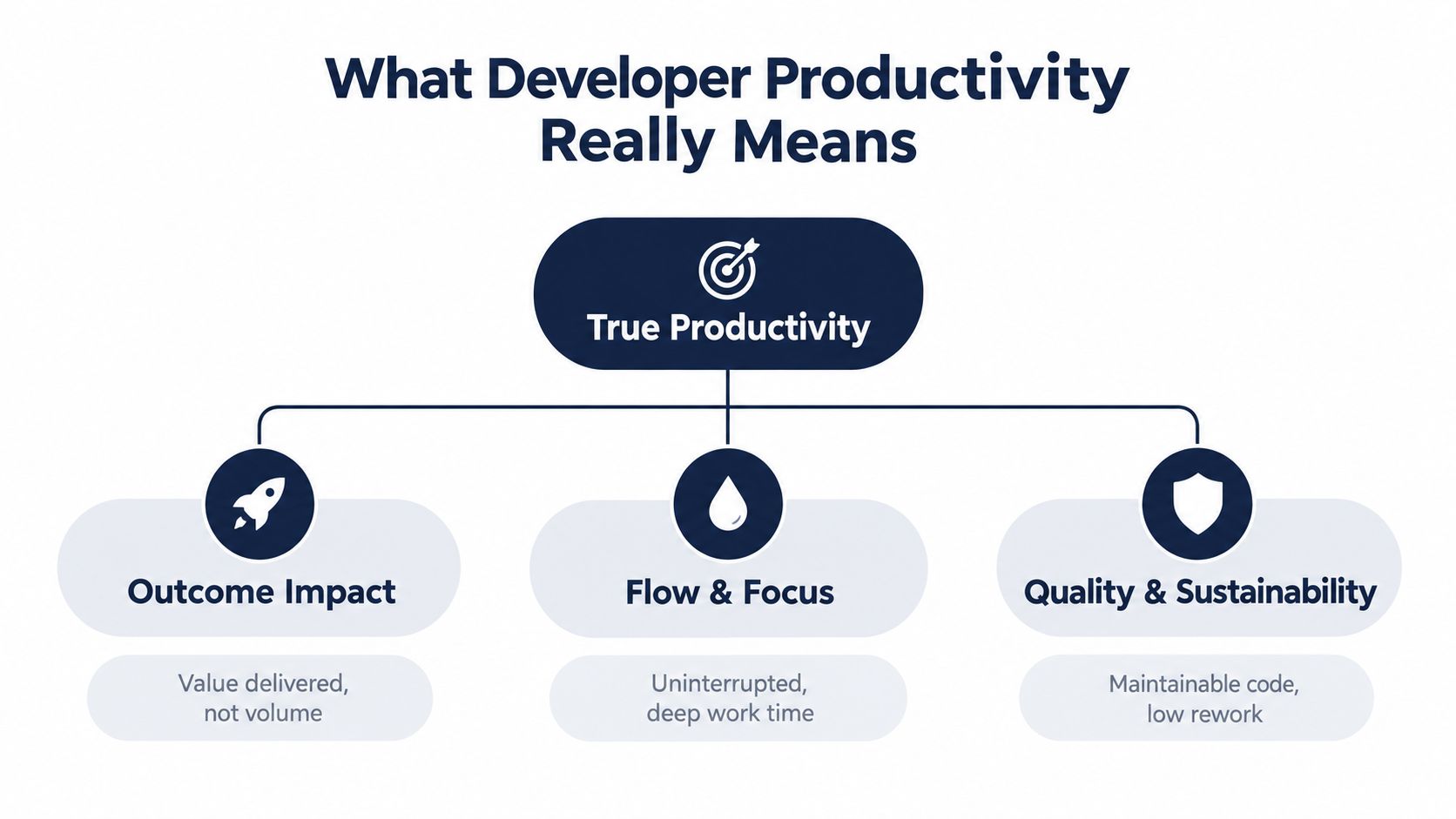
A better analogy is manufacturing flow. A productive factory doesn't judge performance by how much raw material workers touch. It judges performance by how reliably finished goods move out the door with acceptable quality and low waste. Software teams work the same way. Developer productivity means delivering valuable, reliable software with as little friction and rework as possible.
Output is only one piece
A developer who writes a large amount of code may be solving the wrong problem, creating future maintenance work, or increasing review burden. Another developer may write less code but simplify an architecture, reduce defects, and help the team release faster. The second person may be creating more value.
Google Research found that the strongest correlates of self-rated developer productivity were non-technical factors such as job enthusiasm, peer support for new ideas, useful performance feedback, and the ability to work remotely, aligning with the SPACE framework spanning satisfaction, performance, activity, communication and collaboration, and efficiency and flow, as summarized in this Google productivity overview.
A system outcome, not a personal trait
Working definition: Developer productivity is the ability of a team and its surrounding system to turn effort into useful, maintainable, timely software.
That wording matters. It puts the spotlight on the surrounding system. A strong engineer can still get trapped in weak process design, unstable environments, or fragmented communication. In regulated healthtech, the definition gets even narrower. Productive work isn't just what ships. It's what ships safely, integrates cleanly, and can stand up to review later.
What leaders should look for
When product leaders assess developer productivity, three questions help:
-
Are we delivering the right outcomes?
Features should connect to user, business, or operational value.
-
Can developers stay in flow?
Frequent interruptions, waiting time, and context switching erode output.
-
Are we building sustainably?
Fast code that creates defects, debt, or compliance risk is expensive progress.
That's why mature teams rarely rely on a single metric. They use balanced signals that connect engineering speed with quality, collaboration, and predictability. It's also why teams that invest in workflow design often outperform teams that push for more coding hours.
Common Productivity Metrics and Their Limitations
Teams have measured software work in many ways over time. Research has used concrete output and effort measures including added lines of code per year, tasks per month, function points per month, source lines of code per hour, and resolution time in days, as documented in Microsoft Research's review of developer productivity measures in this research paper.
That history is useful because it shows there has never been one universal metric. Every measure captures something real. Every measure also leaves something important out.
What common metrics tell you
Some metrics are operationally useful when handled carefully:
-
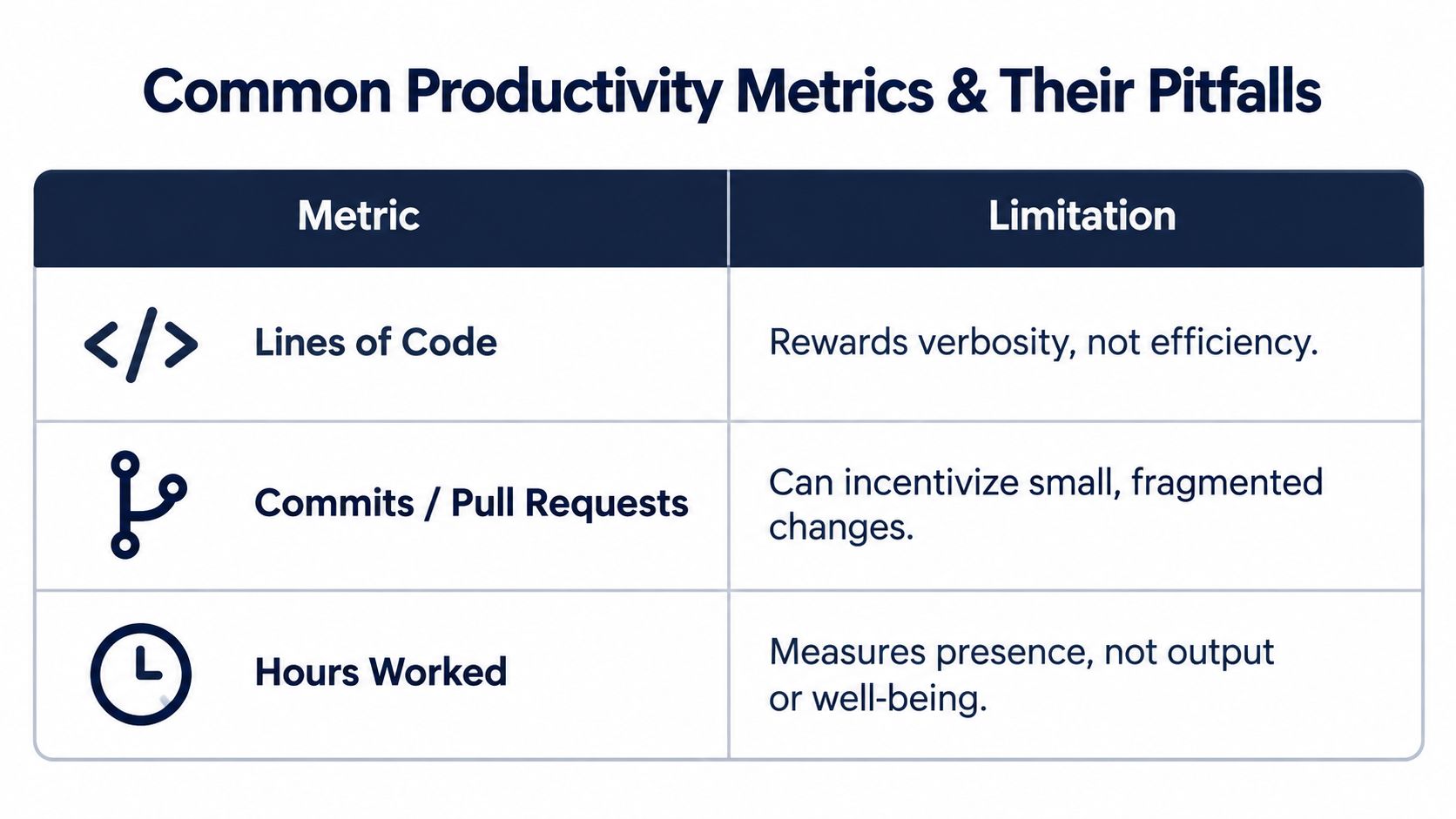
Lines of code: Helpful for understanding codebase growth in a narrow context. Dangerous when treated as a proxy for value.
-
Commits and pull requests: Good for seeing workflow cadence. Weak as indicators of impact because teams can split or batch work differently.
-
Hours worked: Sometimes relevant for staffing or support coverage. Poor for measuring actual knowledge work outcomes.
-
Resolution time: Useful in support and maintenance contexts, but it doesn't reveal complexity or long-term quality.
Where teams get misled
The trap is using one metric as if it were the definition of productivity itself. If leaders reward code volume, developers may write more verbose solutions. If leaders reward commit counts, teams may fragment changes. If leaders reward visible busyness, people may protect optics instead of improving flow.
A metric becomes risky when people can raise it without improving delivery.
That's why naming the exact metric matters. “Productivity is up” says almost nothing. “Lead time improved while escaped defects stayed stable” is much more informative. If you want a practical breakdown of what to track and when, Bridge Global's guide to top software development productivity metrics is a solid companion read.
A better way to read metrics
Use raw activity data as a diagnostic clue, not a final judgment. A rise in commits could mean healthy incremental delivery. It could also mean churn from unclear requirements. More hours could reflect commitment. It could also reflect friction, burnout risk, or poor tooling.
For product leaders, the safest rule is simple:
-
Count activity to inspect workflow
-
Measure outcomes to judge performance
-
Pair speed signals with quality signals
-
Always read numbers in context
How to Measure Developer Productivity Without Gaming the System
The most reliable measurement setups combine delivery signals with human and collaboration signals. That's where DORA and SPACE work well together.
McKinsey recommends tracking system-level, team-level, and individual-level measures, and notes that SPACE was created by GitHub and Microsoft Research to complement DORA by covering satisfaction and well-being, performance, activity, communication and collaboration, and efficiency and flow, as discussed in this McKinsey article on measuring developer productivity.
DORA captures delivery and reliability
DORA's core metrics focus on deployment frequency, lead time for changes, change failure rate, and failed deployment recovery time. Elite performance is typically defined as deploying multiple times per day, achieving lead times under one hour, and recovering from failures in under one hour, while keeping change failure rates in the 0–15% range, according to this summary of DORA developer productivity metrics.
For CTOs, DORA is useful because it keeps the conversation tied to flow through production. It asks whether software moves quickly and whether the system remains stable when it does.
SPACE captures the human side
SPACE helps where DORA is silent. It reflects whether developers can focus, collaborate, and sustain output without excessive friction. That matters because teams don't deliver through pipelines alone. They deliver through attention, communication, and decision quality.
Here's a simple comparison:
| Framework | What It Measures | Best Use Case |
|---|---|---|
| DORA | Throughput, stability, and recovery in delivery systems | Release health, DevOps performance, operational predictability |
| SPACE | Satisfaction, performance, activity, collaboration, and flow | Team health, collaboration patterns, developer experience |
Use both without turning either into a target
A balanced setup usually works at three levels:
-
System level: Release frequency, lead time, recovery patterns
-
Team level: Review delays, blockers, handoff quality, requirement clarity
-
Individual level: Coaching inputs, role-specific expectations, local workflow issues
Practical rule: Never attach a single metric to compensation and then expect honest behavior around it.
For regulated products, measurement also needs to reflect verification work. A slower deployment may be reasonable if the release includes interoperability checks, audit evidence, or patient-safety review. The goal isn’t to remove scrutiny. It’s to understand where scrutiny protects value and where bureaucracy wastes time.
Leaders designing software development service models should build these metrics into operating routines early, then compare them against actual delivery patterns in real client cases. That’s usually where hidden workflow constraints become obvious.
What Drives Developer Productivity
A team ships a feature in two days. Then it spends ten days reviewing edge cases, fixing integration issues, collecting approval evidence, and coordinating release timing across security, QA, and operations. The bottleneck was never typing speed. It was verification and coordination.
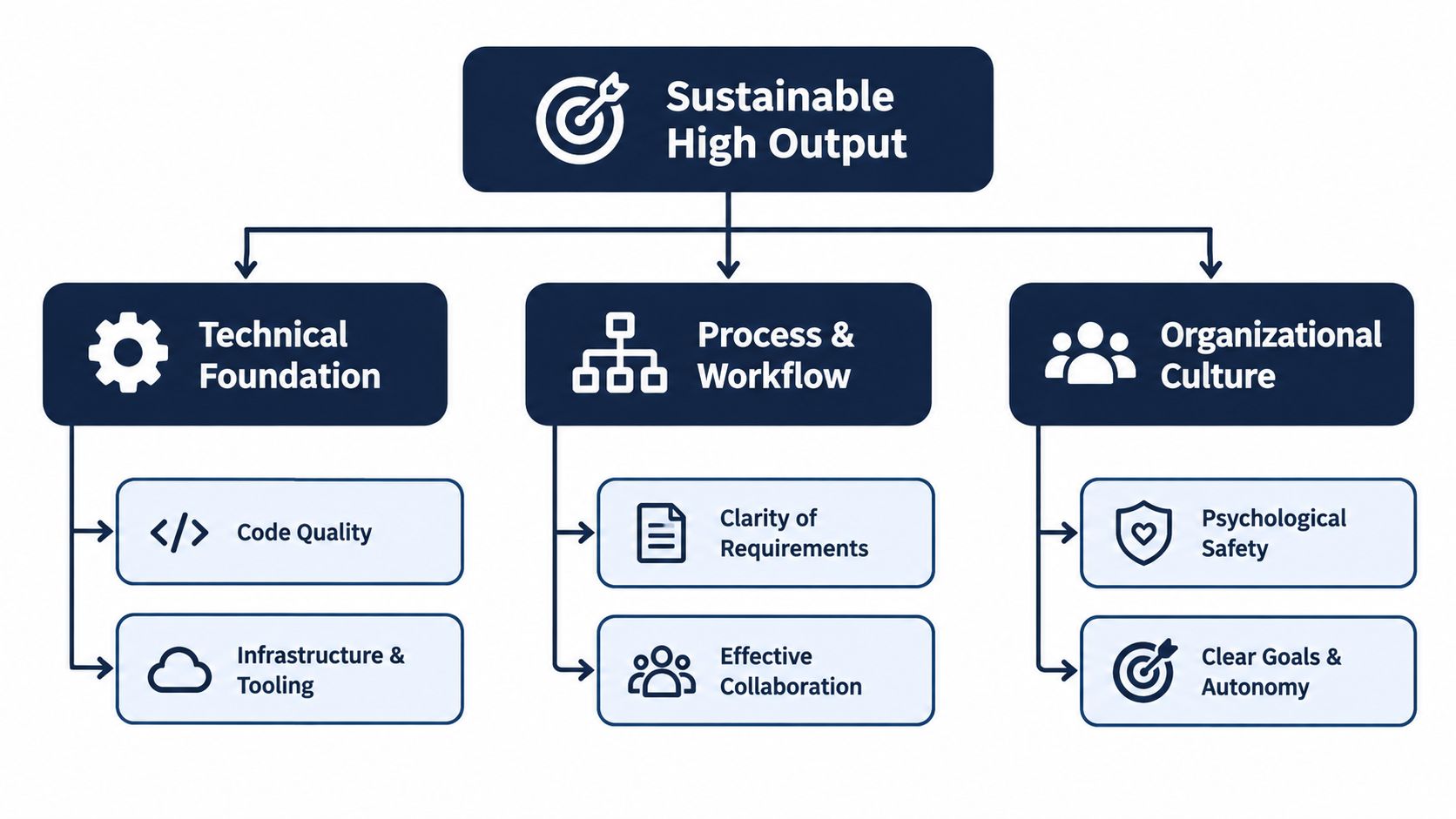
That pattern shows up across engineering organizations, especially where the product has to be correct, traceable, and safe. Google Research found that code quality, technical debt, infrastructure, team communication, goals, priorities, and organizational change all have a causal relationship with developer productivity, as explained in this Google Research publication on code quality and productivity.
Technical friction raises the cost of every change
A codebase works like a factory floor. If the machines are misaligned, every unit takes longer to inspect, rework, and move downstream.
The same is true in software. Weak test coverage, tangled dependencies, slow CI, flaky environments, and poor observability all increase the verification burden around each change. Engineers read more before they can edit. Reviewers hesitate because behavior is harder to predict. Releases wait because no one fully trusts the system.
In healthtech, the verification load is even heavier. Clinical workflows, audit trails, interoperability requirements, and data handling rules turn a small code change into a chain of checks across systems. CMS describes how interoperability standards and implementation guides support secure, efficient data exchange across healthcare software in this resource on interoperability standards and implementation guides.
Coordination costs often dominate coding time
Many delays begin after the code is written.
Work slows when requirements arrive half-formed, when architecture decisions are deferred until review, or when security and compliance teams enter late and force rework. Tool fragmentation adds another layer. Context gets split across tickets, chats, documents, dashboards, and approval systems, so each handoff requires reconstruction.
This matters more as AI enters the workflow. AI can reduce drafting time for code, tests, and documentation. It can also increase the volume of output that needs review. For regulated and enterprise teams, the saved effort often shifts into validation, policy checks, traceability, and ownership decisions. Faster generation does not remove the need for human judgment. In many teams, it increases the need to organize that judgment well.
Strong teams improve three systems at once
Sustained productivity gains usually come from improving the environment around development, not from pushing individuals harder.
First, improve the technical system. Reduce debt, simplify architecture, strengthen automated tests, and make environments reliable.
Second, improve the workflow system. Clarify who approves what, define review paths early, and reduce the number of times work has to stop and wait for missing context.
Third, improve the management system. Set stable priorities, shorten decision cycles, and resolve cross-functional conflicts before they land on engineering.
For teams choosing custom healthcare software development, that three-system view is practical, not theoretical. Compliance and interoperability shape how work is verified and who must coordinate on a release. The same pattern appears in products with broad healthcare integrations and integration-heavy SaaS product development, where delivery speed depends as much on review design and handoff quality as on implementation speed.
Proven Strategies to Improve Developer Productivity With AI-Enabled Workflows
AI can help. It just doesn’t help evenly across the workflow.
In a combined analysis of three experiments covering 4,867 developers, one study reported a 26.08% increase in completed tasks when developers used a generative AI code suggestion tool.
Start where AI removes repeatable toil
The safest early use cases tend to be tasks with high repetition and clear validation paths.
-
Boilerplate generation: Endpoint scaffolding, DTOs, adapters, and repetitive UI patterns.
-
Test support: Drafting test cases, edge-case suggestions, and regression coverage prompts.
-
Documentation assistance: Release notes, code explanations, internal knowledge summaries.
-
Migration support: Refactoring suggestions and translation between frameworks or formats.
For mobile teams working with React Native and Expo, implementation details matter a lot. This article on Expo development with AppLighter is useful because it gets concrete about workflow efficiency in a stack where speed can disappear into tooling and release coordination.
Design for verification, not just generation
The common mistake is treating AI as a coding accelerator only. In many teams, the bottleneck moves. Code appears faster, but reviewers spend more time validating logic, checking compliance, and debugging subtle issues.
Independent recent evidence points in that direction. One 2026 report says developers save 13 hours per week coding, while 67% spend more time reviewing AI-generated code and 52% spend more time debugging AI-introduced problems than a year earlier. The same report notes that AI may shift effort into oversight rather than remove it, as covered in this developer productivity report on coding versus verification time.
If AI speeds up draft creation but slows down trusted release decisions, productivity hasn’t improved in the way leadership cares about.
Put guardrails around AI-assisted delivery
For regulated and enterprise teams, effective AI adoption usually includes:
-
Clear task boundaries
Decide where AI can suggest, where humans must approve, and where automation isn’t appropriate. -
Review protocols
Require stronger review for security-sensitive logic, clinical workflows, financial calculations, and integration mappings. -
Workflow observability
Track whether AI reduces cycle time or creates larger review queues. -
Prompt and usage guidance
Teams need patterns for when to use AI, not just access to tools.
One practical option in this category is Bridge Global’s AI development services, which focus on integrating AI into delivery workflows and products rather than treating it as a standalone feature. For broader modernization, teams often pair that with enterprise AI solutions and a staged AI implementation roadmap.
Improve the workflow around coding
Some of the biggest gains come from reducing non-coding drag instead of generating more code. Useful moves include tighter ticket definitions, better test data access, standard release templates, and fewer approval hops. As we explored in our guide to AI copilots and their impact beyond coding, the strongest gains often appear when AI supports documentation, analysis, and coordination work around development.
The leadership takeaway is straightforward. Use AI where it compresses repeatable effort. Measure whether verification cost rises afterward. Keep the focus on throughput with trust.
Next Steps for CTOs and Product Leaders to Sustain Productivity Gains
The organizations making real progress aren’t chasing a single silver bullet. They’re treating developer productivity as a delivery system problem. They measure outcomes, inspect friction, and adopt AI in places where it improves flow without creating hidden governance costs.
For enterprise planning, recent market research reports that 72% of enterprises with at least $500M in revenue already have at least one AI system in production, up from 49% in 2024, and describes a phased AI implementation roadmap spanning 90 days to 18 months that covers data foundation, pilot selection, governance setup, scaling playbooks, and ROI measurement.
A practical roadmap
-
Start with the baseline: Identify where work stalls now. Look at review delays, handoffs, approval queues, and rework.
-
Choose one pilot flow: Pick a narrow workflow where speed and verification can both be measured.
-
Build governance early: Don’t bolt review rules on after rollout.
-
Scale what proves out: Expand only after the team shows a net gain in trusted throughput.
What to evaluate before adding more tools
Ask hard questions first. Are developers blocked by code creation, or by decision latency? Is QA overloaded? Are integrations brittle? Are requirements too vague? The answer should determine the tooling plan.
For a wider market view, Bridge Global’s analysis of software industry trends is helpful context for leaders balancing AI adoption, delivery speed, and operating risk. If you need a healthtech software development partner or a team that can connect engineering workflow with compliance-heavy product delivery, the right evaluation criteria are usually workflow clarity, verification discipline, and integration depth.
FAQ
Is developer productivity the same as developer velocity?
No. Velocity usually reflects how fast planned work moves through a team’s process. Developer productivity is broader. It includes delivery quality, rework, collaboration, and whether the output creates real value.
Why do high-commit teams still miss deadlines?
Because commits measure activity, not complete delivery. Teams can still get blocked by reviews, requirements changes, testing delays, environment issues, or approvals.
Should regulated teams adopt AI later than other teams?
Not necessarily. They should adopt it more deliberately. The key is matching AI use cases to verification capacity, audit needs, and risk level.
What’s the first sign that productivity is really improving?
Work moves through the system with less waiting and less rework, and releases become more predictable without quality slipping.
Bridge Global helps startups and enterprise teams improve developer productivity through AI-enabled delivery workflows, custom software engineering, and compliance-aware product development. If you’re trying to reduce coordination drag, strengthen verification, or modernize how your team ships software, visit Bridge Global to explore the right delivery model and next-step options.

About Stephanie Cornelissen
Stephanie Cornelissen is a Technical Solutions Consultant with strong experience helping organizations navigate complex digital change. She works closely with teams to align business goals with practical, scalable technology solutions. With expertise in system architecture, integrations, and emerging technologies, she focuses on solving real-world problems through thoughtful execution. She enjoys working where technology meets business strategy and measurable growth.
View all posts by Stephanie Cornelissen →