



Building an AI-Powered Support Assistant in ASP.NET Core
Imagine an HR management application used by thousands of employees every day. Common questions such as “How do I apply for leave?”, “Why can’t I access my payslip?”, or “Where can I find my attendance report?” may be raised repeatedly with the support team. Although the answers are readily available in documentation or knowledge bases, users often prefer immediate assistance rather than searching through multiple pages.
Now imagine having an intelligent assistant built directly into the application that can answer these questions instantly, 24 hours a day. Employees receive immediate guidance, while support teams can focus on more complex issues that require human expertise.
An AI-powered support assistant in ASP.NET Core can provide that additional layer of assistance directly inside an existing application. Routine questions can be handled immediately, while support teams remain available for issues that require investigation, judgment, or access to sensitive business processes.
Traditional support systems rely on FAQs, documentation, or human agents. Although effective, these approaches can be slow and often require users to search through multiple pages before finding an answer.
AI assistants are increasingly being added to enterprise applications for use cases such as search, knowledge access, workflow guidance, and customer support. The practical question for development teams is not simply whether an AI model can generate an answer, but how to integrate that capability into an application in a maintainable, secure, and controlled way.
In this article, we build a beginner-friendly AI-powered support assistant using ASP.NET Core. The goal is to understand the architecture and implementation rather than advanced machine learning concepts.
The Business Problem
Enterprise applications such as ERP, HRMS, and CRM platforms often receive repetitive support requests around password resets, leave applications, report generation, navigation, permissions, and common workflows.
When support engineers repeatedly answer the same questions, time that could be spent on complex incidents, product issues, and user-specific problems is consumed by routine requests.
A support assistant can help users find answers faster, but it should complement rather than replace established support processes. Questions involving exceptions, account-specific decisions, sensitive information, or uncertain responses should still be routed to the appropriate human team.
This makes AI customer support most useful when its scope is clearly defined.
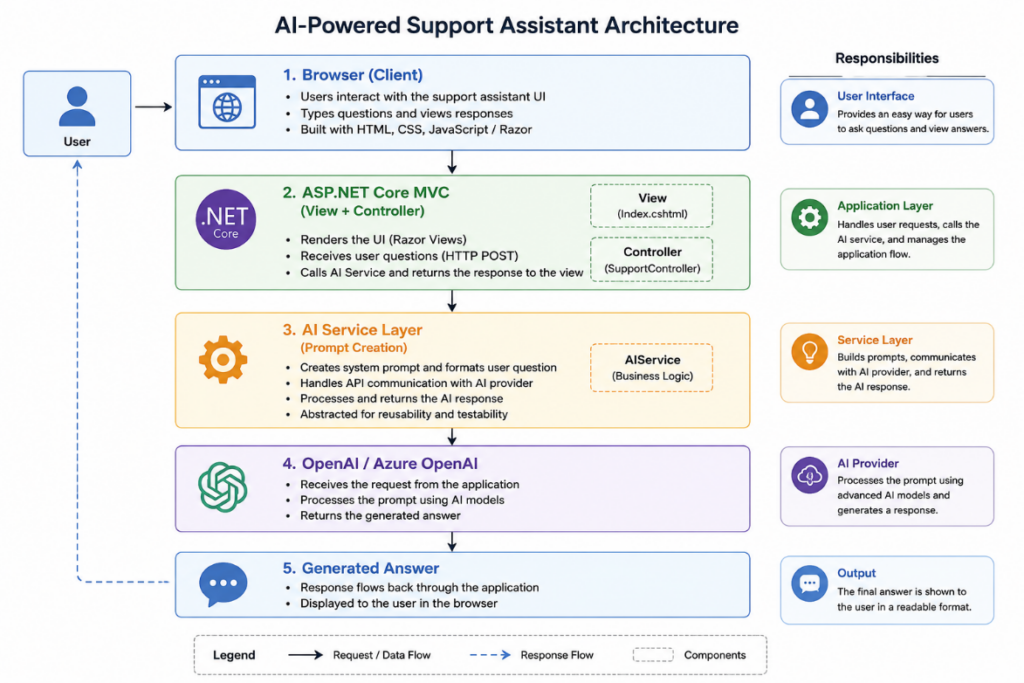
Architecture of the AI-Powered Support Assistant in ASP.NET Core
The solution contains four major components:
- ASP.NET Core MVC
- A Controller
- An AI Service
- An AI provider such as OpenAI or Azure OpenAI
The controller receives the user’s question and forwards it to the AI service. The service communicates with the AI model and returns the generated response.
Keeping AI communication within a dedicated service adheres to the separation of concerns and makes the application easier to maintain, test, and extend.
This separation also means that business logic does not need to depend directly on a specific AI provider. If the integration approach changes later, most of the application can remain unaffected.
Prerequisites
Before starting the implementation, ensure you have the following:
- .NET 8 / ASP.NET Core MVC
- Visual Studio 2022 or another compatible IDE
- Basic knowledge of C# and ASP.NET Core
- An OpenAI or Azure OpenAI API key
- Internet connectivity for accessing the AI service
These prerequisites are enough to follow the example and understand the basic ASP.NET Core AI integration.
Choosing an Integration Approach
There are two common ways to communicate with an AI provider from an ASP.NET Core application.
Option 1: Using HttpClient
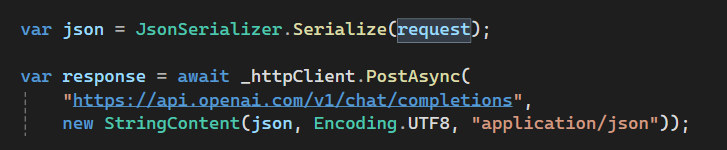
This approach sends HTTP requests directly to the provider’s REST API.
It is useful when learning how the request and response flow works because developers can see how authentication, headers, payloads, and response handling fit together.
Option 2: Using the Official OpenAI .NET SDK
The official OpenAI .NET SDK provides typed client classes and removes much of the repetitive HTTP request handling required when calling the REST API directly.
For production applications, an SDK can often improve maintainability because request construction, client configuration, and API interactions are handled through supported .NET abstractions. The final choice should still depend on the application’s architecture, provider requirements, and how much control the development team needs over the underlying HTTP interaction.
In this article, we use HttpClient to keep the implementation transparent and demonstrate the underlying API communication process. The overall architecture can later be adapted to the OpenAI .NET SDK or Azure OpenAI without changing the basic separation between the controller and service layers.
Implementation Steps
- Create a new ASP.NET Core MVC application.
- Register
HttpClientusing Dependency Injection. - Create an
AIServiceclass. - Store the API credential securely outside source code.
- Create a controller action that accepts the user’s question.
- Pass the question to the service.
- Return the generated response to the Razor view.
- Build a simple interface containing a textbox, submit button, and response area.
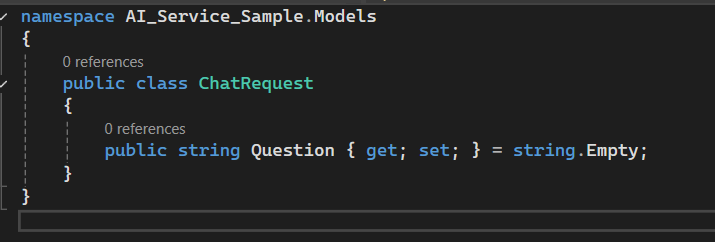
Create the Request Model
Add a model such as ChatRequest.
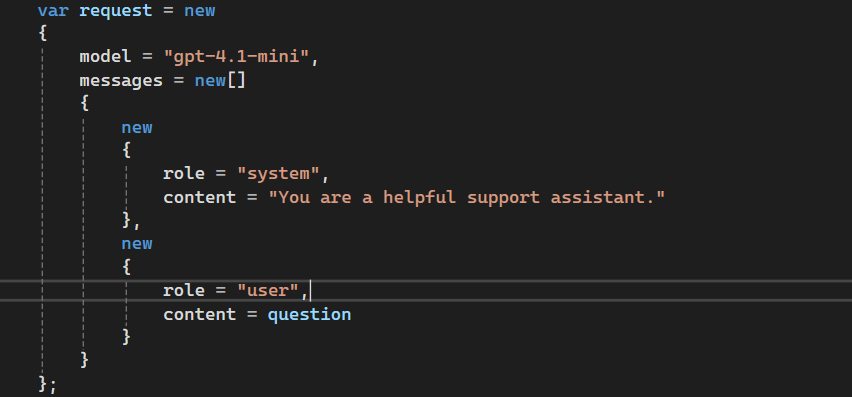
Create the AI Service
Add AIService and use it to send the request to the AI provider and process the returned response.
Important: API keys should not be hardcoded in application code or committed to the repository. For local development, use ASP.NET Core Secret Manager or another secure local configuration mechanism. In production, use an appropriate secret-management service such as Azure Key Vault.
Error Handling and Resilience
In a real application, AI requests will not always succeed.
Possible causes include:
- API timeouts
- Invalid or expired credentials
- Network connectivity problems
- Empty or malformed responses
- Rate-limit errors
- Temporary provider outages
Applications should therefore handle failure states explicitly rather than assuming that every request will return a valid answer.
The AI service can use exception handling such as:
try
{
var response = await _httpClient.PostAsync(url, content);
response.EnsureSuccessStatusCode();
var result = await response.Content.ReadAsStringAsync();
if (string.IsNullOrWhiteSpace(result))
{
return “The AI service returned an empty response.”;
}
return result;
}
catch (TaskCanceledException)
{
return “The request timed out. Please try again.”;
}
catch (HttpRequestException)
{
return “Unable to connect to the AI service.”;
}
catch (Exception)
{
return “An unexpected error occurred.”;
}
For a production application, this basic pattern should be extended with structured error handling, appropriate retry policies for transient failures, provider-specific status handling, and user messages that do not expose internal implementation details.
Logging and Monitoring
Logging becomes particularly important when an external AI service is part of an application workflow.
ASP.NET Core provides built-in logging through ILogger<T>.
Useful information to monitor can include:
- Request success or failure
- API response time
- Rate-limit or throttling events
- Exception details
- Token or usage estimates where available
- Model/provider used
- Overall request volume
Be careful not to log confidential prompts, credentials, personal information, or sensitive business content simply because it is technically available. Logging policies should reflect the application’s security and privacy requirements.
Prompt Engineering Basics
One of the most important concepts when working with AI models is prompt engineering. A prompt is the instruction sent to the AI model that guides how it should respond.
In addition to the user’s question, applications often provide a system prompt that defines the AI assistant’s role and behavior.
Example System Prompt
You are an IT support assistant.
Answer briefly and professionally.
If you don’t know the answer,
say you don’t have enough information.
When a user submits a question, the application combines the system prompt with the user’s input before sending it to the AI model.
For example:
User Question
How do I reset my password?
Combined Prompt
You are an IT support assistant.
Answer briefly and professionally.
If you don’t know the answer,
say you don’t have enough information.
User Question:
How do I reset my password?
Why Prompts Matter
Clear instructions can help:
- Improve consistency
- Maintain an appropriate tone
- Reduce irrelevant responses
- Define the scope of the assistant
- Align answers with business expectations
However, prompt instructions alone should not be treated as a security or accuracy control. If the assistant is expected to provide organization-specific answers, it needs access to trusted and current information, along with application-level controls around what data and actions it can use.
Understanding Token Usage and Cost
AI services generally price requests based on model usage, which can include both input and output tokens.
Every request may contain:
- System instructions
- The user’s question
- Additional context
- The generated answer
As the amount of context and the response length increase, token usage can also increase.
A short question such as:
“How do I reset my password?”
will consume significantly fewer tokens than a detailed multi-paragraph request containing extensive context and instructions.
Practical Ways to Manage Usage
- Keep instructions clear and relevant.
- Send only context required for the current request.
- Limit excessively long responses where appropriate.
- Monitor provider usage and cost.
- Cache suitable repeated responses when the underlying information is stable.
- Avoid repeatedly sending large amounts of irrelevant conversation or document context.
Cost optimization should not come at the expense of answer quality. The objective is to provide the model with enough trusted context to answer correctly without sending unnecessary data.
Add the SupportController
Next, add a SupportController.
Inject AIService using ASP.NET Core Dependency Injection and pass the user query from the controller to the service.
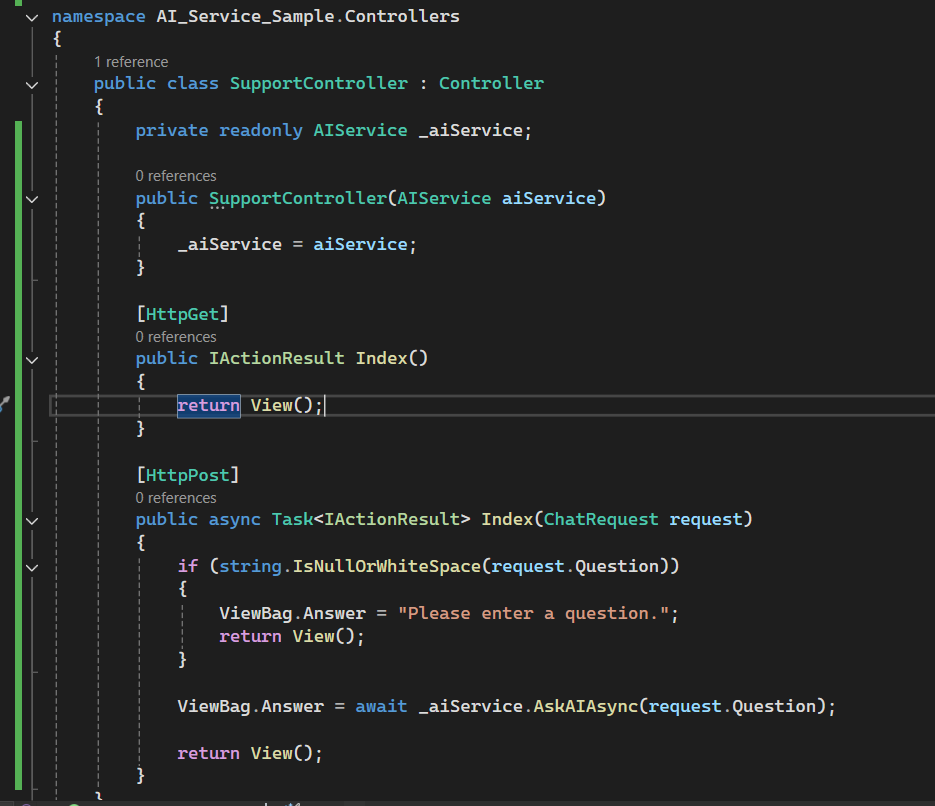
Do not store the API key directly in appsettings.json if that file is committed to source control. Configuration can reference the secret, but the credential itself should remain in an appropriate secret store.
Dependency Injection
The AIService is injected into the controller using ASP.NET Core’s built-in Dependency Injection framework.
Why use Dependency Injection?
Dependency Injection separates the controller from the AI integration implementation.
This provides several practical advantages:
- Loose coupling: the controller does not need to know the details of the AI provider.
- Easier testing: mock services can be injected without making real external API calls.
- Provider flexibility: the underlying provider can be changed with less impact on controller logic.
- Centralized configuration: service registration can be managed in one location.
- Maintainability: changes to the AI integration can remain inside the service layer.
This becomes particularly useful when an experimental AI feature develops into a production capability, and additional concerns such as authentication, telemetry, caching, RAG, or multiple AI providers need to be introduced.
Create the User Interface
Add a Razor view where users can enter questions and see the assistant’s response.
The first version can remain deliberately simple. A textbox, submit button, and answer area are enough to validate the application flow before adding richer conversational features.
Sample Conversation
The following examples demonstrate how users can interact with the AI-powered support assistant.
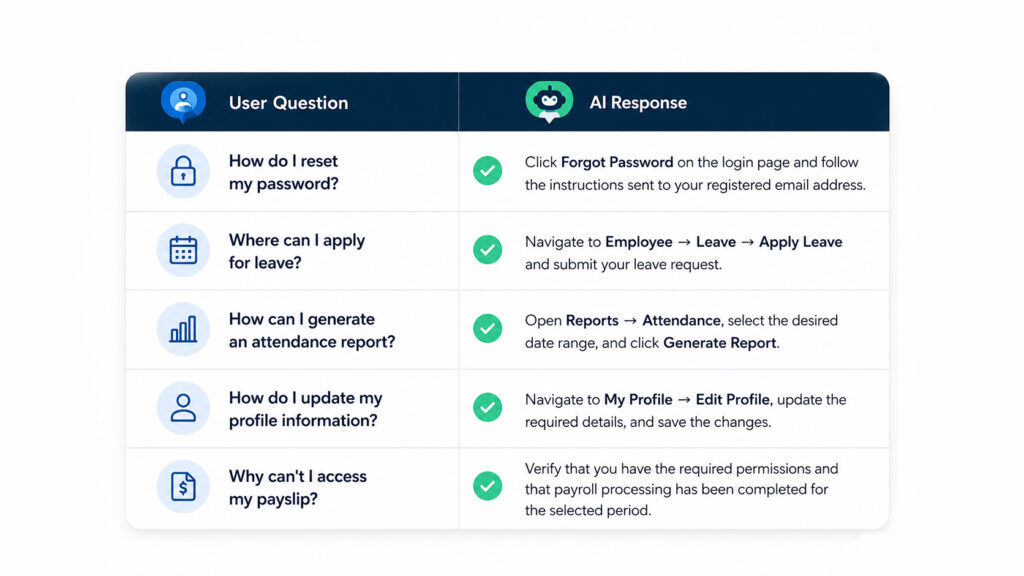
These answers are illustrative. In a real HR application, the assistant should answer from the organization’s actual workflows and knowledge sources rather than relying on the model’s general knowledge.
Request Flow
The basic application flow remains:
+———————-+
| User |
+———-+———–+
|
| Types a question
v
+———————-+
| Index.cshtml (View) |
+———-+———–+
|
| POST request
v
+———————-+
| SupportController |
+———-+———–+
|
| Calls service
v
+———————-+
| AIService |
+———-+———–+
|
| HTTP request
v
+———————-+
| OpenAI API |
+———-+———–+
|
| AI response
v
+———————-+
| SupportController |
+———-+———–+
|
| Returns View
v
+———————-+
| Browser displays |
| AI Response |
+———————-+
This simple flow is useful for understanding the mechanics of an AI chatbot in ASP.NET Core. A production implementation may add authentication, a trusted knowledge source, caching, observability, authorization controls, and other components around this core path.
Security Considerations
Security should be considered from the beginning of any ASP.NET Core AI integration.
Protect API Credentials
Never hardcode API credentials directly in application source code or commit them to source control.
Use a suitable secret-management approach for the environment.
For example:
- ASP.NET Core Secret Manager for local development
- Azure Key Vault for production environments hosted in Azure
- Environment-specific managed secret stores in other deployment environments
Validate Application Input
Validate inputs according to the application’s expected formats, limits, and business rules.
For an AI assistant, security also requires considering prompt injection, unauthorized attempts to retrieve data, unusually large inputs, and requests that fall outside the assistant’s intended scope.
Input validation alone is not enough. Authorization and data-access controls should remain enforced by the application.
Implement Rate Limiting
AI requests consume external resources and may incur direct usage costs.
Rate limiting can help:
- reduce abuse
- protect backend capacity
- control request volume
- manage operational costs
ASP.NET Core includes rate-limiting middleware that can be applied to relevant endpoints.
Apply Least Privilege
The assistant should have access only to the information and operations required for its intended purpose.
For example, an employee asking how to find a payslip may need navigation guidance. That does not mean the AI service should automatically receive payroll records or other employees’ information.
Authorization should be enforced by the application before protected data is ever included in an AI request.
Business Benefits
Organizations can reduce repetitive support tickets, improve response time, and provide consistent answers across departments.
Developers can reuse the AI service in multiple modules without duplicating code. The modular design also allows switching AI providers with minimal changes.
Introducing AI as a support assistant enhances existing business applications without replacing existing workflows or support teams.
OpenAI and Azure OpenAI
The same overall application architecture can support different AI providers.
OpenAI can be appropriate for teams building directly against OpenAI’s APIs, while Azure OpenAI may fit organizations already operating within Microsoft’s Azure environment.
The choice should be based on architectural requirements, deployment environment, governance needs, available models, operational controls, and organizational cloud strategy rather than assuming that one option is universally better.
Keeping the provider integration behind an application service helps preserve that flexibility.
Business Value Without Overstating the Role of AI
An AI support assistant can reduce some repetitive support interactions and help users access information more quickly.
Potential benefits include:
- Faster responses to common questions
- More consistent access to approved guidance
- Reduced repetitive work for support teams
- Support availability outside normal service hours
- Reusable AI integration across relevant application modules
At the same time, AI should not be treated as a replacement for support teams or as an automatic source of truth. Complex cases, exceptions, sensitive workflows, and uncertain answers still require human support and appropriate business controls.
The most useful implementation is often one where the assistant handles a clearly defined set of routine questions and knows when it cannot provide a reliable answer.
Future Enhancements
Once the basic ASP.NET Core AI integration is working, the solution can be expanded with:
- Authentication and authorization
- Conversation history
- Streaming responses
- Multilingual support
- Document and knowledge-base search
- Retrieval-Augmented Generation
- Feedback mechanisms
- Analytics and monitoring
- Role-aware responses
- Enterprise security controls
The architecture should evolve according to the actual support problem rather than adding AI features simply because they are available.
Limitations and Considerations
While AI-powered assistants can significantly improve user experience and productivity, they also have limitations that should be understood before deploying them in business-critical environments.
1. Inaccurate Responses
Generative AI models can produce incorrect or unsupported information.
In a support context, this may include:
- Incorrect navigation instructions
- References to features that do not exist
- Outdated policy guidance
- Inaccurate explanations of business processes
Critical workflows should therefore rely on trusted data sources and appropriate validation rather than unverified model output.
2. Dependence on Prompt Quality
Response quality is affected by the clarity of instructions and the quality of the information available to the model.
Better prompts can improve behaviour, but accurate enterprise answers usually require more than prompt engineering. Reliable knowledge retrieval, access controls, current documentation, and clear escalation paths are equally important.
3. Usage Cost
AI API usage can vary according to:
- Number of requests
- Input size
- Output size
- Selected model
- Additional context
Organizations should monitor real usage before estimating the operational cost of a production deployment.
4. Security and Data Governance
Before sending business or user information to an external AI service, teams need to understand what data is being transmitted, why it is required, who is authorized to access it, and how it should be handled under the organization’s security and privacy policies.
This consideration becomes more important as the assistant gains access to internal documents or user-specific information.
Conclusion
Building an AI-powered support assistant in ASP.NET Core does not require redesigning an existing application around AI.
A clean service layer, Dependency Injection, appropriate error handling, and an AI provider can provide a useful starting point for experimenting with support use cases.
The more important work begins when that experiment moves toward production.
Teams need to think about where answers come from, how credentials are managed, which users can access which information, how failures are handled, how costs are monitored, and when the assistant should hand a request back to a person.
The architecture described here provides a foundation that can later support capabilities such as RAG, conversation history, stronger monitoring, role-aware access, and Azure OpenAI integration.
AI can make support workflows more responsive, but the reliability of the experience still depends on the engineering decisions around it.
If you’re considering an AI support feature inside an existing application and need to work through architecture, integration, security, or scalability concerns, our AI development services team can help you evaluate the right implementation approach. Contact us to discuss your application requirements.

About Vaisakh S
Vaisakh is a Senior Software Engineer with over seven years of experience in .NET development, specializing in backend systems and e-commerce solutions. He has extensive experience in C#, ASP.NET Core, APIs, database development, and enterprise application development.
View all posts by Vaisakh S →